Are your mixes sounding a little too digital, stiff, or sterile in the box? We’ve all been there – pushing faders, stacking clean EQs, and wondering why the track lacks that warm, cohesive vibe that hits you in the chest.
That missing ingredient is almost always the natural glue, saturation, and subtle compression of analog tape. Finding that sound usually costs hundreds of dollars, but today we are fixing that problem without spending a single dime.
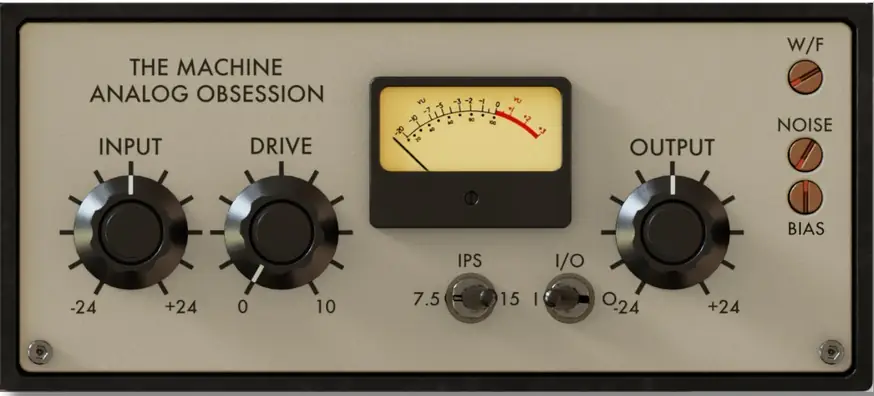
Meet TheMachine, a 30 MB vintage tube-driven tape machine emulation designed to inject raw analog soul, harmonic weight, and smooth roll-offs straight into your tracks.
Why TheMachine is a Game-Changer for Your Mix & Workflow
Getting a track to sit right in modern production can feel like an uphill battle against harsh transients. TheMachine bypasses all that headache by acting like a physical tape reel running through tube circuitry.
Here is what it brings to your production arsenal:
- Gain-Compensated Input Drive: Push the front end hard to dial in that sweet harmonic saturation without wrecking your master headroom or tricking your ears with pure volume increases.
- Tube-Driven Saturation Circuit: Pushes authentic harmonic distortion through your stems, letting thin synths and dry vocals cut through a crowded mix effortlessly.
- Dual Tape Speeds (7.5 & 15 IPS): Flip to 15 IPS for that open, high-fidelity glue, or drop it to 7.5 IPS for a grittier, bass-heavy vintage low-end thud.
- Authentic Wow & Flutter: Recreates the mechanical pitch drift and movement of classic analog decks – absolute gold for lo-fi beats, indie guitars, and nostalgic synth keys.
- Fully Dialed Noise Control: Keep your noise floor surgical down at -120dB, or introduce authentic tape hiss up to -40dB to fill empty frequency space with warm ambiance.
- Adjustable Tape Bias: Fine-tune the tape machine’s high-frequency saturation and transient bite to match whatever instrument you throw at it.
- Fully Clean Output Stage: Recalibrate your output level accurately after cooking the signal, ensuring your gain staging stays pristine.
- Resizable Vector GUI (50% to 200%): Drag the bottom right corner handle to fit any screen resolution – from laptop screens to dual 4K studio monitors.
⚡ Pro Producer Tip: The Drum Bus Glue Trick & GUI Fix
Drop TheMachine on your drum bus, set the IPS to 7.5, and slowly turn the DRIVE knob up until the snare’s sharp peaks start rounding off naturally. It will catch the harsh transients better than a standard digital limiter and give your kit that unified, punchy bounce.
Also, save yourself some setup time: resize the plugin to your screen size before tweaking anything, then save that instance as your DAW’s ‘Default Preset’. Now every new instance will open up at your preferred size automatically!
Tech Specs (Keep it Light)
- File Size: Ultra-compact 30 MB download.
- Formats: VST3, AU, AAX Native – AudioSuite.
- Mac Compatibility: macOS 10.11 or higher (Intel & Apple Silicon native supported; requires a graphics card with Metal support).
- Windows Compatibility: Windows 10 – 11 (requires a graphics card with OpenGL support).
- GUI: Free-scaling interface with quick double-click reset to default.
The Verdict
In a modern production climate where so many plugins feel overly clinical, TheMachine brings that dusty, fat studio vibe we are all chasing. It slaps on drum groups, adds instant warmth to acoustic guitars, and sits vocals right in the pocket with zero fuss. It is lightweight, beautifully modeled, and completely free – making it an essential download for every producer’s toolkit.


TheMachine.1.0 ( 30 MB )
📥 Want instant updates on new free VSTs? Join our Telegram Channel!
Let me know in the comments how this sits in your latest project! Are you throwing tape saturation on individual tracks, or do you prefer strapping it right onto the master bus? Let’s talk shop below! 👇

We’re audio producers and sound designers with over 20 years of experience in the industry. Our team has lived through the entire evolution of digital audio production.
Our mission? To filter out the junk and bring you only the studio-ready free VSTs that actually compete with paid gear. We do the digging so you can focus on creating.