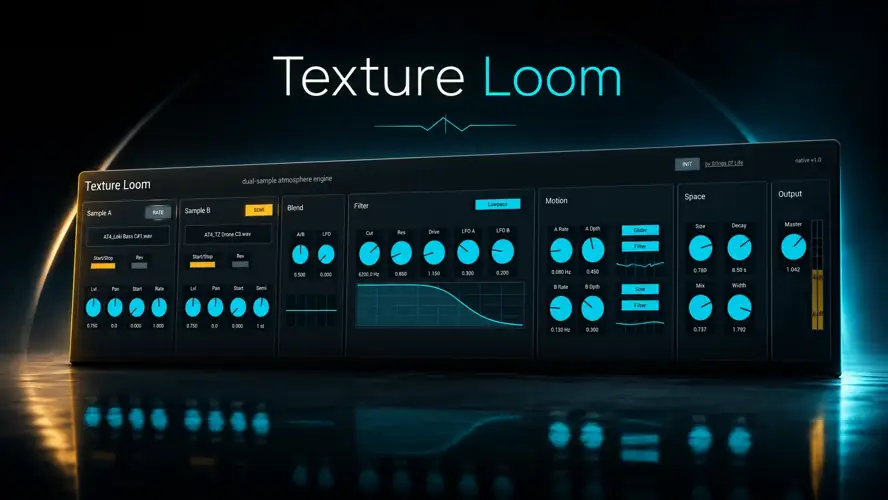
Tired of your transitions sounding stiff and your background layers feeling totally lifeless? Check this out.
As producers, we’ve all hit that wall where the beat just feels flat and empty. You stack synths, drench them in wild amounts of reverb, and try to automate the volume, but the track still lacks that organic, breathing vibe.
Getting those evolving, slow-burning cinematic textures usually means dropping crazy money on massive Kontakt libraries or wrestling with CPU-heavy plugins that eat up all your headroom. It’s a serious studio struggle when your mix needs depth but you don’t have the right tools to create that sonic bed.
Well, I found a fix. Enter Texture Loom by S1gns Of L1fe.
Why Texture Loom is a Game-Changer for Your Mix & Workflow
This isn’t just another rompler. Texture Loom turns your own audio into pure magic. Here is why this plugin absolutely slaps:
- Endless Custom Vibes: Load your own audio into Sample A and Sample B. You aren’t stuck with factory presets—you dictate the tone of your evolving pads and cinematic drones.
- Instant Groove & Movement: With the onboard Blend LFO and Motion LFOs, you can add crazy slow-burning crossfades and pitch movements. Goodbye static, boring soundscapes.
- Sits Perfectly In The Mix: The multimode filter (packing Lowpass, Highpass, Bandpass, Notch, Peak, and Allpass) lets you carve out the exact frequencies you need so your textures don’t muddy up your low-end.
- Massive Headroom & Space: Instantly glue your two samples together using the built-in stereo space/reverb section. Dial in the Size and Width to make your tracks sound huge.
- Zero CPU Stress: Clocking in at a tiny 4.41 MB, this thing is insanely lightweight. It leaves all the processing power for your heavy synths and drum busses.
⚡ Pro Producer Tip: Turn Garbage Into Gold
Don’t just load up pristine synth samples into this beast. Drag a messy voice memo from your phone into Sample A, and a random street noise recording into Sample B. Modulate the Sample A start point with a ‘Drift’ LFO, blend them together, and crank the onboard reverb decay. You’ll instantly create a haunting, one-of-a-kind underscore texture that nobody else has in their sample folder. This plugin truly shines when you feed it weird audio!
Tech Specs (Keep it Light)
- Developer: S1gns Of L1fe
- Size: 4.41 MB (Super fast download)
- Formats: VST3 & AU compatible hosts (Windows & macOS). Also includes the original Max for Live version (requires Ableton Live 12 and Max 9).
- Important Note: Texture Loom is a software instrument, not an audio effect! Load it on a MIDI track. It will make absolutely no sound until you drag and drop your own samples into the A/B slots.
The Verdict
If you make ambient music, cinematic beats, lofi, or just need to add some serious sauce and depth to your productions, Texture Loom is a must-have in your arsenal. It’s flexible enough for deep, generative sound design, yet intuitive enough to start tweaking immediately.
The fact that S1gns Of L1fe gave us this atmosphere engine for free is mind-blowing. Download it, load up some wild Foley, and watch your background layers come to life.


Texture.Loom.1.0.1 ( 4 MB )
📥 Want instant updates on new free VSTs? Join our Telegram Channel!
Let me know in the comments how this sits in your latest project! What weird sample are you going to throw into Texture Loom first—a vocal chop or some random field recording? Let’s talk shop below! 👇

We’re audio producers and sound designers with over 20 years of experience in the industry. Our team has lived through the entire evolution of digital audio production.
Our mission? To filter out the junk and bring you only the studio-ready free VSTs that actually compete with paid gear. We do the digging so you can focus on creating.

