Tired of firing up a CPU-heavy DAW session just to check a sample’s key or see if your two-track bounce has enough headroom? We have all been there. You wrap up an export, and suddenly you have to boot up a project file just to inspect true peaks and LUFS. That friction completely kills your creative vibe when you are locked in the zone.
That is where this ultra-slick utility suite comes into play. Instead of cluttering your desktop with heavy standalone meters or reloading massive sessions, it brings pro-grade audio analysis straight to your right-click context menu.
Why Audio Quick Actions is a Game-Changer for Your Mix & Workflow
Working fast keeps the inspiration alive, and having audio intelligence baked directly into macOS Finder changes the game. Here is what this toolkit brings to your studio arsenal:
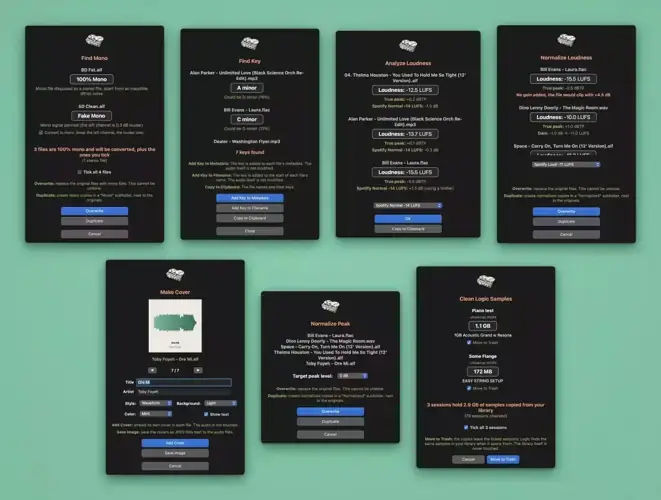
- Instant Loudness & True Peak Checks: Audition file loudness (LUFS) and true peaks on the fly, showing exactly how platforms like Spotify and Apple Music will handle your track before you distribute it.
- Transparent Loudness Normalization: Bring your bounces to targeted streaming loudness or broadcast specs using clean, transparent gain changes without touching dynamic range.
- Surgical Peak Normalization: Normalize lossless audio files to your exact chosen headroom ceiling (0 dB down to -1 dB) in seconds.
- Neural Network Key Detection: Automatically analyze sample pitch and write the key signature straight into the metadata or filename – keeping your sample library perfectly organized.
- True Mono Conversion: Track down pseudo-stereo files containing identical dual-mono channels and instantly convert them to real mono, freeing up disk space and tightening phase coherence.
- Waveform Art Generation: Automatically render an eye-catching visual waveform cover and embed it directly into your audio file without altering a single sample of audio.
- Logic Pro Cache Cleaner: Hunt down duplicate library assets that Logic Pro hoards inside session folders and send them to the trash, reclaiming precious SSD storage.
⚡ Pro Producer Tip: Finder-Level Pre-Master Audits
Before you send an unmastered bounce to an engineer or submit a pre-master to distributors, run ‘Analyze Loudness’ directly in Finder. Catching inter-sample peaks early ensures your master sits in the mix without digital clipping once streaming lossy codecs kick in.
Tech Specs (Keep it Light)
- Platform: macOS (Native Finder Quick Actions)
- File Size: Super lightweight (around 3 MB)
- Requirements: macOS with Quick Actions support (Logic Pro required only for session cleaning features)
- Audio Format Support: Lossless audio formats (WAV, AIFF, FLAC)
- License: Free / Open Source (hosted via GitHub)
The Verdict
Audio Quick Actions is not a flashy saturation box or an analog-modeled compressor, but it is one of the most practical tools you can add to your machine. It strips away the tedious busywork, frees up drive space, and keeps your head focused on making tracks that knock. If you work on a Mac, adding this to your day-to-day workflow is an absolute no-brainer.


Audio Quick Action V3.0 ( 3 MB )
📥 Want instant updates on new free VSTs? Join our Telegram Channel!
Let me know in the comments how this sits in your latest project! How much time does running key detection directly from Finder save your beatmaking sessions? Let’s talk shop below! 👇

We’re audio producers and sound designers with over 20 years of experience in the industry. Our team has lived through the entire evolution of digital audio production.
Our mission? To filter out the junk and bring you only the studio-ready free VSTs that actually compete with paid gear. We do the digging so you can focus on creating.