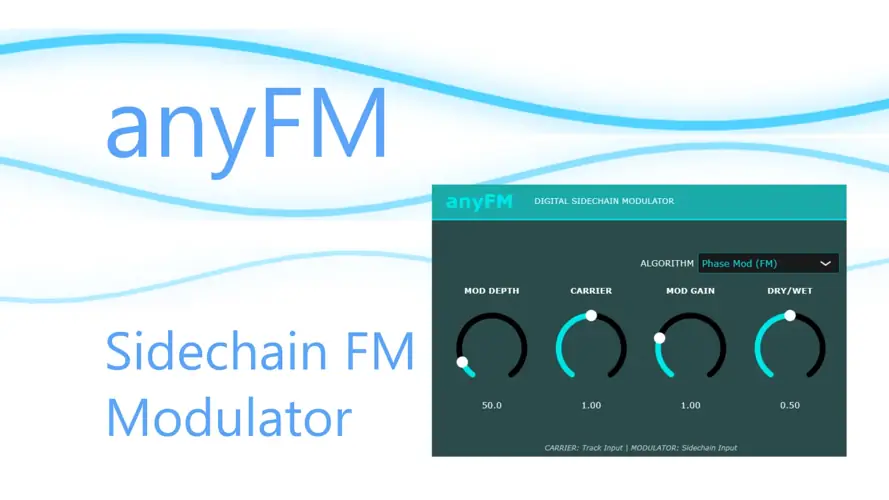
Yo beatmakers, listen up. You ever get stuck with a synth pad, an 808, or a bassline that just sounds… flat? You’ve slapped on saturation, you’ve EQ’d it to death, but it still lacks that gritty, evolving texture that makes a track truly slap.
Sometimes you just need that complex, metallic FM synthesis vibe, but you don’t want to load up a CPU-heavy synth to build a patch from scratch.
Enter anyFM, a brilliant utility that solves this exact struggle by turning your existing audio tracks into wild FM modulators.
Why anyFM is a Game-Changer for Your Mix & Workflow
This isn’t your standard distortion box. anyFM actually fm-modulates a sidechained signal directly onto your carrier signal. Here is why this plugin needs to be in your folder today:
- Infinite Sound Design: By using any track as an FM modulator, you can turn a boring sine wave into a nasty, growling bass, or give a dull vocal a robotic, harmonic sizzle that sits perfectly in the mix.
- Dial in the Vibe: The “Modulation Rate” knob controls the FM depth and strength. Keep it subtle for a little extra analog flavor, or crank it to destroy the signal completely.
- Built-In Ring Modulation: Not feeling the FM? Switch over to Ring Modulation mode to instantly get those classic, sci-fi bell tones that cut right through your headroom.
- Easy Gain Staging: The dedicated volume balance knobs make sure your levels stay correct, so you don’t have to reach for an external utility plugin to fix your gain.
⚡ Pro Producer Tip: AVOID THE “SELF-FM” MISTAKE
Routing is everything with anyFM! In FL Studio, route your modulator track to your carrier track and set it to sidechain (turn the send volume down to 0!). Then—and this is the most crucial part—open the plugin wrapper settings (the cog icon), go to ‘Processing’, and click ‘Auto map inputs’. Unlink the sidechain track from the Master so it behaves like a true FM synth. If you skip this, the plugin will just modulate the carrier with itself, ruining the vibe!
Tech Specs (Keep it Light)
- Developer: aquanode (shoutout for using Claude AI to help code this gem!)
- Format: Windows VST
- File Size: 3.51 MB (Extremely lightweight, zero CPU hogs here)
- Price: 100% Free
The Verdict
For a plugin that barely takes up 3.5MB on your hard drive, anyFM punches way above its weight class. Yes, the routing takes a second to set up, but once you have it locked in, the sonic possibilities are endless.
It’s a massive cheat code for taking lifeless loops and giving them that expensive, complex hardware feel. Download it, route it right, and watch your sounds come alive.


anyFM VST ( 5 MB )
📥 Want instant updates on new free VSTs? Join our Telegram Channel!
Let me know in the comments how this sits in your latest project! Are you using it for nasty bass growls or atmospheric pads? Let’s talk shop below! 👇

We’re audio producers and sound designers with over 20 years of experience in the industry. Our team has lived through the entire evolution of digital audio production.
Our mission? To filter out the junk and bring you only the studio-ready free VSTs that actually compete with paid gear. We do the digging so you can focus on creating.

