Are your reverbs washing out your mixes and eating up all your headroom? I found a fix.
We’ve all been there in the studio: you slap a reverb on a lead vocal or a snare drum, and suddenly the whole track turns into a muddy, comb-filtered mess. You start hacking away at the tail with EQs, sidechaining it to death, but it still sounds cheap, metallic, and disconnected from the dry signal.
It’s a massive struggle trying to get that lush, expensive tail without turning your mix down to mush. Turns out, most commercial reverbs are just repackaging the same 60-year-old Schroeder and Moorer algorithms in a new shiny UI.
Enter Ambience. This open-source VST3 isn’t just a preset player—it re-implements reverb from the ground up using pure research-paper DSP. Let’s dive into why this thing is absolute sauce for your productions.
Why Ambience is a Game-Changer for Your Mix and Workflow
This plugin doesn’t just sound good; it calculates space with insane mathematical precision. Here is why this reverb slaps:
- Pristine Core Engine: Built on a 16-channel Feedback Delay Network (FDN) with a Fast Walsh-Hadamard Transform matrix. In plain English? It delivers incredibly dense, colorless diffusion without those nasty, metallic comb-filter artifacts. It just sits in the mix flawlessly.
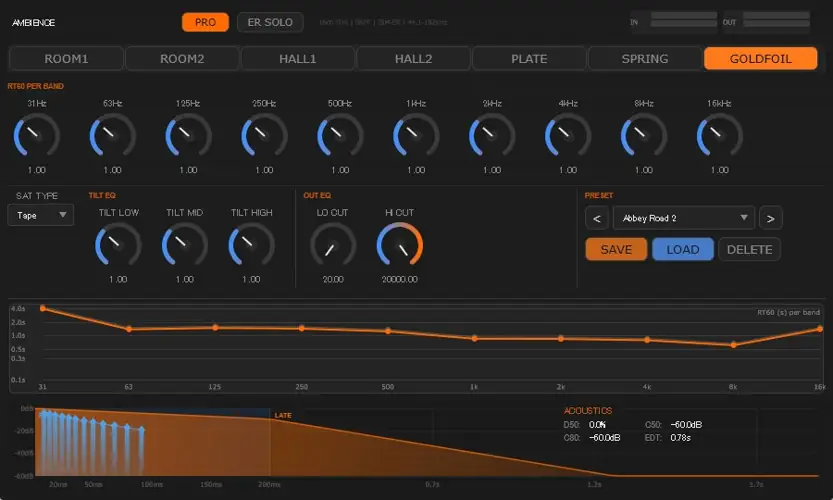
- Seven Unique Characters: This isn’t one algorithm stretched thin. You get 7 totally distinct topological routings: Room 1 & 2, Hall 1 & 2, Plate, Spring, and Goldfoil. Whether you need an intimate studio room vibe or a massive, stadium-sized tail, it’s instantly accessible.
- Surgical RT60 EQ: Thanks to the Välimäki-Liski 10-band GEQ cascade, you can literally bend the reverb decay curve with your fingertips. Dial in exactly how long specific frequencies ring out so your low-end stays punchy and your highs shimmer.
- Built-in ADAA Saturation: Need some grit? Ambience packs four anti-aliasing saturation flavors (Warm, Tape, Tube, Hard). You get all that analog texture without the harsh digital aliasing artifacts ruining your high frequencies.
- Zero Phasing LFOs: Each of the 16 FDN channels has its own independent bandlimited LFO. This guarantees organic, non-periodic motion, making the reverb tail sound incredibly wide and natural.
⚡ Pro Producer Tip: Sculpt the Tail with the PRO Panel
Click the ‘PRO’ button to unlock the per-band RT60 multipliers. If your vocals are getting swallowed by the reverb, drastically shorten the decay times in the low-mids (around 200-500Hz) while keeping the high-end air long. Watch the live RT60 graph (the orange line) to mix visually—this ensures your tail is lush without eating up your headroom!
Tech Specs (Keep it Light)
- Format: VST3 (WiN)
- Size: Super lightweight at just 17.5 MB
- Architecture: 16-channel Feedback Delay Network (FDN)
- Early Reflections: Image Source Method (ISM) for perceptually accurate pre-echo and stereo imaging
- Presets: 21 legendary spaces pre-modeled right out of the box. No DLC, no upgrades required.
- Price: 100% Free (Open-source)
The Verdict
Listen, fam, to get this level of “research-paper DSP” in a plugin, you usually have to drop hundreds of dollars. The fact that the developers are giving away a reverb built on FWHT feedback matrices, nearest-prime delay allocations, and flawless image-source early reflections for free is mind-blowing.
Ambience has the depth, the pristine sound quality, and the UI necessary to become your daily-driver reverb. It’s light on the CPU, heavy on the vibe, and guaranteed to elevate your productions. Download it immediately.


Ambience.1.0.1 ( 17 MB )
📥 Want instant updates on new free VSTs? Join our Telegram Channel!
Let me know in the comments how this sits in your latest project! Are you throwing this on your vocals or your drum bus first? Let’s talk shop below! 👇

We’re audio producers and sound designers with over 20 years of experience in the industry. Our team has lived through the entire evolution of digital audio production.
Our mission? To filter out the junk and bring you only the studio-ready free VSTs that actually compete with paid gear. We do the digging so you can focus on creating.

