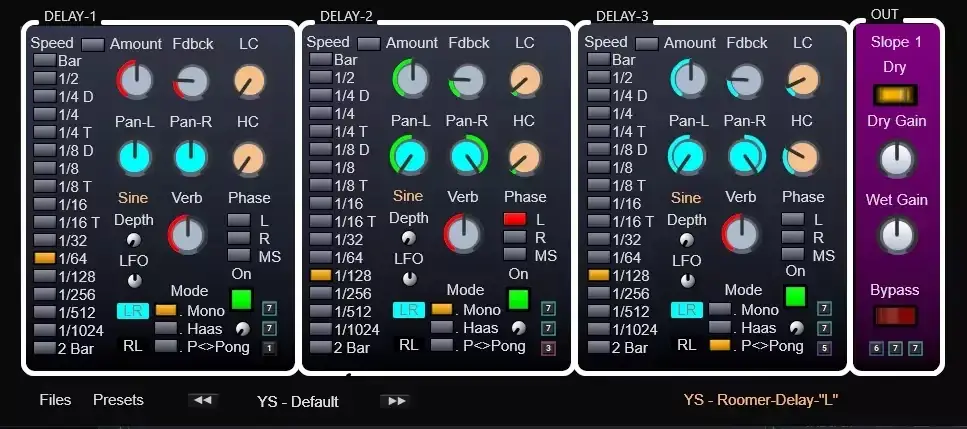
Tired of muddy vocals and flat, two-dimensional mixes? Check this out.
One of the biggest struggles in the studio is trying to get your leads to sound massive and wide without eating up all your headroom. A lot of up-and-coming producers make the mistake of drowning their vocals or synths in a dense, washed-out reverb to get that depth.
The result? The track loses its punch, and everything starts clashing. The real industry secret to getting a vocal that sits in the mix perfectly while still sounding larger-than-life is using precise, controlled delays. And today, we’ve got the perfect free sauce for that. Enter YS Roomer Delay.
Why YS Roomer Delay is a Game-Changer for Your Mix & Workflow
This isn’t just your standard stock echo. The YS Roomer Delay was built to give you total spatial control over your echoes, ensuring your mix stays clean while hitting with serious width. Here is how this plugin is going to elevate your workflow:
- Three Parallel Delays: Stack up to three delays at once. Whether you need a long, trailing stadium echo or a super short delay to simulate a tight acoustic room, this plugin brings the vibe.
- Instant Stereo Sauce: Need width? The built-in Haas mode adds a 1-100ms delay to one channel for an ultra-wide pseudo-stereo effect. Or, flip on Ping-Pong mode to make your hi-hats or vocal chops bounce left and right.
- Mid-Side Processing: This feature absolutely slaps. Switch to Mid-Side mode so you can keep your center channel punchy and strictly apply delay to the sides of your mix.
- Built-In Filtering & Reverb: Stop reaching for extra plugins. Use the onboard High and Low-cut filters so your delays don’t muddy up your sub-bass or harsh up your highs. Plus, you can add a touch of reverb directly to the delayed signal to push it further back in the soundstage.
- Total Phase & Direction Control: Invert the channel phase to avoid comb-filtering, or use the LR-RL switch to completely flip the direction of your Ping-Pong bounces and Haas widening.
⚡ Pro Producer Tip: Dialing in the Haas Effect
When using the Haas mode to widen a mono synth or vocal, make sure to check your track in mono! If the sound suddenly disappears or sounds thin, flip the phase inversion switch or roll off the highs on the delayed channel. It keeps your track sounding huge in stereo without destroying your mono compatibility.
Tech Specs (Keep it Light)
- Format: Universal VST3.
- Compatibility: Fully compatible with both macOS and Windows. Since it’s built on SynthEdit’s new architecture, it natively supports Intel Macs as well as Apple Silicon (M1, M2, and newer). It “just works.”
- Footprint: Super lightweight at only 37 MB. Won’t hog your CPU.
- Bonus: The download includes three different versions with varying GUI designs and sizes, plus a single-module version if you just need a quick, no-nonsense echo.
The Verdict
YS Roomer Delay v1.0 is an absolute must-have if you’re looking for an all-in-one spatial tool. Between the M/S processing, the Haas effect capabilities, and the built-in filters, this plugin provides the exact kind of control you’d normally have to pay top dollar for. It keeps your mixes clean, saves your headroom, and instantly adds that professional drip to your tracks.


YS_-_Rommer-Delay__v.1.0.2 ( 37 MB )
📥 Want instant updates on new free VSTs? Join our Telegram Channel!
Let me know in the comments how this sits in your latest project! Are you slapping this on your vocals or your synths first? Let’s talk shop below! 👇

We’re audio producers and sound designers with over 20 years of experience in the industry. Our team has lived through the entire evolution of digital audio production.
Our mission? To filter out the junk and bring you only the studio-ready free VSTs that actually compete with paid gear. We do the digging so you can focus on creating.
