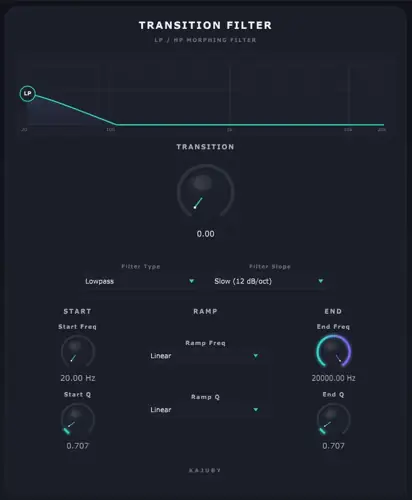
Tired of drawing twenty automation nodes just to get a decent build-up sweep? We have all been there, fam. You are deep in the zone, the beat slaps, but the moment you need to craft a transition into the hook, you get bogged down wrestling with multiple automation lanes. Tweaking cutoff, resonance, and slope across four different parameters completely kills your creative momentum.
Transition Filter fixes that studio headache instantly by condensing your entire transition workflow into one dedicated, musical macro.
Why Transition Filter is a Game-Changer for Your Mix & Workflow
Transition Filter is built strictly for producers who need club-ready sweeps without wasting time. Here is what it brings to your toolkit:
- One-Knob Transition Control: Morph effortlessly from your defined start state to your end state using a single knob (0-255) – perfect for automated rises, breakdowns, or live performance sweeps.
- Independent Morph Curves: Set separate curves for frequency and Q (resonance) using Linear, Smoothstep Curve, Log, or Exponential shapes to ensure your sweeps move naturally with the groove.
- Versatile LP/HP Modes: Toggle quickly between Lowpass and Highpass filtering to create dark, subby build-ups or crisp, high-passed dropouts.
- Four Aggressive Slopes: Select from 12, 24, 36, or 48 dB/octave slopes powered by cascaded biquad stages – giving you anything from a gentle roll-off to a surgical brickwall cut.
- Musically Even Sweeps: Thanks to logarithmic frequency interpolation, your sweeps sound smooth and uniform across the entire frequency spectrum instead of jumping abruptly through the mids.
- Live Response Visualizer: Monitor your frequency response in real time with a sample-accurate curve visualizer to make sure your low-end headroom stays clean.
⚡ Pro Producer Tip: Fake A DJ Drop With 48 dB Exponential Highpass
Map the Transition knob straight to your MIDI controller mod wheel. Set the filter type to Highpass with a steep 48 dB slope and switch the frequency curve to Exponential. In the final two bars before your drop, ride the knob up to carve out all the sub and mid bass. Snap it back to zero on beat one – your kick and 808 will hit ten times harder because of the contrast!
Tech Specs (Keep it Light)
- Platform: Windows (WiN)
- Download Size: A featherlight 3.31 MB
- Filter Types: Switchable Lowpass / Highpass
- Filter Slopes: 12 dB, 24 dB, 36 dB, and 48 dB/octave
- Interpolation: Logarithmic frequency morphing
- Curve Styles: Linear, Curve (smoothstep), Logarithmic, Exponential
- Visuals: Sample-accurate real-time curve display
The Verdict
Transition Filter proves you do not need an over-engineered multi-effect rack to get high-energy transitions that sit right in the mix. It does one specific job and executes it cleanly, saving you time and CPU cycles. If your build-ups feel stiff and your automation lanes are cluttered, throw this freebie on your drum bus or master channel and feel the vibe change immediately.


Transition Filter Setup ( 3 MB )
📥 Want instant updates on new free VSTs? Join our Telegram Channel!
Let me know in the comments how this sits in your latest project! Are you using this on synth risers or slamming it on the master bus for live DJ sweeps? Let’s talk shop below! 👇

We’re audio producers and sound designers with over 20 years of experience in the industry. Our team has lived through the entire evolution of digital audio production.
Our mission? To filter out the junk and bring you only the studio-ready free VSTs that actually compete with paid gear. We do the digging so you can focus on creating.