If you have ever bounced from FL Studio over to Ableton, Logic, or Reaper, you know the exact heartbreak I am talking about. You load up your favorite 808, smack it into the red, and instead of that warm, glued bounce you love, your low end turns into flat, choked mush.
We have all burned hours chaining limiters, saturators, and utility tools just trying to recreate that signature FL drum punch without killing our headroom. That struggle officially ends today.
Why TagoClip is a Game-Changer for Your Mix & Workflow
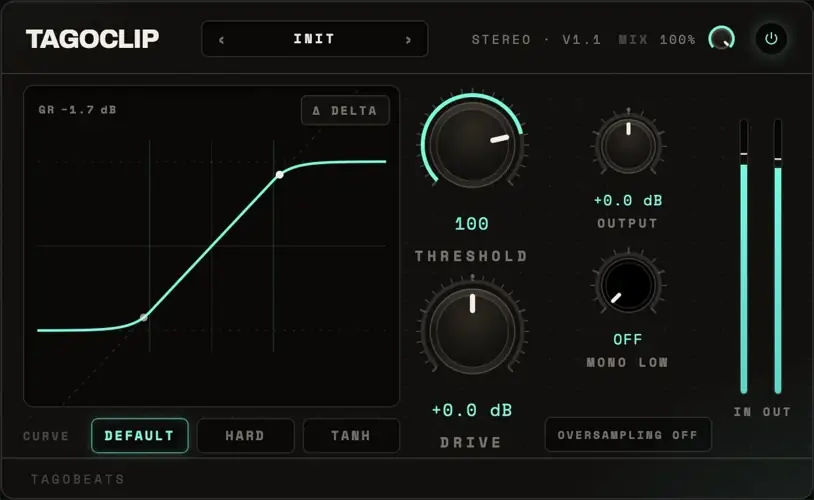
TagoClip takes the legendary Fruity Soft Clipper response curve and drops it straight into your DAW of choice. Here is why this little powerhouse deserves an immediate slot on your drum buss:
- That Legendary 1:1 FL Transfer Curve: Measured down to float-point precision, giving you the exact bounce and grit you grew up on – plus extra hard clip and smooth tanh modes when you want a different flavor of heat.
- Pristine Highs with Clean Oversampling: The original FL clipper is notorious for aliasing. TagoClip offers selectable 4x and 8x oversampling so you can kill high-frequency hash, or keep it off for pure raw grit.
- Delta Listening for Precision Clipping: Hit one button to audition only the peaks you are cutting off. It takes the guesswork out of gain staging so you know exactly what you are trading for pure loudness.
- Monofied Low End Built Right In: Set a crossover frequency to sum your lowest sub frequencies to mono right inside the plugin – keeping your 808 centered and your mix phase-aligned.
⚡ Pro Producer Tip: Dialing the Perfect 808 Ceiling
Slap TagoClip directly onto your kick and 808 buss. Turn on Delta listening and push your input gain until you only hear the top transients crunching in the delta monitor. Once the fundamental note starts bleeding through, ease it back just a touch, switch Delta off, and hit 4x oversampling. Your drums will cut through small phone speakers while holding down serious low-end weight.
Tech Specs (Keep it Light)
- Formats: VST3, AU (Windows & macOS compatible)
- Download Size: A featherlight 10 MB download that will not hog your drive
- Clipping Modes: 1:1 FL Curve, Hard Clip, and Tanh Saturation
- Oversampling Quality: Off (Original FL behavior), 4x, and 8x modes
- Monitoring: Integrated Delta monitor and adjustable low-frequency mono sum
The Verdict
TagoClip gives every modern producer that coveted secret sauce without forcing you to switch your main production hub. It adds instant punch, glues your rhythm section, and lets your drums sit in the mix effortlessly. Best of all, it keeps your CPU load light while saving your master fader from clipping out into nasty digital distortion.


TagoClip.1.1.1 ( 10 MB )
📥 Want instant updates on new free VSTs? Join our Telegram Channel!
Let me know in the comments how this sits in your latest project! Are you keeping the oversampling off for that gritty sound, or running 8x for ultra-clean harmonics? Let’s talk shop below! 👇

We’re audio producers and sound designers with over 20 years of experience in the industry. Our team has lived through the entire evolution of digital audio production.
Our mission? To filter out the junk and bring you only the studio-ready free VSTs that actually compete with paid gear. We do the digging so you can focus on creating.