Tired of throwing your favorite samples into black-box stem splitters only to get watery, phase-smeared garbage back? I feel your pain.
We have all been there – trying to pull a clean vocal or isolate a hard-hitting drum break, waiting on some slow cloud queue, and ending up with weird digital artifacts that completely destroy your mix headroom. StemWave Extract just dropped to solve that exact studio headache.
Why StemWave Extract is a Game-Changer for Your Mix & Workflow
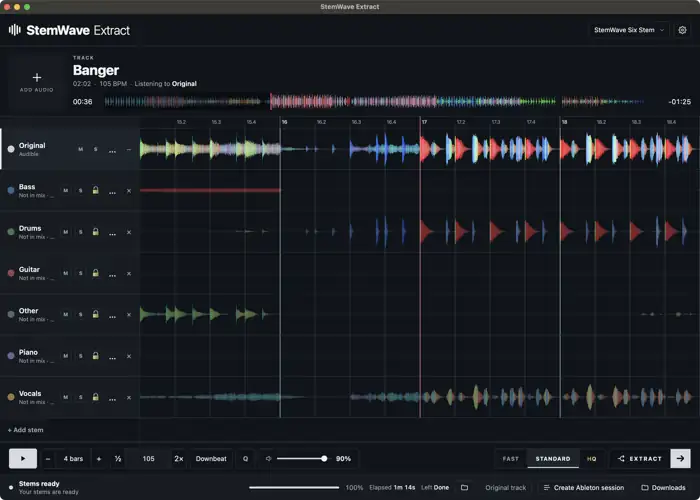
Instead of blindly guessing which algorithm handles your track best, StemWave Extract actually draws out the waveforms for every single model right on your screen. You get to see the transient response, compare results in real time, and pick the cleanest takes before printing.
- Visual Stem Comparison: See the waveform peaks and valleys across different models before you commit, making it easy to spot where transients stay punchy and where artifacts creep in.
- 100% Local Processing: Runs cutting-edge separation models directly on your rig – no subscriptions, no cloud waitlists, and no limits on how many tracks you can chop.
- Hybrid Model Selection: Pick and choose the best results on a stem-by-stem basis. Grab the tight low-end drums from one model and the pristine, artifact-free vocal top-end from another.
- Instant Ableton Live Integration: Export separated stems directly as arranged Ableton Live sets, cutting out tedious file routing so you can start cooking up immediately.
⚡ Pro Producer Tip: Build a Custom Hybrid Stack
Never settle for all four stems from a single model. Use the visual waveforms to find which engine kept the sub-bass rounded and intact, then grab your acapella from whichever model preserved the top-end air without flanging. Combining stems from different algorithms gives your remix maximum clarity and keeps your master bus breathing easy.
Tech Specs (Keep it Light)
- Download Size: 2.5 GB (includes offline separation models).
- Mac Compatibility: macOS 13.6 or later (Apple Silicon native).
- Windows Compatibility: Windows 10 or 11 (64-bit).
- Export Formats: Dedicated audio stems and ready-to-launch Ableton Live project files.
The Verdict
StemWave Extract completely flips the script on sample extraction. It takes the mystery out of the process by letting you see how the separation behaves, saving you tons of time in the lab. The exported tracks sound crisp, preserve precious headroom, and drop right into the pocket without that hollow, filtered sound old-school splitters used to leave behind. If you make bootlegs, flip vinyl samples, or just need clean stems on the fly, this tool absolutely slaps.


WIN ( 2.5 GB )
MAC ( 300 MB )
📥 Want instant updates on new free VSTs? Join our Telegram Channel!
Let me know in the comments how this sits in your latest project! Are you using this for quick club edits or digging deep into vintage record chops? Let’s talk shop below! 👇

We’re audio producers and sound designers with over 20 years of experience in the industry. Our team has lived through the entire evolution of digital audio production.
Our mission? To filter out the junk and bring you only the studio-ready free VSTs that actually compete with paid gear. We do the digging so you can focus on creating.