Style D (Problem/Solution)
Are your mixes sounding a little too flat lately? You know the feeling—you’ve got great drums and catchy melodies, but the whole track feels two-dimensional. It lacks that front-to-back depth that makes top-tier records pop out of the speakers. Usually, trying to get that immersive 3D sound means loading up heavy convolution reverbs that eat up all your CPU headroom, leaving your computer gasping for air.
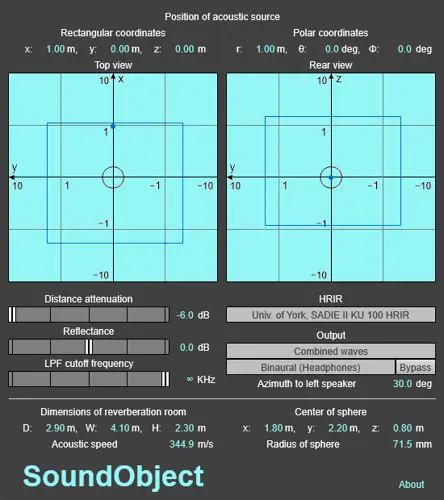
Well, I found the fix. Today we’re looking at SoundObject , a plugin that solves the “flat mix” struggle without crashing your DAW. This tool takes a simple mono source and places it in a three-dimensional space, giving you binaural localization that actually translates on headphones and speakers. It’s perfect for adding that extra layer of ear candy to your productions.
Why SoundObject is a Game-Changer for Your Mix & Workflow
Most spatial plugins rely on heavy IR (Impulse Response) convolution data. While that sounds dope, it destroys your processing power. SoundObject takes a different route, using simplified algorithmic filters (sphere and pinna scattering) to mimic how the human head hears sound. Here is why this vibe is essential for your plugin folder:
- Massive CPU Savings: Because it ditches the heavy convolution math for smart algorithms, this plugin is super lightweight. You can slap this on multiple channels without your session lagging.
- True Depth Perception: Most stereo wideners just push things Left and Right. SoundObject creates a genuine sense of distance. It uses reflected waves to simulate a reverberation room, letting you place sounds “in front” or “far away” in the mix.
- Automatic Doppler Effect: This is the secret sauce for motion. If you automate the sound source to move, the plugin automatically adds the Doppler effect (pitch shift based on speed). It makes fly-bys and transitions feel incredibly realistic.
- Versatile Monitoring: It’s designed for both headphones and stereo speakers. It can even simulate speaker placement while you are monitoring on cans, helping you judge the stereo field better.
⚡ Pro Producer Tip: Create 3D Risers
Don’t just use this for static placement. Take a mono white noise riser or a hi-hat roll and automate the position parameters (X and Y axis) in your DAW. Because SoundObject calculates the Doppler effect automatically, you’ll get a crazy “swirling” sensation around the listener’s head that standard pans just can’t recreate. It’s instant ear candy for your drops.
Tech Specs (Keep it Light)
- Format: VST3 (64-bit).
- Platform: Windows 10 (64-bit) and macOS 10.14.
- Sample Rate: Supports 44.1KHz, 48KHz, and 96KHz.
- Size: Tiny footprint (approx 1.9 MB), so it downloads in seconds.
- Processing: Real-time algorithmic (Non-Convolution).
The Verdict
If you are looking to break out of the standard Left/Right panning limitations, SoundObject is a must-have. It’s rare to find a spatial tool that is this kind to your CPU while still delivering a convincing binaural effect. Whether you are doing sound design for a film or just trying to get that synth lead to sit in a unique pocket in the mix, this plugin delivers the goods. It’s free, it works, and it adds a dimension to your sound that standard panning just can’t touch.


SoundObject_Win_3.1.1 ( 1.9 MB )
📥 Want instant updates on new free VSTs? Join our Telegram Channel!
Let me know in the comments how this sits in your latest project! Are you using the Doppler effect for sound design or just for mixing depth? Let’s talk shop below! 👇

We’re audio producers and sound designers with over 20 years of experience in the industry. Our team has lived through the entire evolution of digital audio production.
Our mission? To filter out the junk and bring you only the studio-ready free VSTs that actually compete with paid gear. We do the digging so you can focus on creating.
