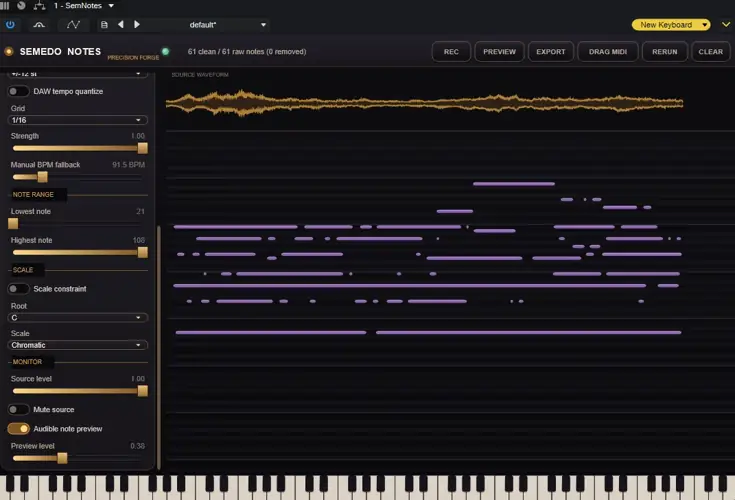
Yo beatmakers, listen up. We’ve all been there in the studio—you hum a crazy melody into your phone, or your homie plays a killer guitar lick, but trying to program those exact vibes on a MIDI keyboard is a total workflow killer. You lose the bounce, the pocket, and the soul. And manually clicking in those notes on the piano roll? Man, nobody has time for that.
Enter Semedo Notes. This isn’t just another gimmick; it’s an absolute powerhouse that listens to whatever you feed it—WAVs, MP3s, live microphone input, you name it – and translates it into crisp, usable MIDI in seconds. No keyboard skills needed, no expensive MIDI controllers required. Just play, sing, and let the plugin do the heavy lifting.
Why Semedo Notes is a Game-Changer for Your Mix & Workflow
- The Ghost Note Filter (Total Lifesaver): If you’ve used audio-to-MIDI tools before, you know they usually spit out a ton of trash notes from room noise or overtones. Semedo Notes has a unique filter that intelligently deletes fake harmonics, low-confidence background noise, and keeps polyphony in check. The result? A clean MIDI file you don’t have to spend an hour editing.
- Captures the Real Sauce (MPE Support): This thing doesn’t just grab flat notes. It detects the micro-pitch movements—your vibratos, bends, and slides—and writes them right into the MIDI. Route this into an MPE-capable synth like Serum or Pigments, and your VSTs will sing exactly the way you played the original audio.
- Locks to the Pocket: It reads your DAW’s BPM automatically. You can time-quantize your transcribed notes straight to the grid (1/4, 1/8, 1/16, triplets) so everything sits perfectly in the mix without messing up the groove.
- Foolproof Scale Filter: Got a vocal run that drifted out of tune? Set the Scale Filter to one of 14 scales (Minor, Dorian, Phrygian, etc.). It strips out the wrong notes so your MIDI is strictly in key. No inventing pitches, just pure musicality.
- Lightning Fast Drag & Drop: When it’s done analyzing, you literally just grab the MIDI clip from the plugin window and drop it onto an instrument track. Absolute workflow cheat code.
⚡ Pro Producer Tip: The Ultimate Layering Hack
Take an organic recording—like a gritty live bass guitar or a raspy vocal hook—and run it through Semedo Notes. Drag that newly generated MIDI onto a sub-bass or a massive wavetable synth. Blend the raw audio with the synthesized MIDI layer for an insanely thick, textured sound with massive headroom. Use the ‘Purity Control’ knob in the plugin to ensure the MIDI layer only triggers on the hardest transients!
Tech Specs (Keep it Light)
- File Size: A ridiculously light 14.7 MB.
- CPU Efficiency: All that crazy AI analysis runs on a background thread. Your audio thread takes zero hits, meaning no dropouts or lag while your DAW is playing back.
- Preview Synth: Comes with a built-in 32-voice sine wave synth (with a soft limiter to stop clipping) so you can audition your MIDI right inside the plugin before routing it anywhere.
- Format: Windows (WiN) VST setup.
The Verdict
Semedo Notes straight up slaps. Whether you’re a producer trying to extract the chord progression from a vintage sample, a guitarist wanting to trigger massive synth leads with your Stratocaster, or a beatmaker turning hummed basslines into 808s, this tool is indispensable.
It bridges the gap between what’s in your head and what’s in your DAW, and the fact that it filters out the ghost notes makes it a cut above the rest. It’s a permanent addition to my template.


SemNotes.1.0.17 ( 14 MB )
📥 Want instant updates on new free VSTs? Join our Telegram Channel!
Let me know in the comments how this sits in your latest project! Are you using this to convert your vocal melodies into synth leads, or ripping chords from old acoustic loops? Let’s talk shop below! 👇

We’re audio producers and sound designers with over 20 years of experience in the industry. Our team has lived through the entire evolution of digital audio production.
Our mission? To filter out the junk and bring you only the studio-ready free VSTs that actually compete with paid gear. We do the digging so you can focus on creating.
