Tired of muddy vocals getting buried in the beat? Check this out.
Frequency masking is the absolute enemy of a clean mix. You try to carve out space using static EQ, but it just sucks the life out of your track and ruins the vibe. You need that vocal to sit right in the pocket, but the synth chords and heavy bass are eating up all the headroom.
Oppressor completely solves this studio nightmare. Instead of turning down the whole track, this zero latency sidechain compressor dynamically ducks only the clashing frequencies, making sure your main elements cut through and your mix slaps.
Why Oppressor is a Game Changer for Your Mix & Workflow
Everybody loves Trackspacer, but having a totally free alternative that brings this level of sauce is crazy. Here is how Oppressor helps you level up:
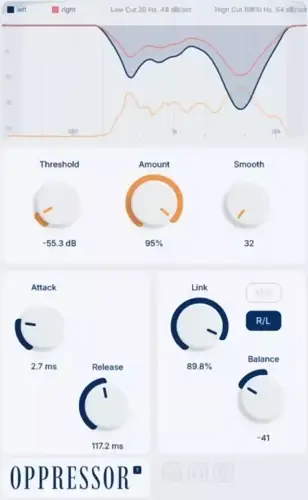
- Surgical Precision : Choose your band count (8 – 32) to transparently carve out space without destroying the original sound.
- Total Dynamic Control : Dial in the exact vibe with standard threshold and effect amount knobs.
- Custom Triggering : Use the sidechain low cut and high cut filters so only the frequencies you actually want will trigger the effect.
- Breathing Envelopes : Tweak the compressor attack and release to make the ducking groove perfectly with the tempo of your beat.
- Stereo Wizardry : Independent processing for M/S and L/R channels. This means you can duck the mid channel for a lead vocal while keeping your wide stereo synths totally untouched.
- Listen to the Math : Hit the Processing Delta button to solo and hear exactly what frequencies are being removed. No more mixing blind.
⚡ Pro Producer Tip: The Vocal Pocket Trick
Slap Oppressor on your main instrument bus and route your lead vocal to its sidechain input. Set it to around 16 bands, engage the Mid/Side mode to process ONLY the mid channel, and push the effect amount just until the vocal cuts through. Your vocal will sit perfectly right up front without sacrificing the wide energy of your beat.
Tech Specs (Keep it Light)
- Format : VST Win and Mac compatible
- File Size : Super lightweight at just 18.7 MB
- Performance : Zero latency processing (perfect for tracking and live mixing)
- Price : 100% Free
The Verdict
If you want your mixes to sound modern, loud, and incredibly clean, dynamic frequency ducking is mandatory. Oppressor takes a complicated, expensive studio technique and puts it into a lightweight, free UI that just works. It frees up the headroom you desperately need and gives every instrument its own lane to shine. Download this gem immediately and watch your mixes instantly open up.


Oppressor.b1.0 ( 19 MB )
📥 Want instant updates on new free VSTs? Join our Telegram Channel!
Let me know in the comments how this sits in your latest project! Are you using it to carve out space for vocals, or getting crazy with kick and bass ducking? Let’s talk shop below! 👇

We’re audio producers and sound designers with over 20 years of experience in the industry. Our team has lived through the entire evolution of digital audio production.
Our mission? To filter out the junk and bring you only the studio-ready free VSTs that actually compete with paid gear. We do the digging so you can focus on creating.