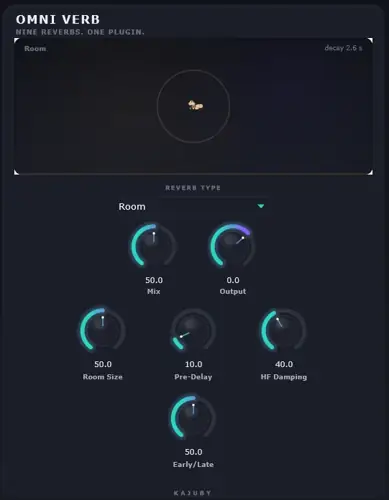
Tired of loading three different plugins just to get your drums to glue, your vocals to float, and your synths to drift into outer space? We have all been there – killing your CPU, choking your headroom, and cluttering up your channel strips just trying to find the right acoustic space. Having to jump between a vintage plate plugin, a clunky convolution loader, and an ambient shimmer tool completely ruins the creative flow.
Well, wipe that studio fatigue off your face. Omni Verb just landed, and it is a certified Swiss Army knife designed to knock out that headache for good.
Why Omni Verb is a Game-Changer for Your Mix & Workflow
Omni Verb isn’t just another throwaway reverb – it is an all-in-one powerhouse that brings elite acoustic modeling and bleeding-edge sound design straight into your DAW. Here is what it brings to your production table:
- Nine Heavyweight Reverb Engines: Jump instantly between tight Rooms, vintage Plates, twangy Springs, massive Halls, realistic Chambers, True-Stereo Convolution, modern Velvet Noise, Modulated Allpass Clouds, and CloudSeed-style Granular tails without ever swapping plugins.
- Massive 190+ IR Soundbank: Dial in instant real-world realism with an elite bundled collection of impulse responses covering halls, rooms, chambers, plates, and ambient spaces.
- Custom IR Loading with Time-Stretch: Drag and drop your own favorite impulse responses on the fly, trim the start/end points, and stretch the time to sculpt unique acoustic textures.
- Surgical Frequency & Tail Shaping: Keep your mix clean using dedicated controls like bass-shear on plates, tension on springs, and independent low/high multipliers on hall decays – meaning zero low-end mud.
- Next-Gen Ambient Textures: The Granular and Velvet Noise engines let you generate lush, evolving soundscapes and pad-like tails that sit right in the pocket behind your lead elements.
- Visual Mix Feedback: Keep your levels in check with real-time input/output metering and an onboard visualizer that lets you see how your reverb spreads across the stereo field.
⚡ Pro Producer Tip: Clean Up The Drip
When you’re running the Plate engine on an 808-heavy beat or an aggressive snare, lean into the ‘bass-shear’ knob. Rolling off the sub frequencies inside the reverb algorithm keeps your low-end punchy and prevents the stereo tail from eating up your master bus headroom.
Tech Specs (Keep it Light)
- File Size: 81.11 MB (featherweight on storage, heavy on features)
- Platform: Windows (WiN)
- Algorithms: 9 Unique DSP & Convolution Engines
- Preset Library: 190+ Included Impulse Responses + Custom IR Loader
- Monitoring: Live I/O Meters & Stereo Reverb Visualizer
The Verdict
Whether you need a snappy studio room to glue your drum bus together, a deep vintage plate to make your lead vocal drip, or an endless granular cloud for ethereal ambient beats – Omni Verb handles business. It delivers the vibe, the depth, and the versatility of top-tier commercial reverbs without costing you a single dime.


Omni Verb Setup ( 81 MB )
📥 Want instant updates on new free VSTs? Join our Telegram Channel!
Let me know in the comments how this sits in your latest project! Which engine are you slapping on first – the vintage Plate or that wild Granular cloud? Let’s talk shop below! 👇

We’re audio producers and sound designers with over 20 years of experience in the industry. Our team has lived through the entire evolution of digital audio production.
Our mission? To filter out the junk and bring you only the studio-ready free VSTs that actually compete with paid gear. We do the digging so you can focus on creating.