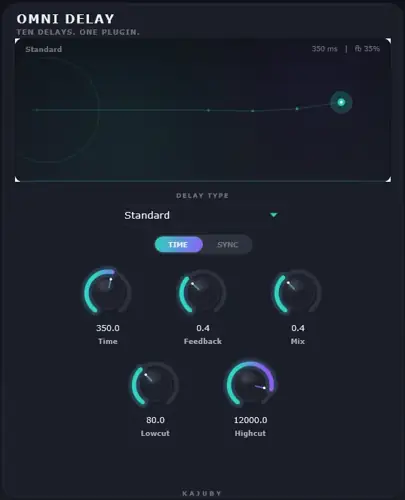
Tired of stacking four or five different delay plugins just to find the right bounce for your track? We have all been there: your lead vocal is sitting flat, you load up a tape delay that sounds too muddy, swap it out for a digital stock plugin that feels clinical, and before you know it, your creative momentum is gone. Switching between bloated plugins just to audition different delay styles wastes time and eats up CPU headroom.
Omni Delay solves that studio headache in seconds. Packing ten distinct delay engines into a featherweight 4 MB footprint, this freebie gives you everything from vintage warmth to spacey reverse textures right from a single, unified interface.
Why Omni Delay is a Game-Changer for Your Mix & Workflow
- Ten Pro Delay Modes in One Spot: Flip between vintage tape, dirty analog BBD, pitch-shifting, slapback, and reverse without resetting your controls or interrupting your creative flow.
- Silky-Smooth Modulation: Built-in cubic interpolation ensures that when you tweak time or layer on modulation, you get zero zipper noise or harsh digital artifacts – just pure, analog-style glide.
- Safe Feedback Experimentation: Push your repeats into infinite self-oscillation without blowing out your speakers, thanks to an integrated soft-knee safety limiter riding the feedback loop.
- Rhythm Precision on Lock: Dial in perfect pocket grooves with 21 tempo-synced divisions – covering straight, triplet, and dotted values – or switch to free-running milliseconds for classic slap.
- Instant Mix Carving: Built-in high-cut and low-cut filters let you clean up muddy low-end rumble and harsh sizzle on the fly so your wet signal sits behind your dry tracks effortlessly.
- Ultra-Lightweight Footprint: Coming in at roughly 4 MB, you can drop an instance on every vocal, synth, and percussion bus without your DAW skipping a beat.
⚡ Pro Producer Tip: The Ambient Bed Trick
Throw Omni Delay onto an aux send in Analog/BBD mode, crank the feedback up around 75%, and dial the low-cut filter up to 350 Hz. The soft-knee limiter keeps the repeats from clipping, while the filtered repeats sit in the mix like warm analog glue without stealing punch from your kick and 808.
Tech Specs (Keep it Light)
- Format: VST (Windows WiN)
- Download Size: Approx. 4 MB
- Engines: 10 Modes (Standard, Ping Pong, Multi-Tap up to 8 taps, Tape, Analog/BBD, Digital, Slapback, Modulated, Pitch Shifting, Reverse)
- Delay Time: Up to 3,000 ms with free and tempo-sync options
- Tone Shaping: High-pass/Low-pass filters, stereo width, and real-time visualizer
The Verdict
Omni Delay cuts through the clutter of over-complicated delay plugins. It delivers immediate character, plenty of versatility, and pristine modulation without hogging your system resources.
Whether you need a quick slapback on a snare, lush tape wow on your keys, or pitching repeats on a vocal hook, this tool flat-out slaps. It is an absolute no-brainer addition to your plugin folder.


Omni Delay Setup ( 4 MB )
📥 Want instant updates on new free VSTs? Join our Telegram Channel!
Let me know in the comments how this sits in your latest project! Are you using that Tape mode for grit or diving into the glitch-free Reverse setting? Let’s talk shop below! 👇

We’re audio producers and sound designers with over 20 years of experience in the industry. Our team has lived through the entire evolution of digital audio production.
Our mission? To filter out the junk and bring you only the studio-ready free VSTs that actually compete with paid gear. We do the digging so you can focus on creating.