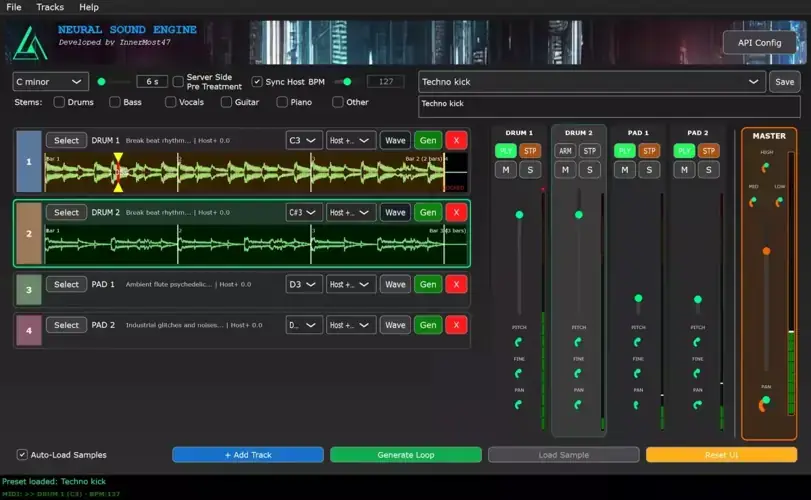
Yo, I’ve been digging through the deep corners of the web and found something special for your arsenal today. We all know that feeling—staring at an empty grid, waiting for inspiration to strike, or just scrolling through the same old sample packs that everyone else is using. It kills the vibe instantly. You want unique textures that sit in the mix, but finding them can take hours.
That’s where Obsidian comes in. This isn’t just another generic generator; it’s a legit instrument that uses AI to cook up samples that actually fit the context of your track.
Why Obsidian is a Game-Changer for Your Mix & Workflow
This tool changes the game because it moves AI from “random generation” to “live performance.” It’s utilizing the Stable Audio Open model, which means the audio fidelity is crisp—we’re talking 44.1kHz, so you aren’t getting that robotic, low-bitrate artifact mess.
Here is why this plugin brings the heat:
- It Reads Your Mind (Sort of): The LLM Brain analyzes your current session and generates smart prompts. It tries to match the vibe you are already cooking up, giving you loops that actually belong in the track.
- Total Control: You get 8 independent tracks with MIDI triggering. You can play the AI generation like a drum rack.
- Workflow Integration: It has smart time-stretching that syncs directly to your DAW’s tempo. No more warping samples for twenty minutes just to get them to groove.
- Sound Design Heaven: The advanced waveform editor lets you zoom in and set precise loop points, so you can take a generated idea and mangle it until it’s entirely your own.
- Zero Latency Lag: Because it runs locally on your GPU, everything happens in real-time. It’s ready for live performance, not just offline rendering.
⚡ Pro Producer Tip: Layering with Intent
Use the “Global Custom Prompts” feature to steer the AI. Instead of letting it guess, type in specific textures like “lo-fi vinyl crackle” or “shimmering reverb tail.” Generate a layer, then use the individual outputs to process that specific texture with your favorite saturation plugin. This adds serious headroom and depth to a mix without overcrowding the frequency spectrum.
Tech Specs (Keep it Light)
Since this is running heavy AI models locally, you need a rig that can handle the heavy lifting. Don’t try to run this on a potato.
- The Brain: Uses Neural Sound Engine & Stable Audio Open.
- Must-Have: NVIDIA GPU with CUDA. This is required for the real-time magic.
- Memory: 8GB+ RAM to load the models smoothly.
- Platform: Windows 10+, Linux, macOS (check your GPU compatibility!).
- Size: The plugin is small (12MB), but the models will take up some space.
The Verdict
Obsidian v0.4 is incredibly promising. It bridges the gap between “typing a prompt” and “playing an instrument.” If you have the NVIDIA hardware to run it, this is a must-download. It generates high-quality ideas fast, lets you manipulate them instantly, and keeps the creative flow moving without needing to open a browser. It slaps, plain and simple.


InnerMost47 – Obsidian-v0.4.7 ( 12 MB )
📥 Want instant updates on new free VSTs? Join our Telegram Channel!
Let me know in the comments how this sits in your latest project! Are you ready to let AI jam in your session, or are you keeping it old school? Let’s talk shop below! 👇

We’re audio producers and sound designers with over 20 years of experience in the industry. Our team has lived through the entire evolution of digital audio production.
Our mission? To filter out the junk and bring you only the studio-ready free VSTs that actually compete with paid gear. We do the digging so you can focus on creating.

