You ever sit there staring at a sample or a synth lead, and it just sounds… dead? Like, no matter how much EQ or standard saturation you throw at the chain, it lacks that unique character and just won’t sit right in the mix? That’s a vibe killer, straight up.
But I found a fix that’s going to wake up your stale audio.
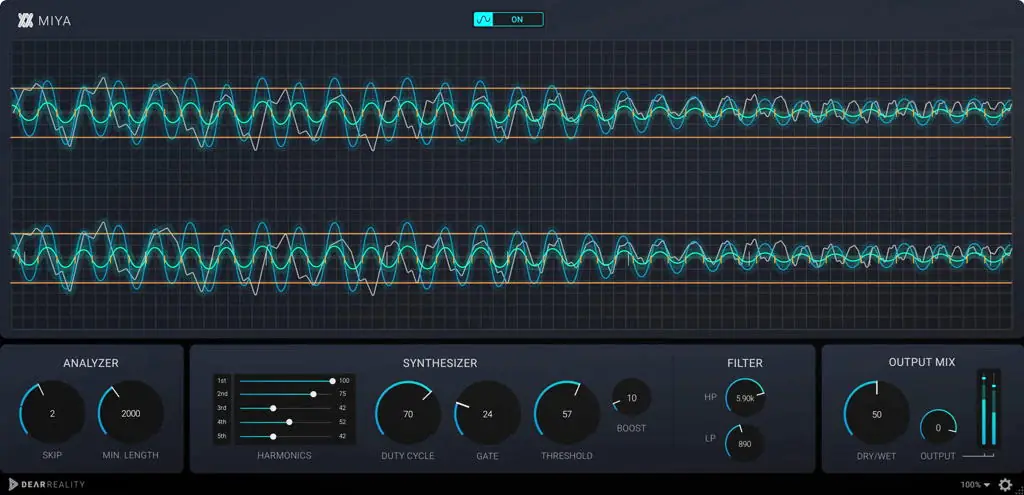
Enter MIYA. This isn’t your standard distortion unit; it’s a waveguide re-synthesizer that completely reconstructs your audio based on zero-crossing intervals. If you’re tired of thin sounds and need something that creates a wide range of permutations – from slight texture adjustments to absolute sonic destruction – this is the tool you need in your arsenal today.
Why MIYA is a Game-Changer for Your Mix & Workflow
Most producers just slap a limiter on the bus and call it a day, but the real magic happens in sound design. MIYA takes the original input and flips it, giving you a synthesized signal that retains the rhythmic characteristics of the original but with a totally new timbral flavor.
Here is why this plugin creates serious headroom for creativity:
- Total Sonic Reconstruction: Instead of just layering effects, you are actually re-synthesizing the audio. This creates unique textures that standard plugins just can’t touch.
- Massive Low-End Theory: The sub-harmonics feature is clutch. If your kick or bass is lacking weight, this can introduce deep frequencies that make the trunk rattle without muddying up the mix.
- From Subtle to Gnarly: Whether you need a gentle “velvet” texture on a pad or aggressive, gnarly distortion on a lead synth, the adjustable harmonics give you full control over the aggression.
- Visual Feedback: The real-time audio visualizer lets you see exactly how the harmonics are reacting, ensuring you don’t cook the signal too hard unless you want to.
⚡ Pro Producer Tip: Parallel Destruction
Don’t put MIYA directly on your main vocal or drum bus unless you want chaos. Instead, duplicate your track or use a Send/Return. Crush the signal with MIYA’s “aggressive reconstruction” settings, then blend it in slowly with the dry signal. This adds incredible “body” and texture to the sound while keeping the transients of the original audio clean. It slaps on drum breaks.
Tech Specs (Keep it Light)
- Format: VST / AU
- Compatibility: Windows & Mac (Universal)
- Size: ~49 MB (Lightweight download)
- Version: 1.1.0
- Key Feature: Waveguide Re-synthesis
The Verdict
If you are looking for “bread and butter” sounds, keep walking. But if you want to experiment and create sounds that make other producers ask, “Yo, how did you make that texture?”, then MIYA is a must-cop.
It’s rare to find a free tool that offers this level of dynamic manipulation. It creates space in a mix by changing the fundamental nature of the sound, rather than just EQing it. Download it, turn the knobs, and watch your CPU usage stay low while your creativity spikes.


dear-reality-miya-v1.1 ( 47 MB )
Let me know in the comments how this sits in your latest project! Did you use the sub-harmonics to beef up a kick, or did you mangle a synth lead? Let’s talk shop below! 👇

We’re audio producers and sound designers with over 20 years of experience in the industry. Our team has lived through the entire evolution of digital audio production.
Our mission? To filter out the junk and bring you only the studio-ready free VSTs that actually compete with paid gear. We do the digging so you can focus on creating.
