Yo beatmakers, listen up. We all know the struggle of dragging a killer loop into our DAW, only to spend an hour fighting with clunky slicing tools, dealing with nasty phase clicks on our sub-bass, or worse – losing our chopped samples when sending a project file to a homie for a collab.
Nothing kills the studio vibe faster than a “missing media file” error. Luckily, I just found a free sampler that completely solves all of that and gets you straight back to the music.
Why Cartridge is a Game-Changer for Your Mix and Workflow
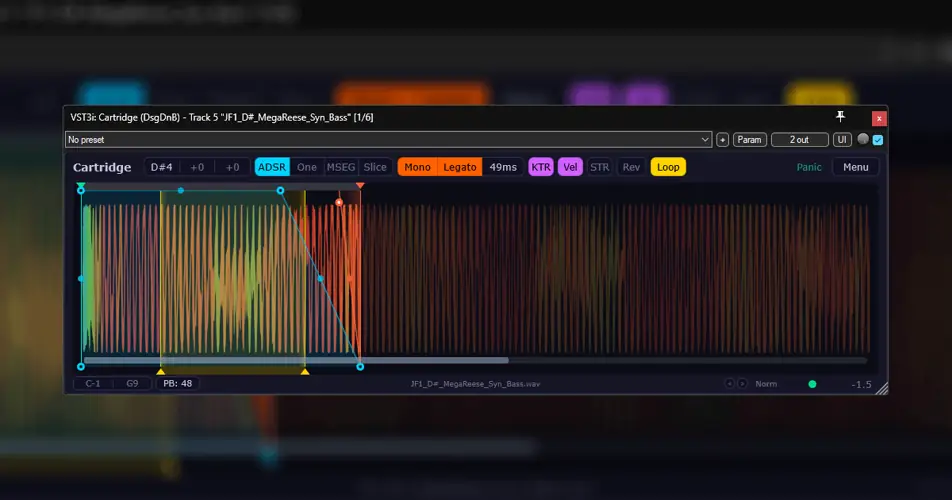
Cartridge isn’t just another basic sample player; it’s an absolute workflow monster. Whether you are using Reaper, FL Studio, or any modern DAW, this thing slaps. Here’s why it deserves a spot in your template:
- Four Killer Playback Modes: You get ADSR for that classic envelope feel, a fire-and-forget “One” mode for punchy drum one-shots, a full Slicer with drag-and-drop MIDI export, and a crazy MSEG mode where you can draw custom volume curves to make sure your sample sits perfectly in the mix.
- Collab-Proof Archiving: This is huge – Cartridge saves your samples inside the project file as high-quality FLACs. You can bounce your session to an engineer or co-producer without ever having to zip up a separate audio folder.
- Flawless Chops & No Pops: With built-in phase-click protection and zero-crossing snap (just Shift+drag), your 808s and kick tails will never have those annoying digital pops again.
- Time-Stretching Magic: Need to pitch a vocal hook down without slowing it down? The built-in time-stretching handles pitch manipulation while keeping your groove locked to the grid.
- Instant Workflow Hacks: Auto-normalize gives you instant headroom control, and auto root-note detection (or Ctrl+Shift+drag for a specific region) means you don’t have to guess the pitch of that random flute sample you downloaded.
⚡ Pro Producer Tip: The Ultimate Drum Rack
Use Cartridge’s MIDI map feature to build out your own custom drum racks using Reaper containers or FL Patcher. Take a raw drum break, slice it up in the plugin, export the MIDI directly to your timeline, and then hot-swap the sample on the fly to instantly remix your groove. Add a little looping with cross-fades to turn a short crash cymbal into a massive, atmospheric texture!
Tech Specs (Keep it Light)
- Format: VST (Works perfectly in any modern DAW, with massive integration goodies for Reaper)
- OS: WiN, MAC, LiNUX
- File Size: A super lightweight 30.5 MB
- UI: Fully scalable and themable so it looks fresh on any monitor setup.
The Verdict
If you’re tired of paying premium prices for samplers that hog your CPU, Cartridge is the truth. It’s incredibly deep but intuitive enough to keep you in the zone when you’re catching a vibe. The fact that it bakes the FLACs right into the project file makes it a no-brainer for producers who do a lot of remote collaborations. Go grab it and start flipping those samples.


Cartridge.0.7.0 ( 30 MB )
📥 Want instant updates on new free VSTs? Join our Telegram Channel!
Let me know in the comments how this sits in your latest project! Are you using this to chop up drum breaks or to flip old soul vocal samples? Let’s talk shop below! 👇

We’re audio producers and sound designers with over 20 years of experience in the industry. Our team has lived through the entire evolution of digital audio production.
Our mission? To filter out the junk and bring you only the studio-ready free VSTs that actually compete with paid gear. We do the digging so you can focus on creating.
