AutoTonic Player
size 25.1 MB / 12.3 MB
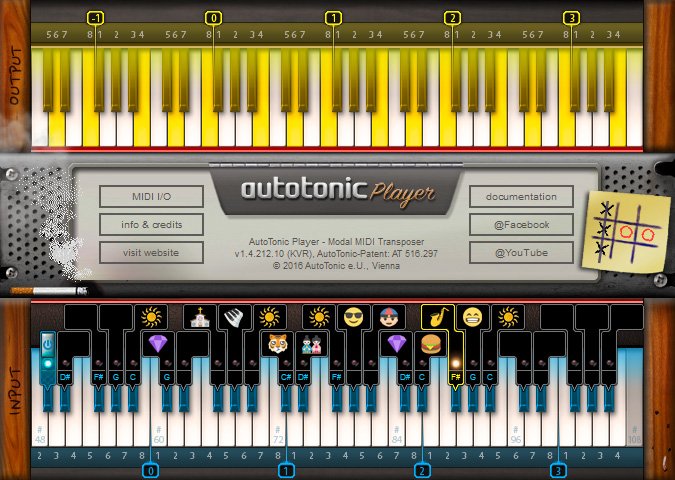
AutoTonic Player is a standalone MIDI modal transposer software.
The AutoTonic Player free version offers you a carefully planned, fixed selection of various famous and custom-made scales.
This free version uses emojis for the scale names which make AutoTonic Player even more expressional and unique to use. By playing only on white keys and loading new mappings by the use of your black keys you have full control over new Tonic/Scale-combinations and simply can enjoy the full power of modal transposing (which allows scales with any count of intervals per octave):
The AutoTonic Player free version offers you a carefully planned, fixed selection of various famous and custom-made scales.
This free version uses emojis for the scale names which make AutoTonic Player even more expressional and unique to use. By playing only on white keys and loading new mappings by the use of your black keys you have full control over new Tonic/Scale-combinations and simply can enjoy the full power of modal transposing (which allows scales with any count of intervals per octave):
- Full & unlimited modal transposing experience.
- Countless of scale/tonic combinations feasible.
- No authorization required, no time restrictions.
SETUP (Recommended) :
- Create a virtual MIDI port on your computer*.
- Select your INPUT device in “MIDI I/O”.
- Select your ‘virtual MIDI port’ as OUTPUT in “MIDI I/O”.
- Set your ‘MIDI port’ as the only (.) input within your host app.
In AutoTonic hit SPACEBAR (=POWER On/Off) to get started …
*Win users may should search for “free virtual MIDI driver”
*Mac users should “create a IAC MIDI port” on their system


autotonic_player_setup ( 25 MB ) Win
autotonic_player ( 12 MB ) Osx

We’re audio producers and sound designers with over 20 years of experience in the industry. Our team has lived through the entire evolution of digital audio production.
Our mission? To filter out the junk and bring you only the studio-ready free VSTs that actually compete with paid gear. We do the digging so you can focus on creating.
