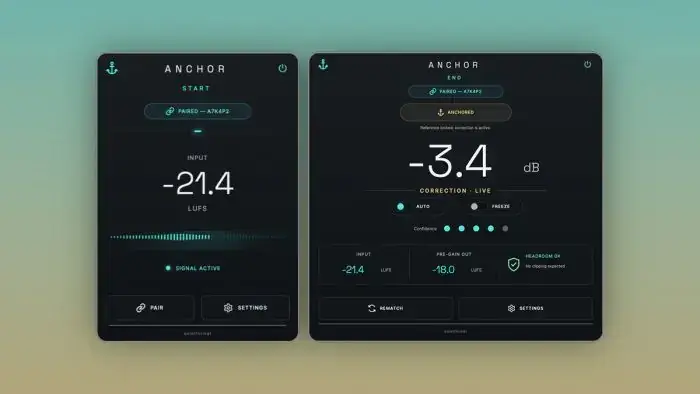
Tired of getting tricked by your own plugin chains? We have all been there – you drop a sweet analog-style EQ or a crunchy saturator on your drum bus, tweak a couple of knobs, and immediately think, “Man, this slaps!” But most of the time, the output just got 2 dB louder, fooling your ears into thinking the track sounds fatter when it is really just eating up your headroom.
Loudness bias is the ultimate studio trap. quietformat came through with a surgical solution called ANCHOR, a sleek utility designed to level the playing field so you can hear what your processors are actually doing to your audio.
Why ANCHOR is a Game-Changer for Your Mix & Workflow
Getting an honest A/B comparison without manual gain tweaking saves tons of time and ear fatigue. Here is how ANCHOR levels up your session workflow:
- True A/B Confidence: The paired START and END workflow lets you bracket single inserts, complex vocal chains, or full master busses to hear purely sonic changes – not volume jumps.
- Zero Coloration at the Source: The ANCHOR START plugin is completely bit-transparent, capturing the raw input without touching your tone or introducing unwanted artifacts.
- Intelligent Broadband Trim: ANCHOR END analyzes matching sections of your audio during continuous playback and applies a single clean trim gain to match pre- and post-processing levels.
- Preserves Your Processing Sauce: Unlike tools that over-process, ANCHOR does not mess with your EQ curves, transient punch, stereo width, or harmonic saturation – it strictly balances the gain so your decisions stay purely musical.
- Fast & Lightweight: Keeps your CPU cool and lets you drop instances across multiple tracks, sub-mixes, and aux groups without breaking a sweat.
⚡ Pro Producer Tip: Master Bus Reality Check
Place ANCHOR START as slot #1 on your mix bus and put ANCHOR END right after your main compressor and saturation stages (before the final safety ceiling limiter). Play the loudest section of your hook to build the reference. Now engage the gain trim on END – this lets you instantly hear if your bus glue is actually adding warmth and density, or if you are just flattening your transient punch with unnecessary gain.
Tech Specs (Keep it Light)
- Download Size: 27.8 MB
- Formats: VST3, AU
- Platforms: Windows & macOS
- Developer: quietformat
The Verdict
If you want your mixes to translate consistently across all playback systems, you have to eliminate guesswork. ANCHOR is one of those utilitarian gems that should live on your default template. It keeps your workflow honest, protects your headroom, and ensures every EQ boost or saturation push genuinely enhances the track.


ANCHOR.1.0.5-1.0.7 ( 28 MB )
📥 Want instant updates on new free VSTs? Join our Telegram Channel!
Let me know in the comments how this sits in your latest project! Are you throwing ANCHOR across your drum bus or using it to keep your mastering chain honest? Let’s talk shop below! 👇

We’re audio producers and sound designers with over 20 years of experience in the industry. Our team has lived through the entire evolution of digital audio production.
Our mission? To filter out the junk and bring you only the studio-ready free VSTs that actually compete with paid gear. We do the digging so you can focus on creating.