Tired of muddy vocals and harsh resonances ruining your vibe? I found a fix. As producers, we’ve all been in that frustrating spot – stacking up static EQs to carve out room for a vocal or an 808, only to realize we just sucked all the life, energy, and headroom right out of the mix.
A static EQ dulls your track the entire time, even when the problem frequency isn’t acting up. Enter dynamic EQ. It’s the ultimate cheat code, and today I’m putting you on to a heavy-hitting tool that’s about to become an absolute staple in your template.
Why EQ Pro is a Game-Changer for Your Mix &Workflow
EQ Pro isn’t just another analog-modeled saturation box; it’s a surgical, transparent powerhouse built for absolute precision. What you draw is exactly what you hear, and the math stays in perfect lock-step with the sound. Here is why this plugin seriously slaps:
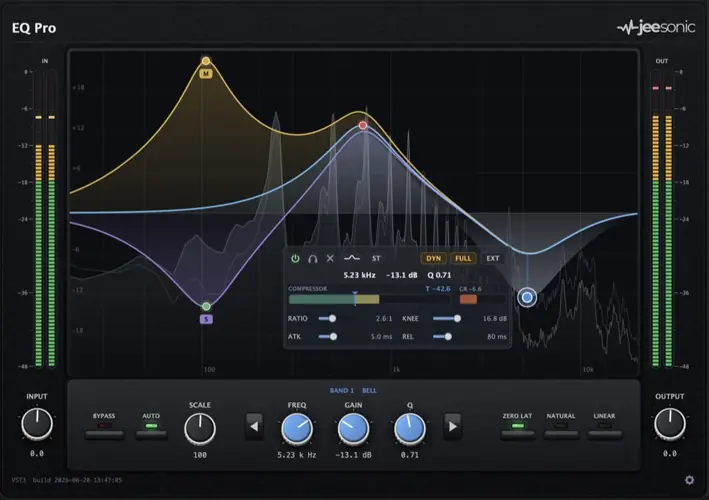
- A Full Compressor in Every Band: This is the secret sauce. Each of the 24 freely typed bands (bells, shelves, cuts, notches, and tilts) has its own threshold, ratio, knee, attack, and release. You tame a nasty resonance only when it rings out, leaving the rest of the performance completely untouched.
- Mid/Side & L/R Routing per Band: Want to widen your mix? You can route any specific band to Stereo, Mid, Side, Left, or Right. The interface splits into color-coded lanes so you can visually confirm exactly where your sound sits in the mix.
- Deterministic Auto Gain: This feature is a massive workflow upgrade. The Auto Gain folds in the dynamic moves in real-time, meaning the tone changes but the loudness stays exactly the same. No more getting fooled by volume jumps—you’re making honest, objective mixing decisions.
- External Sidechaining: Need to duck the bass guitar just in the 60Hz range every time the kick hits? Drive any dynamic band from an external source for insanely precise, frequency-conscious control.
- Three Phase Modes: Whether you need Zero Latency for tracking beats, Natural Phase for mixing, or Linear Phase for mastering to keep phase smear at absolute zero, EQ Pro has you covered.
⚡ Pro Producer Tip: THE SURGICAL DE-ESSER HACK
Instead of throwing a heavy, broadband de-esser on your lead vocal that dulls the whole top end, use EQ Pro’s dynamic bands. Create a sharp bell curve around the harsh 6-8kHz sibilance range, pull down the threshold, and dial in a fast attack. The EQ will duck out the harsh “S” sounds only when they hit, leaving the airy breathiness of your vocal completely intact. Your vocals will sit perfectly in the pocket!
Tech Specs (Keep it Light)
- Formats: Windows (VST3) and macOS (VST3, AU)
- Size: A super lightweight 35 MB
- Bands: Up to 24, fully automatable with real-time pre/post analyzer
- Oversampling: Optional 2x or 4x for ultra-clean, high-frequency moves near the Nyquist limit (keeps latency low!)
- Gain Scale: One master dial to scale your entire EQ curve from 0 to 200%
The Verdict
EQ Pro is a heavyweight contender for anyone doing serious beatmaking, mixing, or mastering. It’s quick, the interactive curves never jump or glitch out, and having a dedicated compressor on 24 different bands gives you surgical control that most stock plugins just can’t touch.
If you want your mixes to sound loud, wide, and commercially polished without destroying the natural vibe of your sounds, this plugin is an absolute must-have for the arsenal. Grab it, load it up, and watch your workflow speed up instantly.


Jeesonic.EQ.Pro.0.1.0 ( 35 MB )
📥 Want instant updates on new free VSTs? Join our Telegram Channel!
Let me know in the comments how this sits in your latest project! Are you dropping this on your drum bus for punch or saving it for surgical vocal processing? Let’s talk shop below! 👇

We’re audio producers and sound designers with over 20 years of experience in the industry. Our team has lived through the entire evolution of digital audio production.
Our mission? To filter out the junk and bring you only the studio-ready free VSTs that actually compete with paid gear. We do the digging so you can focus on creating.
