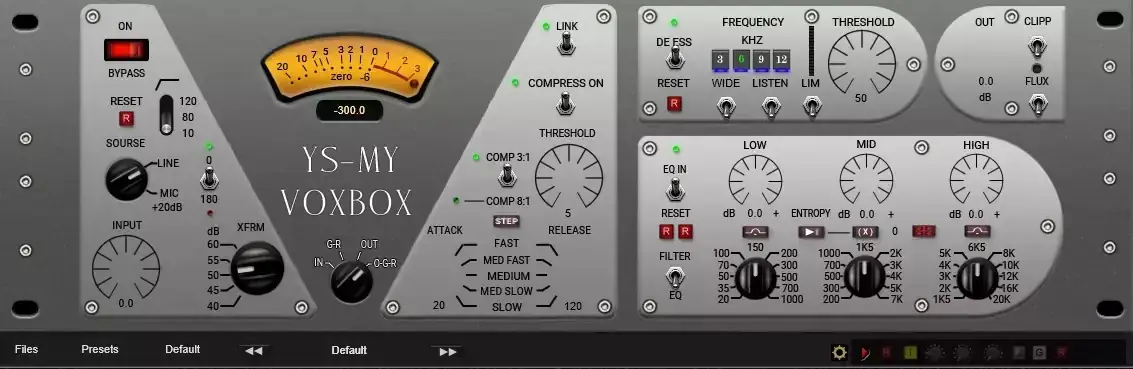
Yo fam, I just stumbled upon this gem today while digging through the depths of the web, and I knew I had to drop this for your arsenal immediately.
We’ve all been there. You track a killer vocal or lay down a synth line, but when you pull it up in the DAW, it just sounds… sterile. Cold. It sits on top of the beat instead of living inside it. You throw a standard compressor on it, and it just squashes the life out without adding any character.
If you are tired of your mixes sounding thin and purely digital, the YS MY VoxBox is exactly the sauce you’ve been looking for to warm things up.
Why YS MY VoxBox is a Game-Changer for Your Mix & Workflow
This isn’t just another compressor. While the developer states this isn’t an exact clone of the famous Manley hardware, they took the basic characteristics from the user manual and built a beast. It’s designed to inject that expensive-sounding “soul” into your tracks.
Here is why this plugin slaps:
- Serious Analog Mojo: The XFRM module adds harmonics that color the sound immediately. It takes a boring signal and makes it sound expensive.
- Next-Level De-Essing: Harsh highs ruining your vocal? The De-Esser works in both “Wide” (full spectrum) or “Split” (four narrow bands) modes. Plus, flip it to limiter mode, and it acts like a classic L2a.
- True Stereo Realism: The ENTROPY and FLUX features are crazy. They create random small differences in EQ and saturation between the left and right channels. This simulates the imperfections of a real analog console or the movement of a tape machine, giving you a wide, wide stereo image.
- Flexible EQ: You get a three-band EQ where the low and high frequencies can switch between “bell” and “shelf” curves. Perfect for sculpting the tone before it hits the compressor.
- Visual Feedback: The VU meter isn’t just for looks. You get three selectable arrows: Input (White), Compression (Red), and Output (Black), so you can gain stage properly.
⚡ Pro Producer Tip: THE TAPE DRIFT TRICK
Don’t sleep on the FLUX-EQ toggle. This engages four generators creating oscillations at different frequencies and speeds. Use this on a stereo synth bus or backing vocals to add “fullness” and movement. It mimics the subtle warble and drift of tape, which makes the mix feel alive rather than static.
Tech Specs (Keep it Light)
Here is what you need to know to get this running in your session:
- Size: 52 MB.
- Compatibility: Windows and Mac.
- Performance: By default, elements are set for smooth switching (frame 201).
- Graphics Fix: If you’re rocking a laptop with a weak video card and the knobs aren’t showing up, the dev included a fix. Just swap the images in the root folder with the smaller renderer from the “Resources” folder (Knob 101 or Knob 51).
- Calibration: You can calibrate the indicators (Zero-VU-6) just by clicking the numbers in the menu.
The Verdict
Honestly? For a free plugin, the YS MY VoxBox is hitting way above its weight class. It handles dynamics with a very musical touch, and the inclusion of the Entropy and Flux features separates it from the hundreds of other basic compressors out there.
If you want your “In the Box” mixes to sound like they ran through a $4,000 channel strip, grab this download. It creates that glue and headroom we’re all chasing.


YS – My VoxBox_ v.1.0.0 ( 52 MB )
Let me know in the comments how this sits in your latest project! Are you using the Split or Wide mode on the De-Esser for your vocals? Let’s talk shop below! 👇

We’re audio producers and sound designers with over 20 years of experience in the industry. Our team has lived through the entire evolution of digital audio production.
Our mission? To filter out the junk and bring you only the studio-ready free VSTs that actually compete with paid gear. We do the digging so you can focus on creating.
