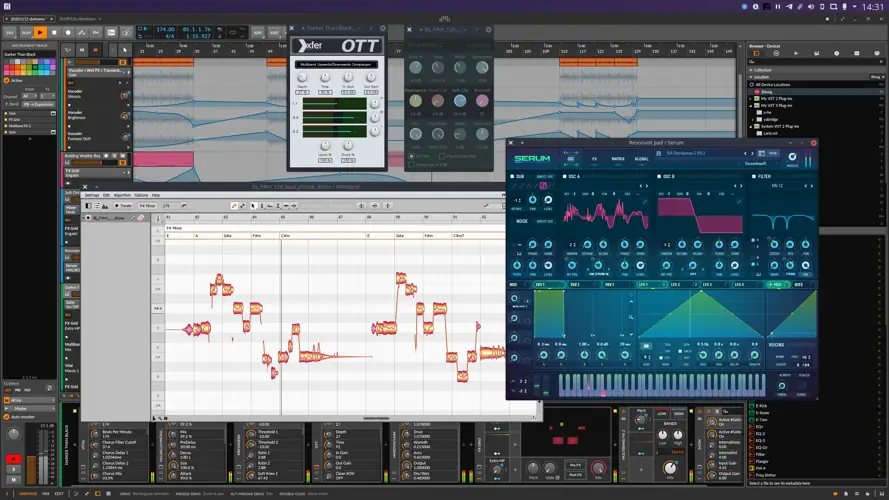
Tired of leaving your favorite heavy-hitting Windows plugins behind just because you’re cooking up beats on a Linux machine? I found a fix.
The biggest headache when making the jump to a Linux DAW is realizing your go-to limiters, synths, and saturation boxes—the ones that make your track slap—aren’t natively supported. You end up wrestling with clunky wine workarounds that kill your creative vibe, crash your session, and completely ruin your workflow.
When you’re in the zone, the last thing you want is a technical roadblock stopping you from getting your mix to sit right.
Why Yabridge is a Game-Changer for Your Mix & Workflow
This isn’t just another buggy wrapper. Yabridge is built from the ground up for transparency and speed. It lets your Windows plugins act exactly like native Linux plugins so you can keep your focus on the music. Here is how it upgrades your studio setup:
- Flawless Integration: Seamlessly run Windows VST2, VST3, and modern CLAP plugins right inside your 64-bit Linux host. It’s so smooth you’ll forget you’re using a bridge.
- Built-in Bitbridge: Still relying on that one secret-weapon 32-bit plugin from 2010? Yabridge automatically detects and handles 32-bit plugins so they run perfectly in your modern 64-bit DAW.
- Drag-and-Drop Ready: Pull samples directly from your native Linux file browser straight into your Windows plugins running under Yabridge. Pure workflow gold.
- Smart Input Grabbing: Yabridge keeps your DAW’s parent window focused. That means your vital transport controls (like hitting the spacebar to play/pause) keep working even while you’re deep tweaking a synth’s GUI.
- Multi-Prefix Support: Got your plugins scattered across different Wine prefixes? No stress. Yabridge automatically detects the right prefix for your
.dll,.vst3, or.clapfiles.
⚡ Pro Producer Tip: The Shift-Key Secret for Bitwig
Because Yabridge brilliantly routes keyboard focus back to your DAW so you don’t lose your transport controls, typing spaces into plugin text fields (like searching presets or entering license keys) can get blocked. The fix? Just hold down the Shift key when clicking into the plugin’s GUI with your mouse! This temporarily hands full keyboard control to the plugin, letting you type smoothly without interrupting your session.
Tech Specs (Keep it Light)
- Plugin Format: Windows VST2, VST3, and CLAP (Bridged to 64-bit Linux)
- File Size: Super lightweight at just 4.2 MB
- Architecture: Modern concurrent architecture for lightning-fast startup times.
- Compatibility: Extensively tested with Wine Staging 9.21.
The Verdict
Listen fam, if you’re producing on Linux, Yabridge isn’t just a luxury—it’s an absolute necessity. It completely bridges the gap, giving you the massive sonic arsenal of the Windows ecosystem with the rock-solid stability of Linux. It runs fast, keeps your workflow snappy, and honestly, it just gets out of your way so you can focus on maximizing your headroom and catching a vibe. It’s an absolute must-download for the Linux beatmaking community.


yabridge-5.1.1.tar ( 4 MB )
📥 Want instant updates on new free VSTs? Join our Telegram Channel!
Let me know in the comments how this sits in your latest project! What is the one Windows plugin you absolutely can’t live without on your Linux setup? Let’s talk shop below! 👇

We’re audio producers and sound designers with over 20 years of experience in the industry. Our team has lived through the entire evolution of digital audio production.
Our mission? To filter out the junk and bring you only the studio-ready free VSTs that actually compete with paid gear. We do the digging so you can focus on creating.
