Sound of Music
22 MB
A plugin that sucks the life out of audio signal
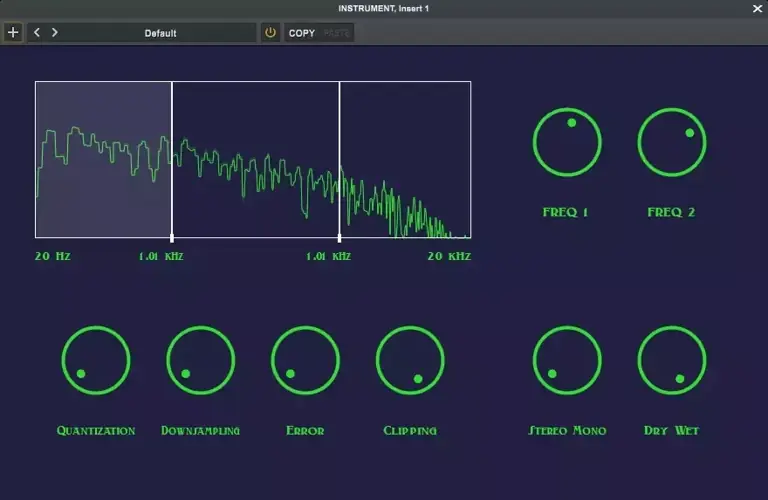
Sound of Music is a multiband bit crusher plugin with three bands, allowing detailed audio control and manipulation.
Installation
VST3 Installation (Windows)
Download the Plugin: Download Sound.of.music.vst3 from releases.
Install the Plugin:
Copy the file into your DAW’s plugin directory.
Rescan Plugins: Follow your DAW’s instructions to rescan plugins or manually add the plugin if necessary.
Usage
Insert Plugin: Load Sound of music plugin into your preferred digital audio workstation (DAW).
Adjust Frequency Bands:
freq1 Slider: Set the boundary between low and mid bands.
freq2 Slider: Set the boundary between mid and high bands.
Select and Adjust Effects:
Select and highlight the active band.
Adjust the following parameters for the selected band:
Downsample: Controls the sample rate,introducing aliasing.
Quantization: Controls the bit depth.
Error: Adds random fluctuation to the signal.
Clip: Controls the threshold level for clipping.
Stereo/Mono and Mix Controls:
Stereo Mono: Controls the stereo width.
Dry Wet: Controls the balance between the dry signal and wet signal.
https://github.com/enter-opy/sound-of-music


SoundofMusic101 ( 22 MB )

We’re audio producers and sound designers with over 20 years of experience in the industry. Our team has lived through the entire evolution of digital audio production.
Our mission? To filter out the junk and bring you only the studio-ready free VSTs that actually compete with paid gear. We do the digging so you can focus on creating.
