Are your mixes sounding washed out because you picked the wrong mic pattern during the session? We’ve all been there—you’re listening back to the tracks the next day, and suddenly that “roomy” vocal sounds muddy, or the figure-eight on the acoustic guitar is catching way too much breathing. Usually, you’re stuck with what you tracked.
But I found a fix that changes the rules entirely.
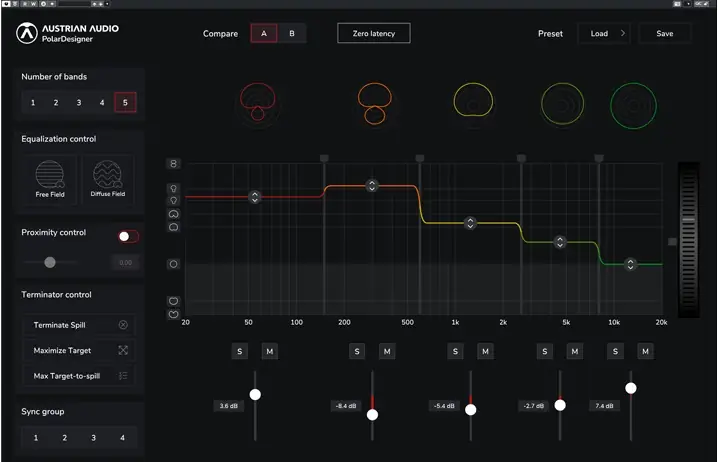
Meet PolarDesigner by Austrian Audio. This isn’t just another EQ; it’s a surgical tool that lets you design the polar pattern of your dreams after the musicians have packed up and left. If you are working with dual-output recordings (like front and back capsules recorded to a stereo track).
This plugin lets you manipulate the polar patterns across five different frequency bands. It’s absolutely wild tech that saves sessions and gives you crazy control over the vibe.
Why PolarDesigner is a Game-Changer for Your Mix & Workflow
This tool is a beast for post-production. It essentially lets you fix “commitment issues” regarding how your mic hears the room. Here is why this plugin needs to sit in your plugin folder:
- Total Sonic Control: Instead of being stuck with one pattern, you can mix and match. Want an Omni bottom end for a fat sound but a tight Cardioid top end to cut the room noise? You can do that across 5 bands.
- Salvage Bad Takes: The “Terminator” algorithm isn’t just a cool name; it helps you target and eliminate specific instruments or frequencies that are bleeding into your track. It rescues audio that would otherwise hit the trash can.
- Pure Audio Quality: It’s phase-linear, meaning you won’t get that weird, swirling phase shift when you start messing with the bands. The signal stays clean and punchy.
- Workflow Automation: You can automate the patterns. Imagine the verse being tight and intimate (Hypercardioid), and the chorus opening up wide (Omni) automatically. That adds serious movement to a mix.
- Hardware Agnostic: While it’s optimized for the Austrian Audio OC818, it works on any dual-output source. If you recorded front/back capsules on your own mic, this plugin slaps.
⚡ Pro Producer Tip: The “Room Killer” Setup
If you have a vocal that has too much room reverb in the low-mids but sounds nice in the highs, use PolarDesigner to set the Low-Mid band to ‘Hypercardioid’ to tighten it up, while setting the High band to ‘Omni’ or ‘Wide Cardioid.’ This keeps the vocal present and ‘in your face’ without losing that expensive, airy top end. It creates a depth that standard EQ just can’t replicate.
Tech Specs (Keep it Light)
- File Size: A lightweight 13 MB.
- Formats: VST3, AAX, AU (OSX 64 Bit / Windows 32 & 64 Bit).
- OS Requirements: macOS 10.7+ or Windows 7+.
- Key Requirement: Works best with dual-output mic sources (Front/Back capsule recorded to stereo).
The Verdict
PolarDesigner is one of those tools you didn’t know you needed until you use it to save a mix. It offers a level of flexibility that used to be impossible.
Whether you are doing sound design, fixing a noisy interview, or trying to get a drum room mic to sit right in the pocket, this open-source gem delivers. It handles the headroom well and the interface is intuitive enough to start tweaking immediately. Grab it, learn it, and keep it in your back pocket for those tricky sessions.




PolarDesigner3_3.0.0 ( 13 MB )
📥 Want instant updates on new free VSTs? Join our Telegram Channel!
Let me know in the comments how this sits in your latest project! Have you ever used multiband pattern processing to save a bad recording? Let’s talk shop below! 👇

We’re audio producers and sound designers with over 20 years of experience in the industry. Our team has lived through the entire evolution of digital audio production.
Our mission? To filter out the junk and bring you only the studio-ready free VSTs that actually compete with paid gear. We do the digging so you can focus on creating.
