Tired of burning through half your session trying to figure out complex chord voicings on a rare sample by ear, only to end up killing your creative momentum? We’ve all been there.
You find a vintage loop with the exact vibe you need, but the keys are buried under vinyl dust, or you want to double that funky bassline with an 808 and can’t catch every passing note. It kills the groove fast. Trying to decode polyphonic audio by hand is a notorious studio headache that robs your tracks of speed and vibe.
Why NeuralNote is a Game-Changer for Your Mix & Workflow
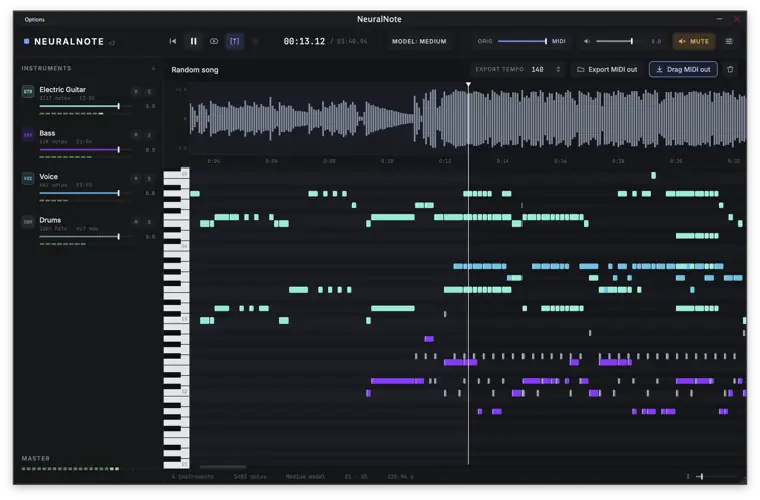
NeuralNote v2 flips that script entirely. Moving away from lightweight algorithms, this beast is powered by the cutting-edge MuScriptor transformer model (packing up to 1.4 billion parameters). It doesn’t just listen to simple melodies – it breaks down full-spectrum audio into usable, musical data right inside your session.
- Rip Chords from Full Mixes: Thanks to multi-instrument separation, you aren’t limited to solo stems. Drop in an entire arrangement and let the model untangle the instruments into dedicated parts.
- Zero Cloud Lag & Total Privacy: The engine runs 100% locally on your machine using your CPU or GPU. Your unreleased music never touches a third-party server, and your workflow doesn’t depend on an internet connection.
- Audition Right in the Box: The built-in multi-instrument synth lets you solo, mute, and balance the gain on detected layers before you commit, saving you massive headroom on your CPU.
- Instant Drag – and – Drop Workflow: Once the transcription lands on the piano roll, simply drag the MIDI clip straight onto an empty track in your DAW and throw your favorite analog synth or keys on it.
- Tailored Processing Speeds: Choose between Small, Medium, or Large AI models to balance processing speed with detail, whether you are on a high-end studio rig or an everyday laptop.
⚡ Pro Producer Tip: Bassline Extraction Sauce
When sampling old records, don’t use Automatic mode. Manually set NeuralNote to isolate the bass track, transcribe it, and drag the MIDI out to trigger a sub-heavy sine wave or an 808. Quantize the notes slightly, clean up the velocities, and blend it under your original audio loop. It locks the low end tight to the original groove without any phase issues!
Tech Specs (Keep it Light)
- Plugin Formats: VST3, AU, and Standalone App
- Operating Systems: macOS (Apple Silicon native; Intel build via source), Windows (x64), Linux (source build)
- Engine: MuScriptor Transformer (GGUF checkpoints downloaded on first launch)
- Acceleration: Metal (Mac GPU), Vulkan (Windows/Linux GPU), and standard CPU fallback
- Audio File Support: WAV, AIFF, FLAC, MP3, and OGG, plus direct live DAW capture
The Verdict
NeuralNote v2 is hands down one of the most powerful utility plugins to land on the freeware scene this year. It bridges that annoying gap between hearing dope musical ideas on an audio track and actually getting those notes onto your grid.
Whether you want to study jazz progressions, beef up sampled chops, or turn hummed melodies into full orchestral patches, this plugin belongs in your everyday toolkit.


NeuralNote.2.0.0 ( 103 MB )
📥 Want instant updates on new free VSTs? Join our Telegram Channel!
Let me know in the comments how this sits in your latest project! Are you using it to rip chord voicings from vinyl or transcribe live guitar riffs? Let’s talk shop below! 👇

We’re audio producers and sound designers with over 20 years of experience in the industry. Our team has lived through the entire evolution of digital audio production.
Our mission? To filter out the junk and bring you only the studio-ready free VSTs that actually compete with paid gear. We do the digging so you can focus on creating.