Yo beatmakers, listen up.
It’s your boy coming through with some serious heat for the hard drive today. We all know the struggle—you spend hours cooking up a beat, the vibe is right, and the mix sounds clean at -6dB. But the moment you try to push the volume to compete with those commercial tracks on Spotify, everything turns to mush. The transients get crushed, the kick loses its knock, and the whole track feels suffocated and distorted.
It’s the classic “loudness vs. clarity” war, and usually, clarity loses.
But I just got my hands on Massimizer, and let me tell you, this plugin solves that headache instantly. It’s designed to push your sound to the absolute limit without sacrificing that precious dynamic range. If you need your tracks to hit hard without clipping the life out of them, you need to read this.
Why Massimizer is a Game-Changer for Your Mix and Workflow
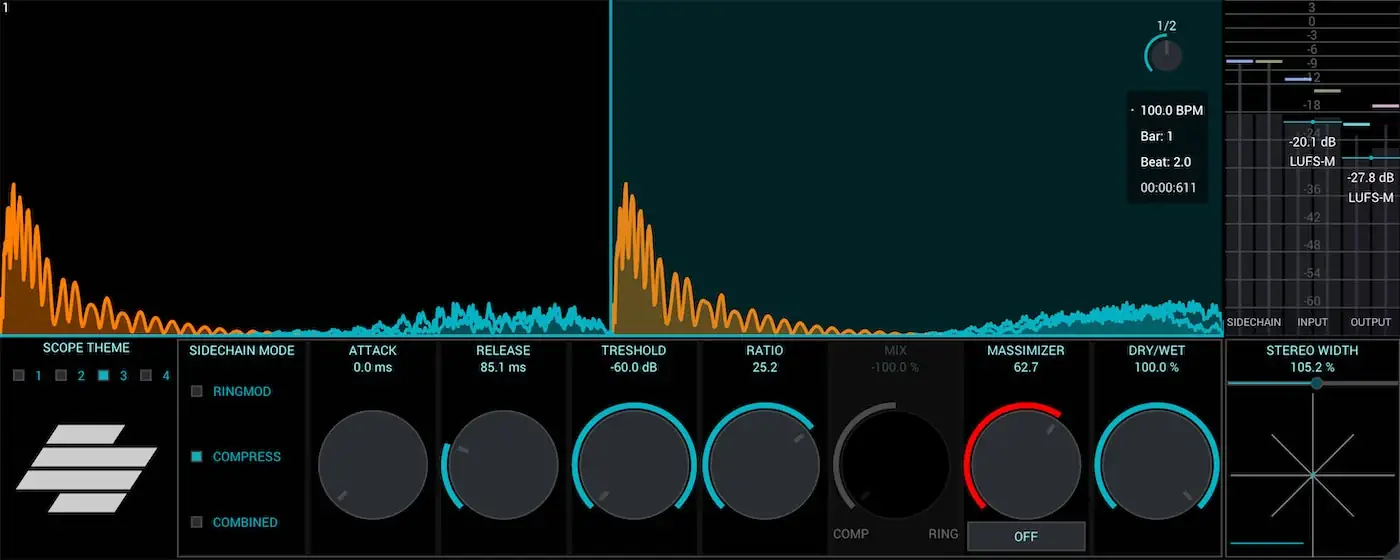
This isn’t just another compressor. Massimizer is built different. It acts as a hybrid system that combines a ringmod sidechain compressor with some tasty saturation. It’s perfect for when you need that “controlled aggression” that top engineers talk about—making the track feel dangerous but keeping it technically safe.
Here is why this plugin needs to be in your template:
- Loudness Without the Crunch: Finally, you can crank the volume without hitting that nasty digital clipping. It preserves the details while boosting the perceived loudness.
- Harmonic Richness: The harmonic signal compression adds weight to the mix without causing frequency overload. It thickens up thin sounds instantly.
- Visual Precision: The tempo-synchronized oscilloscope is a lifesaver. You can actually see the waveform in sync with your beat, making it way easier to dial in the release times so the track “breathes” with the BPM.
- Total Stereo Control: With the built-in Goniometer and stereo widener, you can check your phase issues and make the mix sound wide, while ensuring it doesn’t vanish when played in mono (vital for club systems!).
- Metering You Can Trust: No need for external plugins; this comes with real-time monitoring for RMS, Peaks, and LUFS-M so you know exactly where you sit in the mix.
⚡ Pro Producer Tip: The “Pre-Master” Polish
Don’t just slap this on the very end of your Master channel. Try placing Massimizer on your Drum Bus first. Use the saturation and compression to “glue” the kick and snare together. By controlling the peaks on the drum group before they hit the Master, you gain way more headroom later on. This allows you to get a louder final master without the pumping artifacts.
Tech Specs (Keep it Light)
- Platform: Windows & Mac (VST/AU).
- Version: 1.0.1.
- Key Features: Ringmod Sidechain, Saturation, Oscilloscope, LUFS Metering.
- License: Free.
The Verdict
Honestly, for a free tool, Massimizer is punching way above its weight class. If you make Trap, Dubstep, or heavy Hip-Hop where the loudness is part of the aesthetic, this plugin is essential. It gives you that industry-standard “wall of sound” without making your mix sound like a distorted mess. It’s efficient, the UI looks dope with the visualizers, and it does the heavy lifting so you can focus on the vibe.
Download it, slap it on your bus, and hear the difference.


Massimizer_v1.0.1 ( 32 MB )
Let me know in the comments how this sits in your latest project! Did you use it on the Master or individual stems? Let’s talk shop below! 👇

We’re audio producers and sound designers with over 20 years of experience in the industry. Our team has lived through the entire evolution of digital audio production.
Our mission? To filter out the junk and bring you only the studio-ready free VSTs that actually compete with paid gear. We do the digging so you can focus on creating.
