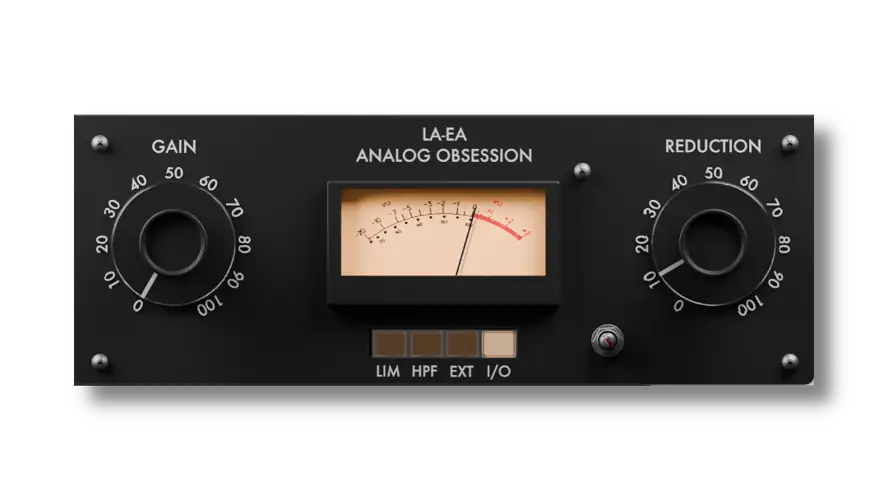
Tired of your lead vocals jumping out of the mix one second and completely vanishing the next? Or maybe your bassline is lacking that glued, up-front consistency without sounding totally choked out. We’ve all been there.
One of the biggest struggles in the studio is dialing in compression that levels out your dynamic range without killing the vibe. When you use aggressive, fast VCA compressors, things can get pumpy and unnatural fast. That’s exactly where a solid-state optical compressor comes in to save the day.
It gives you that buttery, musical leveling of an optical circuit, but with the punchy, tight characteristics of solid-state gear. I’ve been running the LAEA through its paces, and trust me, it easily solves that dynamic headache and helps your tracks sit in the mix effortlessly.
Why LAEA is a Game-Changer for Your Mix & Workflow
This isn’t just another compressor; it’s a total vibe. Analog Obsession brought the heat with this one, giving us a lightweight tool that adds serious weight and headroom to our sessions. Here’s why it absolutely slaps:
- Smooth Sweet-Spot Leveling: The ‘Reduction’ and ‘Gain’ workflow is famously simple. Drive the reduction to grab your peaks, and use the ultra-clean makeup gain to push it back into the sweet spot.
- Limiter Mode (LIM): Need to brickwall those heavy transients? Flip it from compressor to limiter mode and smash it for that aggressive, parallel drum bus energy.
- High-Pass Filter (HPF): This is a massive lifesaver. Engage the side-chain HPF so your heavy 808s and kick drums don’t trigger unwanted pumping. Let the low-end breathe!
- External Side-chaining (EXT): Route external signals to trigger the compression. Perfect for ducking your bass out of the way of your kick drum to keep the low-end super tight.
- Crisp, CPU-Friendly Audio: It skips the heavy oversampling in favor of an embedded, lightweight anti-aliasing algorithm. You get buttery, artifact-free highs without your CPU fans sounding like a jet engine.
⚡ Pro Producer Tip: SET YOUR DEFAULT WORKSPACE
The LAEA has a fully resizable GUI (50% to 200%). If you’re tired of resizing every time you open a new instance, just open the plugin, drag the bottom-right handle to fit your screen exactly how you like it, and save it as your default preset in your DAW. Next time you load it up, it’ll drop in at the perfect size. (Need to reset? Just double-click the resize handle!)
Tech Specs (Keep it Light)
Before you drop this into your plugin folder, here’s what you need to know under the hood:
- File Size: A super-light 72 MB.
- Formats: VST3 / AU / AAX Native / Audiosuite.
- Mac Compatibility: macOS 10.11 or higher (Intel & Apple Silicon natively supported). Note: Requires a Metal-supported graphics card.
- Windows Compatibility: Windows 10 & 11. Note: Requires an OpenGL-supported graphics card.
The Verdict
The LAEA v1.0 is an absolute no-brainer download for your arsenal. Whether you’re trying to glue a messy vocal stack, tame a wild bass DI, or just want some solid-state warmth on your acoustic guitars, this plugin delivers that classic studio sound for zero dollars. It’s punchy, it’s musical, and it respects your CPU headroom. Go grab it and level up your mix down.


LAEA.1.0 ( 73 MB )
Let me know in the comments how this sits in your latest project! Are you slapping this on your lead vocal bus or your bass DI? Let’s talk shop below! 👇

We’re audio producers and sound designers with over 20 years of experience in the industry. Our team has lived through the entire evolution of digital audio production.
Our mission? To filter out the junk and bring you only the studio-ready free VSTs that actually compete with paid gear. We do the digging so you can focus on creating.
