I was digging through the web looking for something to spice up some static tracks and stumbled upon this absolute gem today.
Let’s be real for a second – one of the biggest struggles we face in modern digital production is that everything can sound a bit too clean. When you are working entirely in the box, synth pads, guitars, and keys can easily end up sounding flat, sterile, and clinical. Trying to recreate the warmth and unpredictable movement of old analog gear usually requires stacking multiple plugins or spending a fortune on vintage pedals.
FALA solves this issue by bringing that classic, slightly unstable bucket-brigade device (BBD) modulation directly to your DAW, giving your tracks some real analog soul without cluttering your workflow.
Why FALA is a Game-Changer for Your Mix & Workflow
- Instant Nostalgic Character: The vintage-inspired BBD emulation introduces subtle imperfections, giving your tracks a warm, lived-in feel.
- Two Distinct Modulation Ranges: Switch between “Shallow” for everyday stereo widening, and “Deep” when you want a heavy, warbling vintage chorus that stands out.
- Organic Movement: Features built-in clock drift, wow & flutter, and analog-style saturation to make your modulation feel alive rather than programmed.
- Tight Low End: Low-frequency preservation ensures that your bass frequencies stay solid and centered, preventing your low end from turning into a muddy mess.
- Smooth Stereo Spreading: The stereo modulation engine widens your soundstage naturally while maintaining good mono compatibility.
- Low CPU Overhead: At just over 9 MB and optimized with 4× oversampling, it runs light on your system while delivering high-quality audio processing.
⚡ Pro Producer Tip: Nail the Bass Width
Try loading FALA onto a bass guitar or a synth bass bus. Keep the depth on “Shallow” and set the “Mieszanie” (Mix) to about 20% to 30%. Because of the built-in low-frequency preservation, you will get a wider, warmer low-mid presence that sits nicely in the stereo field without losing the core punch of your sub-frequencies.
Tech Specs (Keep it Light)
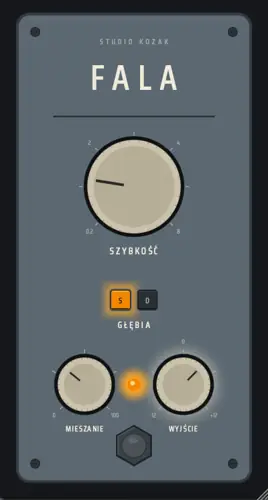
FALA is a lightweight utility that packs a lot of character into a simple interface. The controls are labeled in Polish, which adds to its unique charm, but they are incredibly straightforward to use:
- SZYBKOŚĆ (Rate): Adjusts the speed of the chorus modulation.
- GŁĘBIA (Depth): Toggles between Shallow and Deep modulation modes.
- MIESZANIE (Mix): Controls the dry/wet blend.
- WYJŚCIE (Output): Manages your gain staging after processing.
- ZASILANIE (Power): Bypasses or engages the effect.
Formats & Compatibility:
- File Size: 9.20 MB
- Windows: VST3 (64-bit)
- macOS: AU and VST3 (Universal Binary supporting Intel and Apple Silicon)
- Note: Depending on your macOS security settings, you may need to manually authorize the plugin in your system settings during the first launch.
The Verdict
FALA is not meant to be a mathematically perfect, transparent stereo utility. If you need clean, clinical widening, there are other tools for that. But if you want to add a bit of grit, drift, and vintage attitude to electric guitars, synth pads, or background vocals, this plugin brings a highly usable, nostalgic vibe to the table. It is simple, effective, and free.


FALA.1.0.1 ( 9 MB )
📥 Want instant updates on new free VSTs? Join our Telegram Channel!
Let me know in the comments how this sits in your latest project! Are you planning to run this on guitars, synths, or maybe some background vocals? Let’s talk shop below! 👇

We’re audio producers and sound designers with over 20 years of experience in the industry. Our team has lived through the entire evolution of digital audio production.
Our mission? To filter out the junk and bring you only the studio-ready free VSTs that actually compete with paid gear. We do the digging so you can focus on creating.

