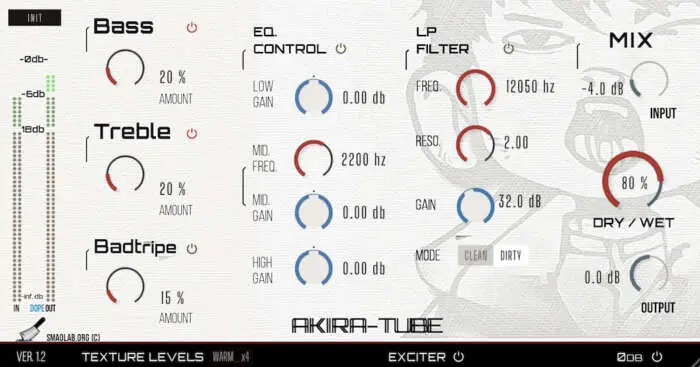
Are your DI guitars and basses sounding thin, sterile, and lifeless? We’ve all been there. You lay down the perfect take, but when you play it back, it has zero vibe and just doesn’t sit right in the mix. You start stacking EQs and compressors, but it just sounds processed, not alive. That’s the struggle – trying to get that authentic amp mojo and analog soul without waking the neighbors with a half-stack.
Well, I found a fix that slaps. Meet Akira-Tube, a VST that brings that much-needed tube saturation and amp-style character right into your DAW, no hardware needed. This thing is the real deal for adding weight, grit, and attitude to your tracks instantly.
Why Akira-Tube is a Game-Changer for Your Mix & Workflow
Look, there are a million amp sims out there, but Akira-Tube just hits different. It’s not trying to be a perfect clone of a vintage amp from the ’60s; it’s a modern tool designed to give you that electrified edge and analog feel without the headache. It’s all about getting a killer tone fast so you can stay in the creative zone.
Here’s how it’ll level up your sound:
- Add Instant Analog Vibe: Dial in everything from a subtle, gentle warmth that glues your track together to full-on, saturated tube breakup. This is the sauce that makes digital recordings sound and feel legit.
- Craft Modern & Aggressive Tones: This isn’t just for vintage sounds. Akira-Tube is perfect for creating crunchy rhythm guitars, searing leads, and distorted basslines that cut through a dense mix with ease.
- Shape Your Sound On The Spot: The built-in analog-style low-pass filter and tone-shaping EQ are clutch. You can carve out space for your instrument right inside the plugin, helping it sit perfectly without fighting your other tracks for headroom.
- Speed Up Your Workflow: Stop wasting time cycling through a thousand amp models and presets. Akira-Tube is straightforward and intuitive, letting you dial in a great sound in seconds. It’s a workhorse for producers who need to move fast.
⚡ Pro Producer Tip: The ‘Bass In Your Face’ Trick
Don’t just slap this on your main bass track. Try this: send your DI bass to an aux track and load up Akira-Tube. Crank the drive to get some serious grit, then use the low-pass filter to cut any fizzy highs. Blend this distorted aux track back in under your clean bass signal. You’ll get all the weight and aggression without losing the fundamental low-end punch. Instant pro-level bass tone that feels huge.
Tech Specs (Keep it Light)
This plugin is super lightweight, so it won’t hog your CPU. Here’s what you need to run it:
- Platform: Windows 10/11, Mac OS X 13.7+, Linux (Ubuntu Studio 22.xx)
- Architecture: 64-bit (M1 optimization coming soon)
- RAM: 4GB
- Disk Space: 50MB
- Display: 1280x768px
The Verdict
In a world of overly complicated plugins, Akira-Tube is a breath of fresh air. It does one thing—tube and amp emulation—and it does it incredibly well. Whether you’re a guitarist looking for a simple practice and recording tool or a producer who needs to inject some life into DI tracks, this plugin delivers. It’s easy to use, sounds fantastic, and gives you that electric energy and warmth that can be so hard to find in the box. It’s a definite keeper for the plugin folder.


Akira-Tube-v1.0 ( 21 MB )
Let me know in the comments how this sits in your latest project! Are you using this for that subtle analog warmth or for some heavy, distorted grit? Let’s talk shop below! 👇

We’re audio producers and sound designers with over 20 years of experience in the industry. Our team has lived through the entire evolution of digital audio production.
Our mission? To filter out the junk and bring you only the studio-ready free VSTs that actually compete with paid gear. We do the digging so you can focus on creating.
