I just stumbled upon this gem today, and it completely flipped my sound design workflow upside down.
We have all been there in the lab – staring at a dry synth loop or stale vocal chop, trying to make it sound fresh and futuristic. Standard EQ sweeps and modulation plugins only take you so far, and traditional spectral editors feel more like doing math homework than making music.
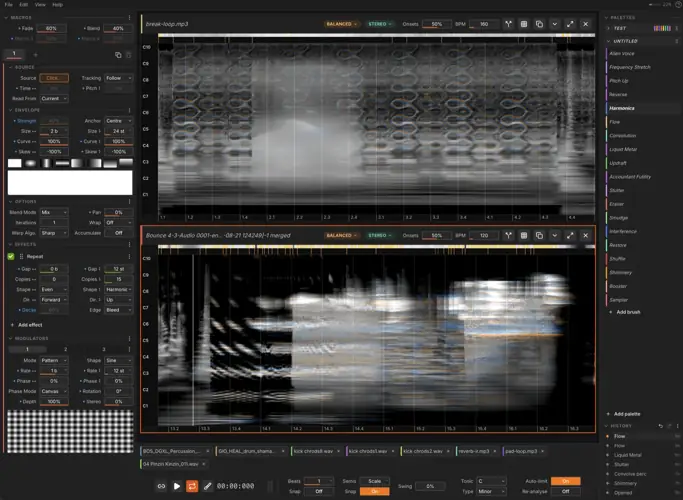
Enter Noise Canvas. Instead of twisting sterile knobs, this tool literally lets you paint textures, blurs, and transformations directly onto your audio’s spectrogram using a brush or stylus. It is pure creative sauce for dialing in ear candy that sits effortlessly in the pocket.
Why Noise Canvas is a Game-Changer for Your Mix & Workflow
- Paint directly on pitch and time – Sketch crazy spectral sweeps or gritty texture splotches that snap perfectly to your project’s musical key and grid.
- 11 stackable spectral effects – Stack and reorder heavy-hitting modules like evolve, blur, binaural, convolve, and transmute to sculpt sounds that drip with character.
- Deep 2D modulation engine – Drive brush strokes with procedural textures, external images, envelope followers, or tablet pen pressure for ultimate dynamic feel and organic headroom.
- Built-in stem splitting – Break down audio with harmonic/percussive, NMF, or AI separation, paint your processing, and merge it back together cleanly with zero phase issues.
- Lightning-fast GPU resynthesis – Hear every stroke the split second you dab it on the canvas without choking your CPU buffer.
- Tight DAW integration – Slots right into your setup as a dedicated external sample editor, boasting deep Ableton Live 12 extension support and Ableton Link tempo sync.
⚡ Pro Producer Tip: Turn Static Foley into Custom Risers
Drop a standard ambient room recording or foley sound into Noise Canvas. Grab the “Evolve” and “Convolve” brushes, lock the grid to your scale, and paint upward diagonal strokes right before the hook drops. You will end up with custom, organic tension-builders that sit cleanly around your drums without muddying up the low end.
Tech Specs (Keep it Light)
- Platforms: Windows (149 MB), macOS (589 MB), Linux (312 MB)
- DAW Support: Universal External Sample Editor, dedicated Ableton Live 12 extension, Ableton Link support
- Hardware: Full graphics acceleration (GPU) – pen tablet and stylus pressure/tilt supported
- Workflow: Multi-branch undo history that saves across DAW restarts
The Verdict
Noise Canvas is a bona fide cheat code for producers chasing that modern, left-field sound. Whether you are crafting cinematic sci-fi textures, soundscapes for trap beats, or just looking to breathe life into dead loops, it brings a fresh, tactile vibe to sound design. It turns the technical headache of spectral surgery into pure visual fun.


WIN ( 113 MB )
Mac Intel ( 143 MB )
Mac, Apple Silicon ( 138 MB )
Linux ( 155 MB )
📥 Want instant updates on new free VSTs? Join our Telegram Channel!
Let me know in the comments how this sits in your latest project! Are you using this for crazy ambient backdrops or surgical vocal chops? Let’s talk shop below! 👇

We’re audio producers and sound designers with over 20 years of experience in the industry. Our team has lived through the entire evolution of digital audio production.
Our mission? To filter out the junk and bring you only the studio-ready free VSTs that actually compete with paid gear. We do the digging so you can focus on creating.