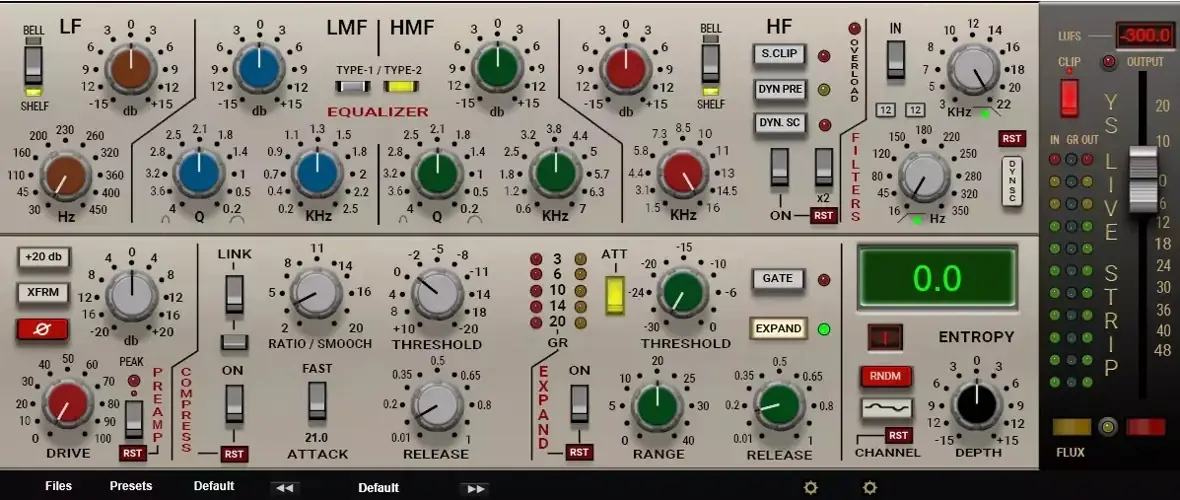
I just stumbled upon this gem today, and I had to share it immediately. I’ve been digging through the web and found something special for your arsenal—the YS Live Strip.
Look, we’ve all been there. You’re staring at your DAW, stacking plugins, but the mix just feels… sterile. You’re trying to get that buttery, cohesive sound, but everything sits separately in the spectrum like oil and water. You need that analog “glue” without spending thousands on hardware.
That’s exactly where this plugin steps in. It brings that classic console character right into the box, helping your drums slap and your vocals sit perfectly in the pocket.
Why YS Live Strip is a Game-Changer for Your Mix & Workflow
This isn’t just another generic EQ or compressor. The developer explicitly mentions that while this isn’t a 1:1 clone of a specific famous unit, it pulls the “basic characteristics” from the user manual of a well-known device. That means you get the soul of the hardware without the copyright headache.
Here is why you need to add this to your plugin folder:
- Instant Analog Vibe: It’s designed to give you the response curves of high-end gear, adding immediate warmth and headroom to your tracks.
- Performance Friendly: Coming in at just 46 MB, it’s light on your drive. Plus, if you’re rocking a machine with a weaker video card, the dev included a “Knob 51” archive to swap out the GUI renderers so it runs smooth as butter.
- Workflow Flexibility: It handles the heavy lifting of mixing (EQ, dynamics) in one window, speeding up your workflow so you can stay in the creative zone.
- Precision Control: Sometimes you need to make surgical moves. This plugin allows for micro-adjustments so you can dial in the perfect frequency without jumping too far.
⚡ Pro Producer Tip: Dialing in the Sweet Spot
When you are messing with the knobs, hold down the Ctrl key. This engages “Fine Tuning” mode. This is crucial when you are trying to notch out a muddy frequency or set the threshold just right on a vocal bus. Don’t let your mouse hand ruin a good mix—use the modifier key for precision.
Tech Specs (Keep it Light)
- Format: VST2 / VST3
- Platform: Windows & Mac
- Size: 46 MB
- Compatibility Note: If you are running Windows and your DAW is acting weird with the VST3 version, the developer recommends swapping to the VST2 version for better stability.
- GUI Fix: Includes a “Knob 51” folder for smoother graphics on older computers (switches frames at 101).
The Verdict
If you are looking to add some character to your sound without breaking the bank, YS Live Strip is a no-brainer. It captures the essence of hardware mixing desks and puts it right at your fingertips. It might require a little tweaking if you have an older graphics card, but for the sound quality you get for free? It’s absolutely worth the download.


YS_LS_1.0.0_WIN ( 21 MB )
YS_LS_1.0.0_MAC ( 25 MB )
📥 Want instant updates on new free VSTs? Join our Telegram Channel!
Let me know in the comments how this sits in your latest project! Does this replace your stock channel strip, or is it just for color? Let’s talk shop below! 👇

We’re audio producers and sound designers with over 20 years of experience in the industry. Our team has lived through the entire evolution of digital audio production.
Our mission? To filter out the junk and bring you only the studio-ready free VSTs that actually compete with paid gear. We do the digging so you can focus on creating.

