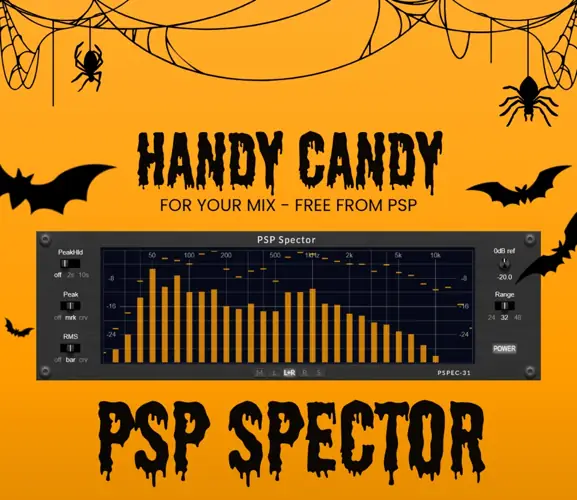
Are your mixes sounding muddy in the low-mids, or piercing in the highs, but you just can’t pinpoint the frequency? I found a fix.
We’ve all been there – you’re five hours into a mix, your ears are fatigued, and you can’t tell if that kick is eating up all your headroom or if the snare is clashing with the vocals. Trusting your ears is rule number one, but sometimes you need a visual confirmation to double-check what’s really going on under the hood.
That’s where a solid spectrum analyzer becomes your best friend.
Why PSP Spector is a Game-Changer for Your Mix & Workflow
PSP Audioware is legendary in the game—their saturators and EQs are industry standard. So, when they drop a utility tool like this for free, you grab it immediately. Originally part of their premium ConsoleQ bundle, this plugin is now standalone. It’s not just about watching pretty bars bounce; it’s about surgical precision.
Here is why this plugin needs to sit on your master bus right now:
- Surgical Frequency Monitoring: With 31 bands of analysis, you aren’t just guessing; you get a detailed map of exactly which frequencies are poking out or lacking energy.
- Flexible Metering: Whether you need to see the instantaneous Peaks or the average RMS loudness, this tool lets you switch views to match the vibe you’re tracking.
- Visual Customization: Hate rigid bars? Switch to the smooth curve view. Need to analyze a specific channel? You can isolate channels to see exactly what’s happening on the Left or Right.
- Workflow Integration: The interface is fully adjustable. Whether you’re on a massive 4K monitor or a laptop setup, you can resize it so it fits your screen without cluttering your view.
- Low-End Control: It features a built-in High-Pass Filter, allowing you to focus your analysis specifically on the frequencies that matter, ignoring the sub-rumble if needed.
⚡ Pro Producer Tip: The Reference Check
Load PSP Spector on your Master Bus. Then, import a professional track in the same genre as your beat. Watch the curve shape of the pro track (especially the low-end slope). Now, try to get your track’s curve to match that general shape. It’s the fastest cheat code to getting your tonal balance ready for streaming platforms.
Tech Specs (Keep it Light)
This thing is lightweight and won’t hog your CPU, leaving plenty of juice for your heavy synths.
- File Size: Approx 30 MB.
- Format: VST, VST3, AAX, and AudioUnit.
- Compatibility (PC): Windows 7 through Windows 11 (64-bit).
- Compatibility (Mac): macOS Mojave 10.14 up to macOS 16 (Intel & Apple Silicon Native).
- Bonus: Comes with 15 presets to get you started.
The Verdict
Look, utility plugins aren’t always the “sexiest” downloads compared to a new synth or a saturator, but they are essential for getting a professional sound. PSP Spector gives you high-end visualization for absolutely zero cost. It’s accurate, it looks clean, and it helps you make better mixing decisions faster. If you want your tracks to translate well to car speakers and earbuds, you need this in your folder.


PSP_Spector_1.0.0_WIN ( 18 MB )
PSP_Spector_1.0.0_MAC ( 43 MB )
📥 Want instant updates on new free VSTs? Join our Telegram Channel!
Let me know in the comments how this sits in your latest project! Do you prefer mixing with your eyes or strictly your ears? Let’s talk shop below! 👇

We’re audio producers and sound designers with over 20 years of experience in the industry. Our team has lived through the entire evolution of digital audio production.
Our mission? To filter out the junk and bring you only the studio-ready free VSTs that actually compete with paid gear. We do the digging so you can focus on creating.
