Yo fam, I just stumbled upon this gem today while digging through some developer repositories, and I had to share it immediately. You know how sometimes you’re staring at a session, and your loops are just sitting there—static, lifeless, and boring? You’re trying to layer synths, but the frequencies are clashing, or your delay throws are just cluttering up the low-mids.
We’ve all been there. The mix sounds flat, and you need something to inject some movement and “happy accidents” into the production without killing your CPU. That’s exactly what this bundle solves. The Zack Steinkamp Effects M4L Bundle isn’t just one plugin; it’s a collection of six Max for Live devices that handle everything from complex crossfading to wild feedback loops. If you’re on Ableton, this is the secret sauce you’ve been looking for.
Why Zack Steinkamp Effects M4L Bundle is a Game-Changer for Your Mix & Workflow
This bundle is all about utility meeting creativity. It takes concepts that are usually a headache to set up manually in a DAW and puts them into simple, lightweight devices. Here’s why these tools deserve a spot in your user library:
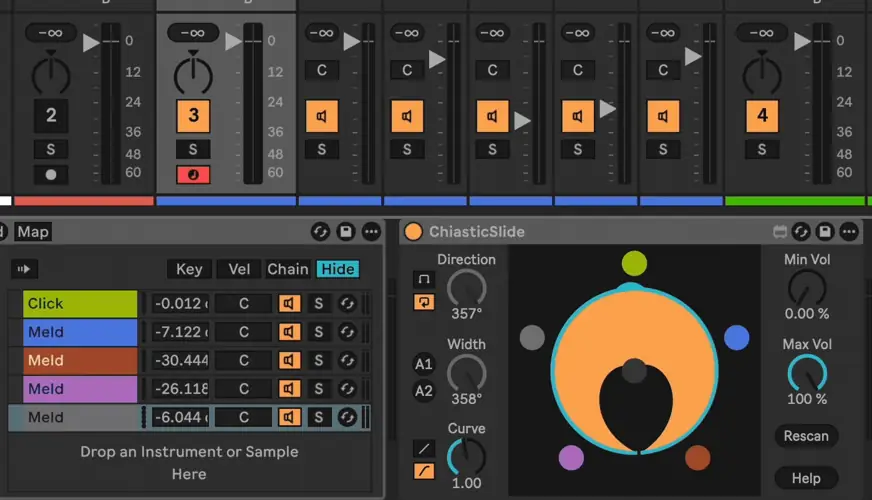
- Evolving Textures (Chiastic Slide): Stop drawing tedious automation curves. This tool lets you smoothly morph between multiple tracks or chains. It’s instant vibe for creating pads that breathe and move over time.
- Precision Scrubbing (SimulScrub): This is crazy for sampling. You can play multiple segments of audio at once while keeping the sample at 1x speed. It adds that granular, glitchy texture to your drums or vocals without losing the groove.
- Immersive Spaces (TapPanZeit): This isn’t your stock delay. With up to 128 taps and control over stereo placement, you can build massive, wide atmospheres that sit in the mix without muddying up the center channel.
- Dub-Style Chaos (zs Feedback Matrix): If you produce Dub Techno or ambient, this is gold. It creates feedback loops between two chains, allowing for self-generating textures that sound analog and gritty.
- Clean Reverb Throws (zs Send Duck Rack): This is a mixing essential. It automatically ducks the effect signal when the dry signal plays. No more muddy vocals—your reverb tails will pump and breathe around the lead perfectly.
- Workflow Mastery (Chiastic Solo): Mapping hardware knobs to solo specific tracks in a group usually sucks. This device fixes that, making it a breeze for live performance or mastering workflows.
⚡ Pro Producer Tip: Automate the ‘Chiastic Slide’
Don’t just leave the Chiastic Slide static. Drop it on a drum rack group with 4 different hi-hat patterns. Map the crossfader knob to an LFO tool with a slow sine wave. This will constantly morph between your hat patterns, creating a rhythm that evolves constantly and keeps the listener hooked without you lifting a finger.
Tech Specs (Keep it Light)
- Format: .AMXD (Max for Live Devices)
- Size: Tiny footprint (64 KB for the bundle)
- Requirement: Ableton Live Suite (or Standard with Max for Live license).
- Compatibility: Windows & macOS.
- Note: The Chiastic Solo device requires a quick options.txt workaround if you are rocking Live 12, but it’s smooth sailing otherwise.
The Verdict
Honestly, for a free download, this pack punches way above its weight class. Whether you need the TapPanZeit for that wide stereo imaging or the zs Send Duck Rack to clean up your vocal chain, these tools are practical, lightweight, and inspiring. They don’t have fancy GUIs, but they do the job better than some paid plugins I’ve used. If you want to add some serious character to your sound design and speed up your workflow, go grab this bundle. It slaps.


zs-m4l-AudioEffects ( 0.6 MB )
📥 Want instant updates on new free VSTs? Join our Telegram Channel!
Let me know in the comments how this sits in your latest project! Are you going to use the Feedback Matrix for some crazy sound design experiments? Let’s talk shop below! 👇

We’re audio producers and sound designers with over 20 years of experience in the industry. Our team has lived through the entire evolution of digital audio production.
Our mission? To filter out the junk and bring you only the studio-ready free VSTs that actually compete with paid gear. We do the digging so you can focus on creating.
