Yo beatmakers, listen up. Are you tired of your drums sounding like they were programmed by a calculator? We’ve all been there—you quantize your beat to the grid, and suddenly all the soul gets sucked right out of the room. It sounds stiff, robotic, and frankly, it just doesn’t slap.
I stumbled across a fix for this exact problem. Usually, getting that “Dilla” swing or that human feel requires nudging MIDI notes off the grid manually, which is a total headache and ruins your visual workflow.
But today, I’m showing you a tool that handles the micro-timing for you, based entirely on how hard you hit the keys.
Why 4D Pocket Groove Designer is a Game-Changer for Your Mix & Workflow
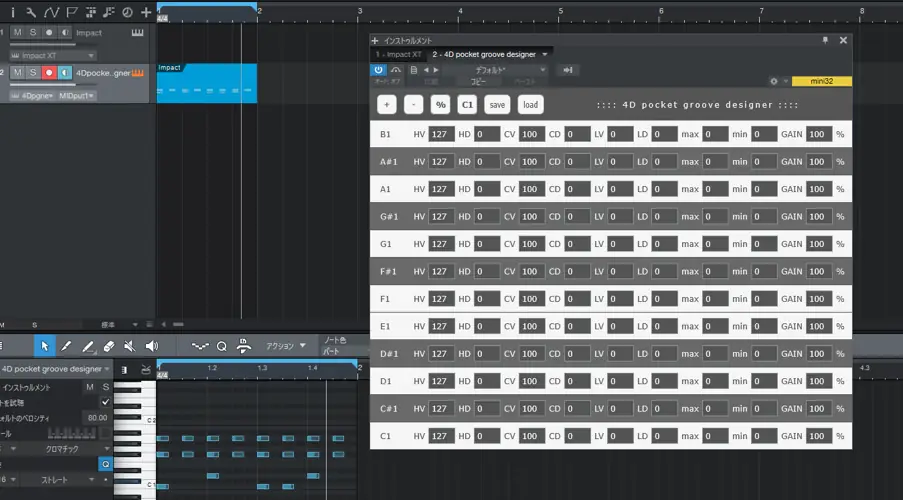
This plugin is unique because it’s not just a delay; it’s a dynamic groove engine. It reads the velocity and pitch of your MIDI signal and alters the pronunciation timing of the sound without actually moving the note on your sequencer. This means your grid stays clean, but the audio sits in the pocket.
Here is why this little 5MB plugin deserves some space on your hard drive:
- Dynamic Kick Drum Response: The plugin is coded so that when you hit the bass drum harder (high velocity), it triggers slightly earlier. This gives your beat that aggressive, “pushing” feel without rushing the tempo.
- Laid Back High-Ends: Conversely, when your hi-hats are weaker (lower velocity), they are pronounced slower. This creates that lazy, behind-the-beat drag that makes Lo-Fi and Boom Bap tracks vibe so hard.
- The Snare Pocket: The snare is automatically set to pronounce a little slower, ensuring it always lands with that heavy, “head-nod” snap.
- Non-Destructive Workflow: You can keep your quantization and swing settings on the grid. 4D Pocket Groove Designer adds the displacement and randomization on top.
- Pre-Beat Transient Preservation: Because it functions without moving the sequencer position, it handles those tricky drum samples where the transient hits a little before the beat, making editing a breeze.
⚡ Pro Producer Tip: Ride The Velocity
Since this plugin relies on velocity to calculate timing, don’t just draw your notes in at 127 velocity! Go into your piano roll and randomize the velocity of your hi-hats by about 15-20%. This will trigger the plugin’s “slower/weaker” function intermittently, creating a constantly evolving groove that feels like a real drummer is playing it.
Tech Specs (Keep it Light)
- File Size: Tiny footprint (approx 5 MB).
- Format: VST / Standalone (depending on install).
- Compatibility Warning: This was developed and tested specifically in Windows Studio One.
- OS: Windows Only. (Mac users, this one might not play nice with your rig).
- DAW Note: While it works like a charm in Studio One, it may be experimental in other DAWs like FL Studio or Ableton. Treat it as a secret weapon for specific sessions.
The Verdict
If you are a Studio One user on Windows, this is an absolute no-brainer. It takes the tedious work of “humanizing” a drum track and automates it based on dynamics. It adds that elusive “soul” to the rhythm section that separates amateur beats from pro records. While the compatibility is a bit limited, for the right setup, this tool is pure gold.


4D_pocket_groove_designer ( 5 MB )
📥 Want instant updates on new free VSTs? Join our Telegram Channel!
Let me know in the comments how this sits in your latest project! Do you prefer manual nudging or using tools like this to find the pocket? Let’s talk shop below! 👇

We’re audio producers and sound designers with over 20 years of experience in the industry. Our team has lived through the entire evolution of digital audio production.
Our mission? To filter out the junk and bring you only the studio-ready free VSTs that actually compete with paid gear. We do the digging so you can focus on creating.
