SpectroBits v1.0

SpectroBits
size 2.08 MB
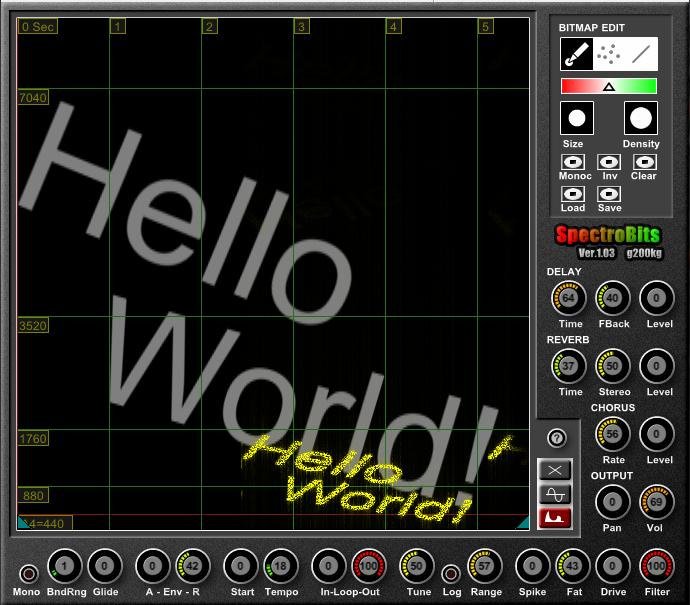
SpectroBits interprete the image as a “Spectrogram“, that means X-Axis as time, Y-Axis is frequency (but the MIDI note determine the base-note).
The black pixel is silent. The bright pixels means strong harmonics for that freq.
The “A4=440” (red) line means 440Hz if you play the note ‘A4’.
“880” line is 880Hz if you play the note ‘A4’, and so on…
About colors, Red for L-ch and Green for R-ch. Blue is ignored.
The image can be edit by right upper “BITMAP EDIT” section. You can also import any images of “.bmp”, “.png”, “.jpg” and “.gif”. Image size is fixed to 512×512. Any images are resized automaticaly to 512×512 if you import.


spectrobits103 ( 2.08 MB )

We’re audio producers and sound designers with over 20 years of experience in the industry. Our team has lived through the entire evolution of digital audio production.
Our mission? To filter out the junk and bring you only the studio-ready free VSTs that actually compete with paid gear. We do the digging so you can focus on creating.
Recent Posts
Cozy Piano – Lo-Fi Upright VST
Tired of sterile, overly polished grand piano libraries that hog all your headroom and sound like a corporate commercial? I…
magic.METER – Vocal Analyzer
Tired of guessing why your lead vocal just won't sit in the pocket like a Billboard smash? We have all…
MS2000R Emulator – VA Synth
I've been digging through the web and found something special for your arsenal today, fam. We have all been stuck…
CA-72 – Analog Synth VST
I've been digging through the web and found something special for your arsenal today. Let's keep it real: how many…
X-Or – Free Bass Synth
Tired of your low end feeling thin, cluttered, or fighting your kick for headroom? I found a fix that hits…
TagoClip – Soft Clipper VST
If you have ever bounced from FL Studio over to Ableton, Logic, or Reaper, you know the exact heartbreak I…