Proteus v1.2.0 Win Mac Linux

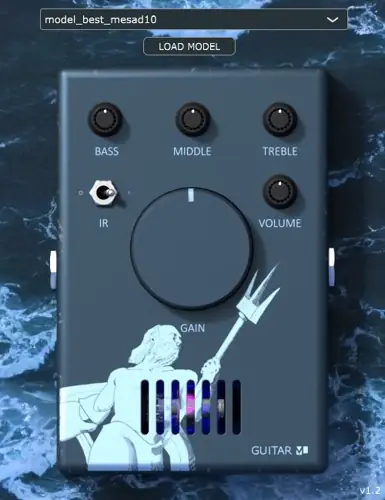
Proteus v1.2.0 Win Mac Linux
70 MB
Guitar amp and pedal capture plugin using neural networks.
Capture your own amps/pedals/plugins with Proteus. Can capture a drive/tone knob, or snapshot of the sound at a specific setting. Use the Capture Utility to quickly train models in the cloud with Colab. Effective for Amps/PreAmps, Distortion/Overdrive/Boost pedals (non-time based, no Reverb/Delay/Flange/Phaser).You can also capture a “rig”, or combination of pedals/amp.
This is similar in concept to a Kemper, Quad Cortex, or ToneX, in a free and open source plugin, with the ability to capture and share the sound of guitar gear normally costing hundreds or thousands of dollars.
Visit the GuitarML ToneLibrary Website to download Proteus compatible models.
Download the Proteus Capture Utility, which includes the input audio file and Colab script to train models.
As of Version 1.2, Proteus also features a 3-Band EQ (Bass, Mid, Treble) and a built in default IR (for convenience, recommended to use a dedicated IR plugin).
Proteus uses a LSTM neural network to emulate guitar amplifiers/preamps and distortion/overdrive/boost pedals. You can capture the sound of an amplifier either by recording with a microphone, or direct out from a load box. When running “Direct Out” models, you will need to use an Impulse Response plugin to accurately model the amp speaker/cabinet.
You can create your own models using the Automated-GuitarAmpModelling repository directly (LSTM with hidden size 40), or by using the Capture Utility files (available for download at GuitarML.com) with Google Colab (recommended).
To share your best models, email the json files to smartguitarml@gmail.com and they may be included in the ToneLibrary.
Loading models:
Download available models from the Proteus ToneLibrary. Use the Load Model button to select a folder containing Proteus json models. Note that models for NeuralPi and SmartPedal use a different model architecture and will not be compatible.
Capturing an Amp/Pedal/Plugin
Download the Proteus_Capture_Utility.zip to obtain the ProteusCapture.wav and ProteusCapture.ipynb Colab script.
Play the Proteus Capture.wav from your DAW / Audio Device and input to your amp/pedal/plugin, and record the output. Recommended to use a Reamp for impedence matching, and a Load Box for direct amp captures.
Upload the “ProteusCapture.ipynb” from the Capture Utility to the Google Colab website. Upload your out.wav file and follow the instructions in the Colab script to create a Proteus compatible model. Snapshot model training will take 10 minutes or less, and Knob model training will take around 30 minutes. For Knob captures, you will need 5 separate out wav files, as detailed in the tutorial videos.
Note: Recommended to follow along with the video tutorials listed above.
https://github.com/GuitarML/Proteus


Proteus120 ( 70 MB )

We’re audio producers and sound designers with over 20 years of experience in the industry. Our team has lived through the entire evolution of digital audio production.
Our mission? To filter out the junk and bring you only the studio-ready free VSTs that actually compete with paid gear. We do the digging so you can focus on creating.
Recent Posts
SK Rust – Lo-Fi Dirt Machine
I've been digging through the deepest corners of the web, and I just stumbled upon something special for your sonic…
Space Replicator – Virtual Studio
Tired of your mixes sounding fire in your cans only to fall completely flat the second you test them in…
Delta6 – Free FM Synthesizer
Tired of FM synthesis feeling like an advanced calculus exam instead of an inspiring studio session? I found a fix.…
INVADER Lite – Retro Synth
I've been digging through the web and found something special for your arsenal today. How many times have you opened…
SURVIVE – Smart Stereo Clipper
Tired of digital clippers choking your drums and flattening your low end? I found a fix. We’ve all been there…
OCCULAR – Audio Visualizer
I've been digging through the web and found something special for your arsenal. Let’s keep it real - staring at…