gFractor – Advanced Spectrum Analyzer

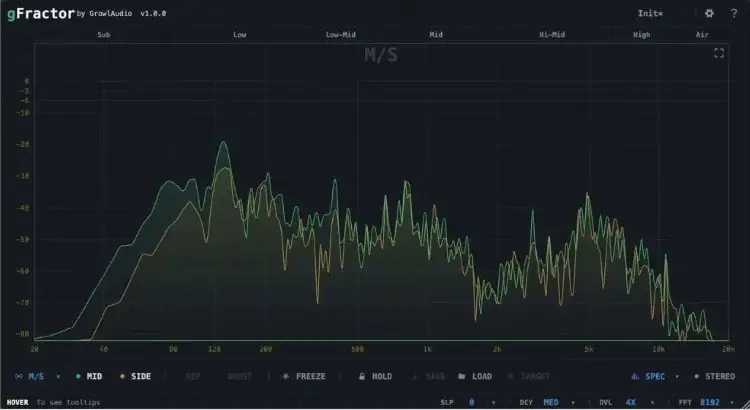
Tired of muddy low-ends and phase issues ruining your masters? We’ve all been there. You bounce the track, take it to the car, and suddenly your mix sounds completely different- the kick lacks punch, the vocals are buried, and the whole vibe feels cluttered.
A lot of times, you’re just flying blind because you can’t actually see what your frequencies and stereo field are doing behind the speakers. Today, I’m putting you onto a fix that solves all that guesswork.
Why gFractor is a Game-Changer for Your Mix & Workflow
This isn’t just another boring EQ visualizer. gFractor is built with tools that actually think like musicians, giving you deep insight into your audio at every stage – from early sound design to the final master. Here’s why it’s going to help your tracks sit in the mix:
- Advanced Component Isolation: Switch between Mid/Side, Left/Right, and Transient/Tone modes. You can actually isolate your transients to make sure your drums are slapping, or solo the mid-channel to ensure your lead vocal has its own lane without clashing.
- Instant Sidechain Comparison: Ever struggle to match a reference track? Route your reference into the sidechain and visually compare it to your main mix side-by-side. A single key press swaps them, letting you A/B test rapidly without breaking your creative flow.
- Stereo Field Mastery: Stop guessing if your track is mono-compatible. gFractor packs a goniometer for phase imaging, a correlation meter, and visualizes your stereo width per octave. You’ll know exactly where your width is coming from (and where it’s lacking).
- Target Save & Compare: This is a cheat code. Capture any Peak Hold curve of a mix you love, save it to a file, and load it into your current session. It’s the ultimate way to match tonal balance across an entire beat tape or album.
- Real-Time Oscilloscope: Get instant visual feedback on your waveforms to catch peaking transients before they eat up all your headroom.
⚡ Pro Producer Tip: Steal The Vibe
Grab a commercially mastered track that has the exact tonal balance you want for your beat. Run it through gFractor, capture the Peak Hold curve, and save it as a target. Then, throw gFractor on your mix bus and EQ your track until it hugs that exact same curve. Instant commercial loudness and pro balance!
Tech Specs (Keep it Light)
- Size: 11.2 MB (Super lightweight, won’t choke your CPU)
- Format: Available for both WiN & MAC setups
- Key Modules: Mid/Side & Transient/Tone Monitoring, Oscilloscope, Goniometer, Correlation Meter, Target Curve Matching
The Verdict
Look, if you want your tracks to sound major-label ready, you need to know exactly what’s eating up your headroom and where your phase might be acting out of pocket. gFractor doesn’t just show you squiggly lines; it separates the crucial elements of your mix so you can actually diagnose problems.
Whether you’re trying to glue a mix together or just want to make sure your 808s and kicks aren’t fighting for the same space, this joint is an absolute must-have for the digital studio arsenal.


gFractor.1.0.6 ( 11 MB )
Let me know in the comments how this sits in your latest project! Are you gonna use this mostly for fixing phase issues or matching mastering curves? Let’s talk shop below! 👇

We’re audio producers and sound designers with over 20 years of experience in the industry. Our team has lived through the entire evolution of digital audio production.
Our mission? To filter out the junk and bring you only the studio-ready free VSTs that actually compete with paid gear. We do the digging so you can focus on creating.
Recent Posts
Cozy Piano – Lo-Fi Upright VST
Tired of sterile, overly polished grand piano libraries that hog all your headroom and sound like a corporate commercial? I…
magic.METER – Vocal Analyzer
Tired of guessing why your lead vocal just won't sit in the pocket like a Billboard smash? We have all…
MS2000R Emulator – VA Synth
I've been digging through the web and found something special for your arsenal today, fam. We have all been stuck…
CA-72 – Analog Synth VST
I've been digging through the web and found something special for your arsenal today. Let's keep it real: how many…
X-Or – Free Bass Synth
Tired of your low end feeling thin, cluttered, or fighting your kick for headroom? I found a fix that hits…
TagoClip – Soft Clipper VST
If you have ever bounced from FL Studio over to Ableton, Logic, or Reaper, you know the exact heartbreak I…