FamiStudio – Free NES DAW

Yo beatmakers, listen up.
If you’ve ever tried to cook up some authentic 8-bit chiptune beats, you know the struggle is real. Usually, you have to mess with “trackers”—software that looks more like an Excel spreadsheet than a music studio. You’re staring at columns of hexadecimal numbers just to get a simple melody to sit in the mix. It kills the vibe instantly.
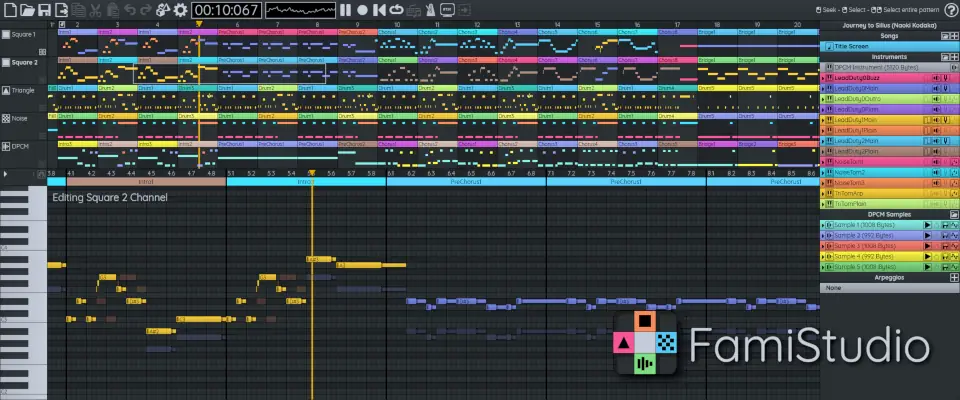
That’s why I’m hyped to put you onto FamiStudio. This isn’t just another emulator; it’s a standalone music editor that finally speaks our language. It ditches the confusing code and gives you a modern Piano Roll interface. Now you can get that crunchy, retro Nintendo sound without needing a degree in computer science.
Why FamiStudio is a Game-Changer for Your Mix & Workflow
FamiStudio takes the raw soul of the NES sound chip and wraps it in a workflow that modern producers will actually recognize. Here’s why this joint belongs in your toolkit:
- Zero Learning Curve: Forget the hex codes. This rocks a modern DAW-style UI with a piano roll, so you can draw in your notes just like you do in FL Studio or Ableton.
- Serious Sound Design: It comes with full Instrument & Envelope editing, plus a DPCM Sample Editor so you can chop up custom samples for that gritty 8-bit texture.
- Workflow Flexibility: It supports full Undo/Redo, Copy & Paste, and even Drag & Drop for notes with audio previews. No more guessing if a note is gonna slap or not.
- Massive Expansion Support: Want that extra headroom and polyphony? It supports audio expansions like VRC6, VRC7, FDS, and MMC5. That means fatter basslines and richer chords.
- Connectivity: MIDI input support means you can play your lines in with your keyboard controller instead of clicking everything in.
⚡ Pro Producer Tip: The Lo-Fi Secret Sauce
Since FamiStudio is a standalone app, build your 8-bit loop here first. Use the “Export to WAV” feature to bounce your loop, then drag that WAV file into your main DAW (like Logic or Pro Tools). Throw a low-pass filter and some tape saturation on it. You’ll get an authentic retro sample texture that VST emulations struggle to recreate because the source audio is genuinely generated like an NES chip.
Tech Specs (Keep it Light)
- Size: 152 MB (Super light on the CPU).
- Compatibility: Windows, MacOS, Linux, and even Android (make beats on the go).
- Import: MIDI, FamiTracker FTM & Text.
- Export: WAV (for your DAW), NSF, ROM (for actual hardware), MIDI.
- Engine: Authentic NES sound engine (CA65, NESASM).
The Verdict
Honestly, FamiStudio is a breath of fresh air. If you are part of the NES homebrew community or just a producer looking to add some nostalgia to your trap or lo-fi beats, this tool is essential. It respects the history of the sound while respecting your time as a creator. It allows you to focus on the melody and the groove rather than the math. It slaps, it’s free, and it’s cross-platform. Go grab it.


FamiStudio433 ( 152 MB )
Let me know in the comments how this sits in your latest project! Are you making a game soundtrack or just adding 8-bit spice to a beat? Let’s talk shop below! 👇

We’re audio producers and sound designers with over 20 years of experience in the industry. Our team has lived through the entire evolution of digital audio production.
Our mission? To filter out the junk and bring you only the studio-ready free VSTs that actually compete with paid gear. We do the digging so you can focus on creating.
Recent Posts
DearVR Mix-SE – Virtual Mix Room
Tired of your mixes sounding fire in your headphones but completely falling apart the second you play them in the…
Waveform Compressor – Visual Comp
Are your mixes sounding lifeless because you're over-compressing blind? I found a fix. We’ve all been there—squashing the life out…
YS Compressor 2025 – Mixing Comp
Are your mixes sounding thin and sterile? I found a fix. You know the struggle - you’re trying to get…
Spl4sh 4 – Free Synth VST
Are your Future House leads sounding a little thin and lifeless? I found a fix. As a producer, one of…
VoxRelief Lite – Vocal Fixer
Tired of muddy, boxy vocals ruining your mix? I found a fix. We’ve all been there in the studio: you…
HLF-3C – Passive EQ Filter
Tired of your instrument busses sounding like a muddy, cluttered mess? I found a fix. There is nothing worse than…