Frequency Trainer – Ear Training

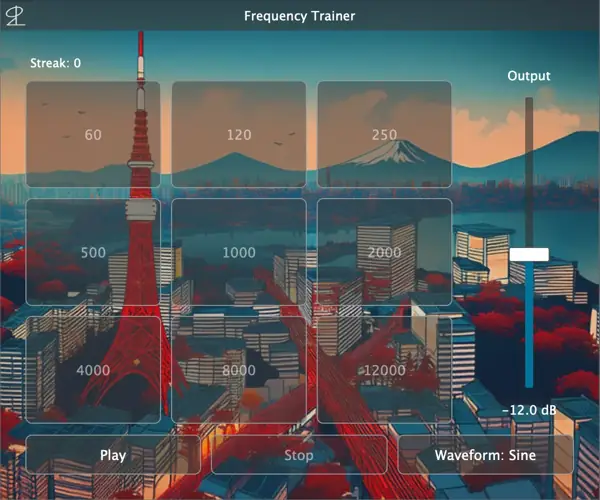
Are your mixes sounding muddy and you’re just guessing with your EQ? I found a fix.
Before you throw another fancy analog EQ emulation on your master buss hoping it adds the right vibe, you gotta know what frequencies you’re actually boosting or cutting.
One of the biggest studio struggles for up-and-coming producers is “frequency sweeping”—endlessly dragging a narrow Q band around trying to find that one annoying ringing sound, and destroying your phase in the process.
We’ve all been there, just blindly turning knobs until the track somewhat sits in the mix. But what if you could just hear the problem instantly?
Why Frequency Trainer is a Game-Changer for Your Mix & Workflow
- Stop Guessing, Start Carving: Fine-tuning your auditory skills is essential for producing high-quality mixes. This tool trains you to accurately identify specific frequency ranges so you can apply EQ with absolute confidence, achieving massive clarity and balance.
- Turn the Lights On: As they say, mixing without trained ears is like navigating in the dark without headlights. This auditory training provides clear guidance through the soundscape, enabling informed decisions and totally eliminating the guesswork that eats up your studio time.
- Elevate the Whole Vibe: By regularly starting auditory training, you strengthen your critical listening skills. Improved frequency recognition means more precise, surgical adjustments—giving you better headroom and a consistently higher overall audio quality that just slaps.
⚡ Pro Producer Tip: Warm Up Your Ears
Treat your ears like a muscle. Run this Frequency Trainer for just 10-15 minutes before you start a heavy mixing session. Calibrating your brain to specific frequency bands before you even touch an EQ will save you hours of second-guessing and keep your low-end from sounding muddy.
Tech Specs (Keep it Light)
- File Size: Super lightweight at just 23.3 MB. Won’t clog your drive at all.
- Supported OS: Windows 10 or later / macOS 11 Big Sur or later.
- CPU: 64-bit Intel processor or Apple Silicon (Native support, so it runs buttery smooth on M1/M2/M3 chips).
- Memory: 8 GB RAM or more recommended.
- Plugin Formats: VST3 (64-bit), AU (64-bit), AAX (64-bit, macOS only).
The Verdict
Bottom line, fam: plugins don’t mix records, you do. The best piece of gear you own is sitting right between your ears, and Frequency Trainer is the ultimate gym to get them in shape.
If you want your beats to translate from the studio monitors to the car stereo without losing that punch, you need to know your frequency spectrum inside and out. It’s lightweight, it’s effective, and it’s going to level up your critical listening skills fast.
Add this to your daily routine and watch your mixes go from amateur to industry-ready.


Frequency.Trainer.1.0.0 ( 23 MB )
Let me know in the comments how this sits in your latest project! Which frequency range do you find the hardest to EQ? Let’s talk shop below! 👇

We’re audio producers and sound designers with over 20 years of experience in the industry. Our team has lived through the entire evolution of digital audio production.
Our mission? To filter out the junk and bring you only the studio-ready free VSTs that actually compete with paid gear. We do the digging so you can focus on creating.
Recent Posts
Cozy Piano – Lo-Fi Upright VST
Tired of sterile, overly polished grand piano libraries that hog all your headroom and sound like a corporate commercial? I…
magic.METER – Vocal Analyzer
Tired of guessing why your lead vocal just won't sit in the pocket like a Billboard smash? We have all…
MS2000R Emulator – VA Synth
I've been digging through the web and found something special for your arsenal today, fam. We have all been stuck…
CA-72 – Analog Synth VST
I've been digging through the web and found something special for your arsenal today. Let's keep it real: how many…
X-Or – Free Bass Synth
Tired of your low end feeling thin, cluttered, or fighting your kick for headroom? I found a fix that hits…
TagoClip – Soft Clipper VST
If you have ever bounced from FL Studio over to Ableton, Logic, or Reaper, you know the exact heartbreak I…