Audacity 3

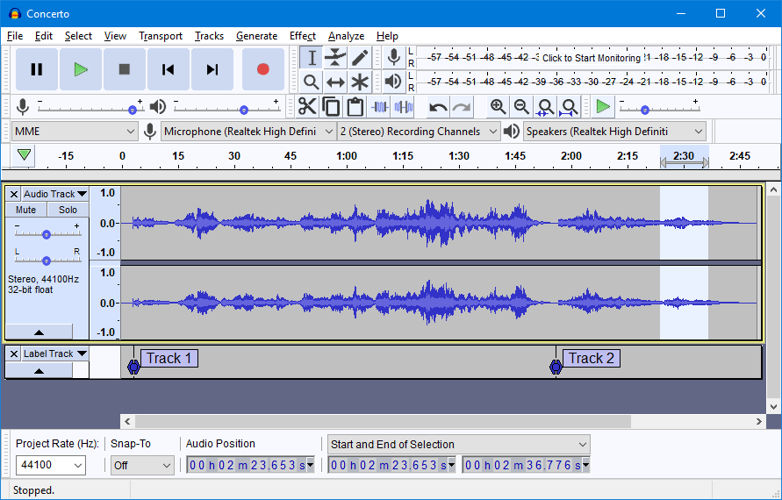
Audacity 3
size 28 MB / 39 MB / 12 MB
Audacity is a free, easy-to-use and multilingual audio editor and recorder for Windows, Mac OS X, GNU/Linux and other operating systems.
Audacity can record live audio through a microphone or mixer, or digitize recordings from cassette tapes, vinyl records, or minidiscs. With some sound cards, it can also capture streaming audio.
- Record from microphone, line input, or other sources.
- Dub over existing tracks to create multi-track recordings.
- Record up to 16 channels at once (requires multi-channel hardware).
- Level meters can monitor volume levels before, during, and after recording.
Import sound files, edit them, and combine them with other files or new recordings. Export your recordings in several common file formats.
- Import and export WAV, AIFF, AU, and Ogg Vorbis files.
- Import MPEG audio (including MP2 and MP3 files) with libmad.
- Export MP3s with the optional LAME encoder library.
- Create WAV or AIFF files suitable for burning to CD.
- Import and export all file formats supported by libsndfile.
- Open raw (headerless) audio files using the “Import Raw” command.
EDITION
- Easy editing with Cut, Copy, Paste, and Delete.
- Use unlimited Undo (and Redo) to go back any number of steps.
- Very fast editing of large files.
- Edit and mix an unlimited number of tracks.
- Use the Drawing tool to alter individual sample points.
- Fade the volume up or down smoothly with the Envelope tool.
- Change the pitch without altering the tempo, or vice-versa.
- Remove static, hiss, hum, or other constant background noises.
- Alter frequencies with Equalization, FFT Filter, and Bass Boost effects.
- Adjust volumes with Compressor, Amplify, and Normalize effects.
- Other built-in effects include: Echo, Phaser, Wahwah, Reverse.
QUALITY
- Record and edit 16-bit, 24-bit, and 32-bit (floating point) samples.
- Record at up to 96 kHz.
- Sample rates and formats are converted using high-quality resampling and dithering.
- Mix tracks with different sample rates or formats, and Audacity will convert them automatically in realtime.
PLUG-INS
- Add new effects with LADSPA plug-ins.
- Audacity includes some sample plug-ins by Steve Harris.
- Load VST plug-ins for Windows and Mac, with the optional VST Enabler.
- Write new effects with the built-in Nyquist programming language.
ANALYSIS
- Spectrogram mode for visualizing frequencies.
- “Plot Spectrum” command for detailed frequency analysis.


audacity-win-3.0.0 ( 28 MB )
audacity-macos-3.0.0 ( 39 MB )
audacity-minsrc-3.0.0.tar ( 12 MB )

We’re audio producers and sound designers with over 20 years of experience in the industry. Our team has lived through the entire evolution of digital audio production.
Our mission? To filter out the junk and bring you only the studio-ready free VSTs that actually compete with paid gear. We do the digging so you can focus on creating.
Recent Posts
HLF-3C – Passive EQ Filter
Tired of your instrument busses sounding like a muddy, cluttered mess? I found a fix. There is nothing worse than…
GMXR2 – Audio Generator
Tired of spending hours digging through bloated sample packs just to find a simple riser, laser, or transition FX? I…
Supreme Drums One Synth – Drum VST
Are your drum busses sounding thin and lifeless, or taking way too long to dial in? I found a fix.…
AliasSynth – Glitch Synth
I’ve been digging through the web and found something truly special for your arsenal today. Let’s keep it real for…
Yabridge – Windows VST Bridge
Tired of leaving your favorite heavy-hitting Windows plugins behind just because you're cooking up beats on a Linux machine? I…
YS Phantasm – Analogue Enhancer
Are your mixes sounding a little too sterile and digital? I found a fix. We all know the real studio…