ZL Splitter Ultimate Signal Tool v0.2.0 WiN Mac Linux

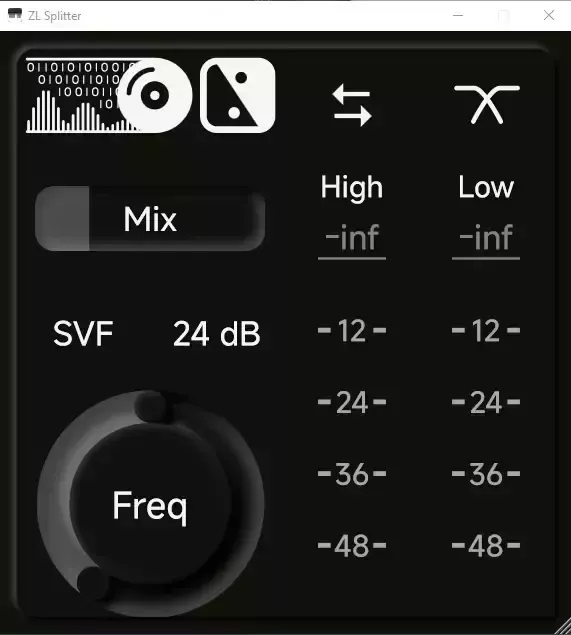
Are your mixes sounding a little flat or muddy? I found a fix.
Yo producers, listen up. We’ve all been there—you’ve got a snare that has a great tail but zero punch, or a synth loop that’s drowning out your vocals in the center channel. You try EQ, you try compression, but you just can’t isolate the specific part of the sound that needs the sauce.
Enter ZL Splitter. This isn’t just another utility plugin; it’s a surgical knife for your signal chain. This joint solves the headache of complex routing by allowing you to split your audio signal in ways that usually require expensive mastering gear or a mess of aux tracks. If you want your drums to knock and your stereo image to sit perfectly in the mix, you need to check this out.
Why ZL Splitter is a Game-Changer for Your Mix & Workflow
This plugin is pure workflow acceleration. Instead of setting up five different busses to parallel process a sound, you can just slap ZL Splitter on the track. It takes your raw audio and divides it into two distinct paths based on how you want to manipulate the vibe.
Here is why this tool is essential for your arsenal:
- Total Stereo Control: The Left/Right split lets you EQ each side independently, perfect for balancing uneven samples.
- Mastering Grade Width: Use the Mid/Side split to keep your low-end mono and focused while widening the sparkling highs on the sides.
- Multi-Band Freedom: The Low/High frequency crossover essentially lets you build your own multi-band compressors or saturators.
- Drum Punch: The Transient/Steady mode is the real MVP here. It separates the initial attack from the sustain, letting you make drums slap without ruining the body of the sound.
- Dynamic Taming: Use the Peak/Steady split to catch those random loud spikes while leaving the average volume alone.
⚡ Pro Producer Tip: The “Crispy Snare” Trick
Load ZL Splitter on your main snare bus and set it to Transient/Steady mode. Route the “Transient” output to a saturator or a clipper, and leave the “Steady” signal clean. This adds serious grit and punch to the initial hit of the drum without making the tail sound distorted and muddy. It sits in the mix beautifully!
Tech Specs (Keep it Light)
- Platform: Windows, Mac, and Linux (We love cross-platform love).
- Size: A light 45 MB download.
- Version: v0.2.0.
- Format: VST3.
The Verdict
Honestly, ZL Splitter is one of those “sleepers.” It doesn’t look fancy, but it does the heavy lifting that makes a mix sound professional. Whether you are trying to fix a bad recording or doing creative sound design by distorting only the “sides” of a synth pad, this tool gives you the headroom and control you need. It’s a must-have for the utility folder.


ZL.Splitter-0.2.0_WIN ( 10 MB )
ZL.Splitter-0.2.0_MAC ( 16 MB )
ZL.Splitter-0.2.0_MAC ( 16 MB )
Let me know in the comments how this sits in your latest project! Are you using the Transient mode for drums or experimental creative effects? Let’s talk shop below! 👇

We’re audio producers and sound designers with over 20 years of experience in the industry. Our team has lived through the entire evolution of digital audio production.
Our mission? To filter out the junk and bring you only the studio-ready free VSTs that actually compete with paid gear. We do the digging so you can focus on creating.
Recent Posts
Cider – Multi-Engine Sidechain
Tired of your kick and sub bass fighting for their lives in the low end? We’ve all been there -…
GAMEOVER – Chiptune Generator
What's good fam! We have all been there - staring at a blank piano roll, trying to hand-draw a bouncy,…
Unirock Cherry LPS – Guitar VST
Tired of stiff, robotic virtual guitars ruining the vibe of your tracks? We have all been there - you drop…
Gluon – Free Bus Compressor
Are your tracks sounding thin and disconnected, with your drums, synths, and bass constantly fighting each other instead of sitting…
ToneShaper – Passive Tone EQ
Tired of digital EQs making your top end sound brittle or totally muddying up your low-mids? I found a fix.…
GALAXY – Dynamic Sampler
Tired of sitting on hundreds of gigabytes of sample packs you never touch? We have all been there. You drop…