Visu (Real-Time Spectrogram) v1.0 WiN MAC

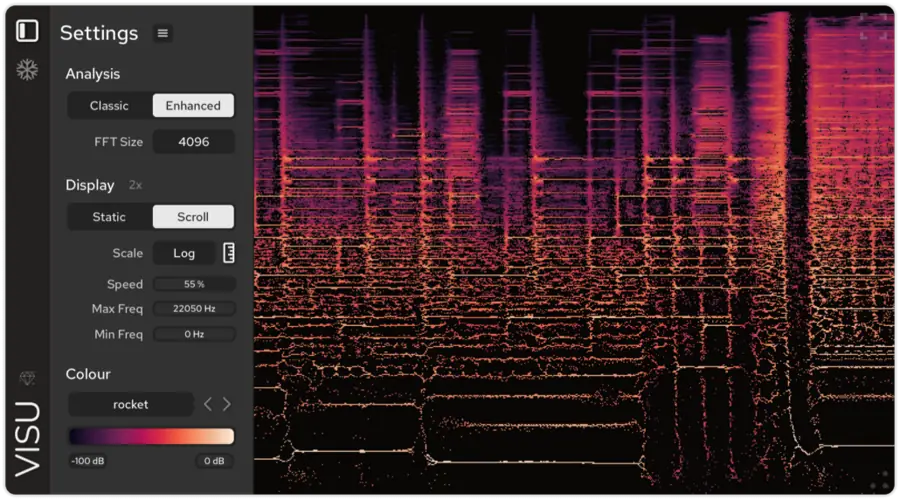
Are your mixes sounding muddy and you just can’t pinpoint why? I found a fix. We’ve all been there—you’re trying to get that kick to punch through the 808, or that vocal to sit right without getting buried, but your ears are fatigued and you’re chasing ghosts. Sometimes, you gotta stop guessing and actually see what the audio is doing.
I just downloaded Visu, and it’s basically an X-ray machine for your DAW. If you’re tired of hidden frequencies eating up your headroom and ruining your master, you need to check this out. It’s lightweight, it’s sharp, and it helps you make those surgical moves that turn a demo into a record.
Why Visu is a Game-Changer for Your Mix & Workflow
A lot of visualizers look cool but don’t actually tell you much. Visu is different because it’s built for analysis, not just for looking pretty in screen recordings. Whether you are hunting down harsh resonances or checking how your transients are hitting, this plugin gives you the visual feedback you need to clean up your tracks.
Here is why this thing belongs in your template:
- Next-Level Precision: This isn’t just a standard analyzer. The “Enhanced Mode” uses time-frequency reassignment to relocate energy based on phase info. Translation? You get a wildly sharp image of your transients and pitch.
- Spot the Noise: Easily detect unwanted low-end rumble or high-end hiss that’s eating up space in your mix before it hits the mastering chain.
- Customizable Views: Whether you want a Linear or Logarithmic scale, or need to adjust the FFT size for better resolution, you can tweak the view to fit your workflow.
- Capture the Vibe: Includes a Freeze function and PNG export. This is dope if you need to compare the frequency spectrum of a reference track against your own beat.
- Totally Free (With Style): The free version is fully functional but strictly Black & White. Honestly? That high-contrast aesthetic looks super clean and professional anyway.
⚡ Pro Producer Tip: The “Visual EQ” Sweep
Struggling with a snare that sounds boxy? Throw Visu on the snare channel and freeze the visual right when the snare hits. Look for the brightest, most dense clusters of energy in the low-mids (usually around 300-500Hz). That’s your boxiness. Now you know exactly where to cut with your EQ without sweeping blindly.
Tech Specs (Keep it Light)
You don’t need a supercomputer to run this; it’s optimized nicely.
- Download Size: ~17 MB (Super light).
- Formats: VST3 and AU (Mac/Win).
- OS Requirements: Windows 10/11 or macOS 10.15+ (Intel & Silicon supported).
- DAW: Works in any VST3/AU host or Pro Tools.
- Display: Full HiDPI support, so it looks crisp on 4K screens.
The Verdict
Visu is a no-brainer download. While there is a paid version that unlocks 40+ color maps, the free Black & White version is fully functional and honestly, it keeps you focused on the data rather than the pretty colors. It’s an essential utility tool that helps you diagnose mix issues quickly so you can get back to the creative side of things.
If you want your low end to translate and your top end to sparkle, you need to know what’s going on in the spectrum. Grab this joint and clean up that mix.


Tritik_Visu_v1.0.0 ( 20 MB )
Let me know in the comments how this sits in your latest project! Do you prefer mixing with your eyes or strictly by ears? Let’s talk shop below! 👇

We’re audio producers and sound designers with over 20 years of experience in the industry. Our team has lived through the entire evolution of digital audio production.
Our mission? To filter out the junk and bring you only the studio-ready free VSTs that actually compete with paid gear. We do the digging so you can focus on creating.
Recent Posts
DearVR Mix-SE – Virtual Mix Room
Tired of your mixes sounding fire in your headphones but completely falling apart the second you play them in the…
Waveform Compressor – Visual Comp
Are your mixes sounding lifeless because you're over-compressing blind? I found a fix. We’ve all been there—squashing the life out…
YS Compressor 2025 – Mixing Comp
Are your mixes sounding thin and sterile? I found a fix. You know the struggle - you’re trying to get…
Spl4sh 4 – Free Synth VST
Are your Future House leads sounding a little thin and lifeless? I found a fix. As a producer, one of…
VoxRelief Lite – Vocal Fixer
Tired of muddy, boxy vocals ruining your mix? I found a fix. We’ve all been there in the studio: you…
HLF-3C – Passive EQ Filter
Tired of your instrument busses sounding like a muddy, cluttered mess? I found a fix. There is nothing worse than…