ViatorDSP – Electron EQ

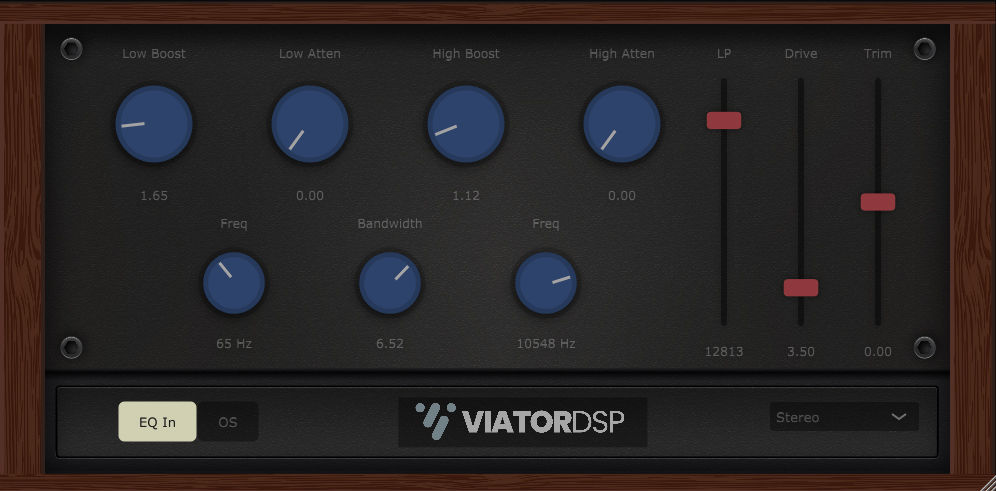
Electron EQ
size 12 MB / 14 MB
Electron EQ is a tube equalizer inspired by popular EQ’s that have been in top studios for decades.
This bad boy is full of cool features, like 4x oversampling, mid/side processing, and meticulous tube-overdrive circuit emulation.
- Low Boost – Low shelf filter of original design controlled by the “freq” dial near it from 22 Hz to 300 Hz by 0 dB to +10 dB.
- Low Atten – Low cut filter just above the Low Boost filter. It helps define and fatten the low-end, by 0 dB to -10 dB.
- High Boost – High shelf filter of original design controlled by the “freq” dial near it from 1000 Hz to 16000 Hz by 0 dB to +10 dB.
- High Atten – High cut filter just above the High Boost filter. It helps define and round off the high-end, by 0 dB to -10 dB.
- Bandwidth – Controls the “Q” factor, or bandwidth of the low and high filters, 0 being the most narrow and +10 being the widest.
- LP – Low-pass filter from 20000 Hz to 3000 Hz.
- Drive – Controls the drive parameter for a meticulously modeled tube circuit with parallel processing to subtly dial in tube saturation. When the drive slider is at 0 dB, the processing turns off to save CPU usage when the effect is not desired.
- Trim – Output volume control.
- EQ In/Out – Toggles the EQ processing on or off without resetting the current state of the filter’s boost and atten settings.
- OS – Toggles 4x oversampling on or off. Toggling oversampling on will set the LP filter to 19000 Hz if it is currently set to 20000 Hz. This takes care of some sampling rate math and lets you hear the high end difference. It would be best to leave the LP filter lower than 19000 while oversampling is on.
- Stereo Mode – This allows you to choose between mid/side/left/right/stereo processing. Use this to remove low end from the sides or add brightness to the sides, whatever cool mid/side/left/right/stereo processing you like to do! This effect will of course perform the best on a stereo source.
- Setting a filter to 0 dB will turn off processing to save CPU for unused filters.
- The plugin will save it’s window size when you hit save in your DAW and it will recall the size on the next startup.
https://www.patreon.com/ViatorDSP


ElectronEQ_VST3 ( 12 MB )
ElectronEQ-MacInstaller ( 14 MB )

We’re audio producers and sound designers with over 20 years of experience in the industry. Our team has lived through the entire evolution of digital audio production.
Our mission? To filter out the junk and bring you only the studio-ready free VSTs that actually compete with paid gear. We do the digging so you can focus on creating.
Recent Posts
Cozy Piano – Lo-Fi Upright VST
Tired of sterile, overly polished grand piano libraries that hog all your headroom and sound like a corporate commercial? I…
magic.METER – Vocal Analyzer
Tired of guessing why your lead vocal just won't sit in the pocket like a Billboard smash? We have all…
MS2000R Emulator – VA Synth
I've been digging through the web and found something special for your arsenal today, fam. We have all been stuck…
CA-72 – Analog Synth VST
I've been digging through the web and found something special for your arsenal today. Let's keep it real: how many…
X-Or – Free Bass Synth
Tired of your low end feeling thin, cluttered, or fighting your kick for headroom? I found a fix that hits…
TagoClip – Soft Clipper VST
If you have ever bounced from FL Studio over to Ableton, Logic, or Reaper, you know the exact heartbreak I…