ViatorDSP – Electron EQ

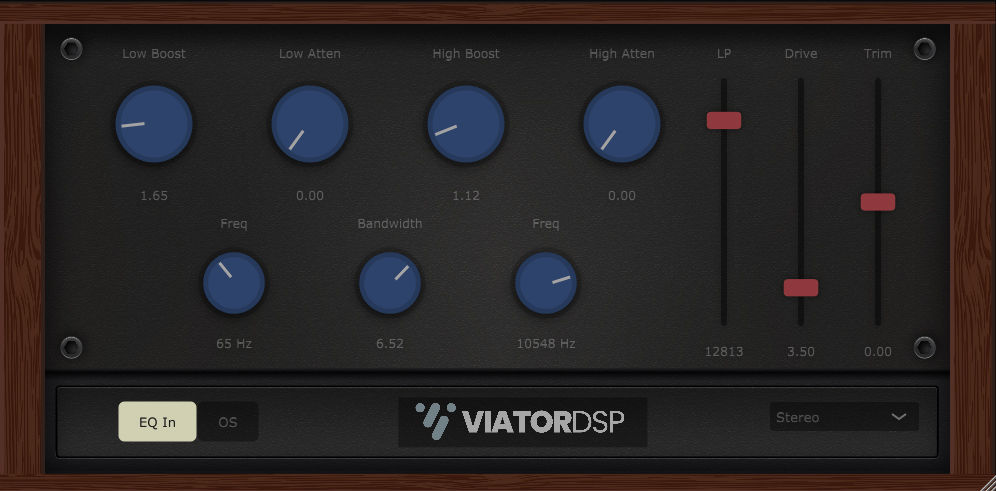
Electron EQ
size 12 MB / 14 MB
Electron EQ is a tube equalizer inspired by popular EQ’s that have been in top studios for decades.
This bad boy is full of cool features, like 4x oversampling, mid/side processing, and meticulous tube-overdrive circuit emulation.
- Low Boost – Low shelf filter of original design controlled by the “freq” dial near it from 22 Hz to 300 Hz by 0 dB to +10 dB.
- Low Atten – Low cut filter just above the Low Boost filter. It helps define and fatten the low-end, by 0 dB to -10 dB.
- High Boost – High shelf filter of original design controlled by the “freq” dial near it from 1000 Hz to 16000 Hz by 0 dB to +10 dB.
- High Atten – High cut filter just above the High Boost filter. It helps define and round off the high-end, by 0 dB to -10 dB.
- Bandwidth – Controls the “Q” factor, or bandwidth of the low and high filters, 0 being the most narrow and +10 being the widest.
- LP – Low-pass filter from 20000 Hz to 3000 Hz.
- Drive – Controls the drive parameter for a meticulously modeled tube circuit with parallel processing to subtly dial in tube saturation. When the drive slider is at 0 dB, the processing turns off to save CPU usage when the effect is not desired.
- Trim – Output volume control.
- EQ In/Out – Toggles the EQ processing on or off without resetting the current state of the filter’s boost and atten settings.
- OS – Toggles 4x oversampling on or off. Toggling oversampling on will set the LP filter to 19000 Hz if it is currently set to 20000 Hz. This takes care of some sampling rate math and lets you hear the high end difference. It would be best to leave the LP filter lower than 19000 while oversampling is on.
- Stereo Mode – This allows you to choose between mid/side/left/right/stereo processing. Use this to remove low end from the sides or add brightness to the sides, whatever cool mid/side/left/right/stereo processing you like to do! This effect will of course perform the best on a stereo source.
- Setting a filter to 0 dB will turn off processing to save CPU for unused filters.
- The plugin will save it’s window size when you hit save in your DAW and it will recall the size on the next startup.
https://www.patreon.com/ViatorDSP


ElectronEQ_VST3 ( 12 MB )
ElectronEQ-MacInstaller ( 14 MB )

We’re audio producers and sound designers with over 20 years of experience in the industry. Our team has lived through the entire evolution of digital audio production.
Our mission? To filter out the junk and bring you only the studio-ready free VSTs that actually compete with paid gear. We do the digging so you can focus on creating.
Recent Posts
DearVR Mix-SE – Virtual Mix Room
Tired of your mixes sounding fire in your headphones but completely falling apart the second you play them in the…
Waveform Compressor – Visual Comp
Are your mixes sounding lifeless because you're over-compressing blind? I found a fix. We’ve all been there—squashing the life out…
YS Compressor 2025 – Mixing Comp
Are your mixes sounding thin and sterile? I found a fix. You know the struggle - you’re trying to get…
Spl4sh 4 – Free Synth VST
Are your Future House leads sounding a little thin and lifeless? I found a fix. As a producer, one of…
VoxRelief Lite – Vocal Fixer
Tired of muddy, boxy vocals ruining your mix? I found a fix. We’ve all been there in the studio: you…
HLF-3C – Passive EQ Filter
Tired of your instrument busses sounding like a muddy, cluttered mess? I found a fix. There is nothing worse than…