VeeMax

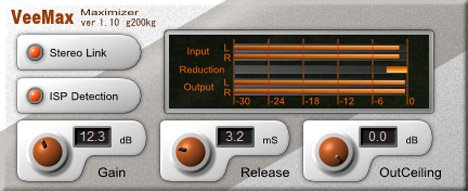
VeeMax
size 0.28 MB
VeeMax is a Maximizer plugin with ‘Inter Sample Peak’ processing.
It will do maximizing process by not only digital value peaks, but also hiding peaks of inter samples.
- Gain: the gain from input signals. the default value, 0dB means no maximization.
- Release: Release time of the gain reduction. the output amplitude may be undulated if the Release time is too long. conversely, the output may be distort if the Release time is too short.
- OutCeiling: the maximum output signal peak amplitude. settled to 0dB in default.
- ISP Detection: the ISP is a abbreviation of the ‘Inter Sample Peak’. that is not only the digital value peaks but a hiding peaks of inter samples. it will be appeared after the D/A convert or digital resampling. VeeMax will do the maximizing process by this ISP value if turn this switch on. the default is on.
- Stereo Link: If this switch is turn on, the Maximizing process will be done in same ratio for L and R signals. By this, the pan information will be kept. If this switch is off, that may distort the pan information but a little more maximization will be done. the default is On.


veemax110 ( 0.28 MB )

We’re audio producers and sound designers with over 20 years of experience in the industry. Our team has lived through the entire evolution of digital audio production.
Our mission? To filter out the junk and bring you only the studio-ready free VSTs that actually compete with paid gear. We do the digging so you can focus on creating.
Recent Posts
Paradigm Lite – Vintage Synth VST
What's good fam! If you've been cooking up in the box lately, you know the daily studio struggle: you lay…
The Final Master – Smart Mastering
Tired of your mixes sounding quiet, thin, or completely squashed when you try to master them yourself? I found a…
Wave Emulation – Wavetable Synth
I've been digging through the web and found something special for your arsenal. Let's keep it 100 - so many…
MANTIS Lite – Distortion Plugin
Tired of digital distortion plugins that sound stiff, fizzy, and completely rob your drums of their punch? We have all…
Stereo Unlimited – Stereo Widener
Tired of your synths and background vocals fighting for space dead in the center? We have all been there -…
CY-FAN Lite – Creative Modulation
Are your synth chords and guitar tracks feeling completely flat and lifeless in the DAW? I found a fix. We…