VeeMax

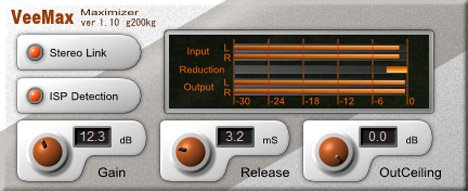
VeeMax
size 0.28 MB
VeeMax is a Maximizer plugin with ‘Inter Sample Peak’ processing.
It will do maximizing process by not only digital value peaks, but also hiding peaks of inter samples.
- Gain: the gain from input signals. the default value, 0dB means no maximization.
- Release: Release time of the gain reduction. the output amplitude may be undulated if the Release time is too long. conversely, the output may be distort if the Release time is too short.
- OutCeiling: the maximum output signal peak amplitude. settled to 0dB in default.
- ISP Detection: the ISP is a abbreviation of the ‘Inter Sample Peak’. that is not only the digital value peaks but a hiding peaks of inter samples. it will be appeared after the D/A convert or digital resampling. VeeMax will do the maximizing process by this ISP value if turn this switch on. the default is on.
- Stereo Link: If this switch is turn on, the Maximizing process will be done in same ratio for L and R signals. By this, the pan information will be kept. If this switch is off, that may distort the pan information but a little more maximization will be done. the default is On.


veemax110 ( 0.28 MB )

We’re audio producers and sound designers with over 20 years of experience in the industry. Our team has lived through the entire evolution of digital audio production.
Our mission? To filter out the junk and bring you only the studio-ready free VSTs that actually compete with paid gear. We do the digging so you can focus on creating.
Recent Posts
LAEA – Free Optical Comp
Tired of your lead vocals jumping out of the mix one second and completely vanishing the next? Or maybe your…
NastyDLA mkIII – Tape Echo VST
Are your delays sounding a little too perfect and digital? I found a fix. Listen up - one of the…
YS Master Hand – Volume Leveler
Tired of muddy vocals getting buried in the track? Or maybe your drum bus is just way too wild and…
Unholy – Hybrid Distortion
Are your mixes sounding a little too sterile and thin? I found a fix. We’ve all been there - you…
Grainfreeze – Spectral Freeze
I've been digging through the web today and found something truly special for your arsenal. Ever struggled to create those…
DearVR Mix-SE – Virtual Mix Room
Tired of your mixes sounding fire in your headphones but completely falling apart the second you play them in the…