Vee Bass Amp

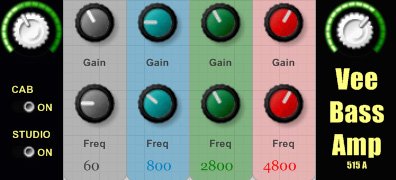
Vee Bass Amp
size 2.04 MB
Vee Bass Amp is a bass amp simulation.
It consists of a tube preamp, a parallel parametric EQ, a bass cabinet emulation, a studio/room ambience emulation. Hidden features include a HPF to remove subsonic rumble, a LPF to remove hiss and high frequency artifacts, a 8:1 FET type compressor placed between preamp and EQ.
The optional cabinet was specifically designed to attenuate the most troublesome frequencies a bass guitar produces. Automatic attenuation of bad resonances and muddiness in conjunction with automatic level control make the bass tracks easier to manage during mixing, even for inexperienced mixers.
Optional “studio ambience” emulation adds a realistic vibe by blending simulated “wall reflections” into the dry signal, as if the cab was miked with an additional condenser mic.
EQ NOTES: Low Shelf and High Shelf EQ controls are independent from Low Mid and High Mid bands. The signal is divided into two identical streams and recombined after the EQ section. This is known as “parallel EQ’ing”, commonly used in analogue domain devices. EQ moves become less aggressive, allowing for greater cuts/boosts and EQ bands do not interact with each other (ex. you do not change 1000Hz boost when boosting 3k which often happens in serial EQs).
COMPRESSOR NOTES: the one used in VeeBassAmp is set up in a “New York” RMS manner, letting transients through but transparently leveling dynamic range of the entire track. In most cases you will not even hear it working. When you hear it pumping – lower the input level. Threshold = -12dBFS.
PREAMP NOTES: the preamp slightly colors the sound, adding tube harmonics through the entire spectrum. It can be overdriven when cranked up to the max and fed with a really hot signal.
- DRIVE – a tube preamp section gain knob. Turn clockwise for more gain and tube overdrive. Turn counterclockwise for a cleaner sound.
- CAB ON/OFF switch – turns the cab emulation on and off. Click on a button to operate.
- STUDIO ON/OFF switch – turns the ambience simulation on and off. Click on a button to operate.
- EQ – Gain – turn knobs to boost (clockwise) and attenuate (counterclockwise) selected frequencies.
- EQ Freq – turn knobs to select EQ center points.
- MASTER – an output volume control. Use it to set unity gain and control the overall volume of the plugin.
Thanks to Antress (for generously shared tube overdrive algorithm, FET compressor “circuits” and GUI knobs – http://antress.blogspot.com) and Christian W. Budde for his awesome VST Plugin Analyzer


VeeBassAmp ( 2.04 MB )

We’re audio producers and sound designers with over 20 years of experience in the industry. Our team has lived through the entire evolution of digital audio production.
Our mission? To filter out the junk and bring you only the studio-ready free VSTs that actually compete with paid gear. We do the digging so you can focus on creating.
Recent Posts
Relic – 13 Analog Plugins
Tired of your in-the-box mixes sounding flat, sterile, and cold? We have all been there - you stack clean digital…
StereoiXer – Spatial Processor
Are your mixes sounding flat, boxed-in, and totally lifeless? I found a fix. We have all been there in the…
StemDeck – AI Stem Splitter
We've all been there: you stumble across an absolute grail of a sample, but the kick is clashing hard with…
DiodeCrush – Crush Compressor
Are your drums sounding a little too polite and thin? We've all hit that wall where standard digital compressors keep…
Focus – Stereo Bus Utility
Tired of your mix sounding wide in your headphones, but the second you test it in the car or on…
The Usual Suspects – Plugin Manager
What's good fam! Nothing kills the studio vibe faster than sitting down to cook up, opening your DAW, and realizing…