Transient Control – Free Shaper

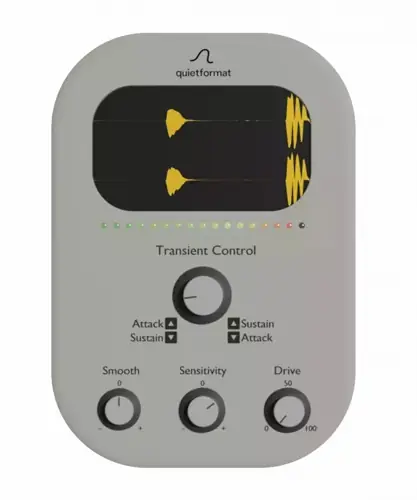
Yo, what’s good producers? Let’s talk about a real struggle we all face in the studio. You spend hours layering your drums, but when you drop them into the mix, they just sound… flat. The snare has no snap, or the kick tail is muddying up your low-end headroom. You try to EQ it out, but you lose the vibe. You try compression, and it pumps too hard.
Stop stressing. I found the fix. If you need to fix your transient response without getting bogged down in complex menus, you need to check out Transient Control. It’s a workflow lifesaver that helps your drums sit perfectly in the mix with zero hassle.
Why Transient Control is a Game-Changer for Your Mix & Workflow
Look, sometimes you just need to move fast. This plugin isn’t about giving you a hundred knobs to tweak; it’s about getting that “finished” sound in seconds. It’s got a super intuitive interface that lets you shape the envelope of your sound immediately.
Here is why this joint belongs in your plugin folder:
- Instant Pocket: The main knob is pure magic. Turn it right to smooth out the attack and bring up the sustain (great for ambient pads or legato lines). Turn it left to emphasize the attack and tighten the sustain (perfect for snappy snares).
- Smart Smoothing: The
Smoothknob is context-aware. If you’re boosting sustain, it softens the feel when turned left. If you’re boosting attack, it softens the feel when turned right. It adapts to your workflow. - Analog-Style Grit: The
Drivefeature isn’t just a volume boost; it saturates the signal to add density and presence. It gives your track that thick, analog sauce. - Precision Detection: With the
Sensitivitycontrol, you decide how the plugin reacts to the incoming signal, ensuring it only triggers on the transients you actually want to shape.
⚡ Pro Producer Tip: The “Velvety Tight” Technique
Want to create a sound design texture you can’t get with standard shapers? Try this: Set the Main Knob all the way to -100. Then, crank both the Smooth and Sensitivity knobs to maximum. This creates a unique “soft yet tight” texture where the attack becomes velvety, but the body stays punchy. It’s killer for experimental percussion.
Tech Specs (Keep it Light)
We keep it simple here. No massive libraries to download, just the essentials.
- Platform: Windows & Mac compatible.
- Size: ~76 MB.
- Format: VST/AU.
- CPU Load: Very low—you can slap this on every drum channel without your DAW choking.
The Verdict
Honestly, this thing slaps. Whether you are trying to get a kick drum to punch through a dense heavy metal mix or trying to tighten up a funky bassline, Transient Control does the job in seconds. It allows you to boost punch or trim tails without over-thinking it. For a free tool, the added Drive saturation is a massive bonus that adds that pro-level polish. Download it, mess with the sensitivity, and watch your mix clarity improve instantly.


Transient.Control_WIN ( 17 MB )
Transient.Control_MAC ( 73 MB )
Let me know in the comments how this sits in your latest project! Do you prefer using this to tighten up drums or to smooth out synth plucks? Let’s talk shop below! 👇

We’re audio producers and sound designers with over 20 years of experience in the industry. Our team has lived through the entire evolution of digital audio production.
Our mission? To filter out the junk and bring you only the studio-ready free VSTs that actually compete with paid gear. We do the digging so you can focus on creating.
Recent Posts
Room Service – Plate Reverb
Tired of free reverb plugins turning your lead vocals into a washed-out, muddy mess? We've all been there. You want…
Bit Layer – Multi-Band Crusher
Tired of traditional bitcrushers completely wrecking your punch and turning your low end into pure digital mud? We've all been…
RMSC – Ring Mod Sidechain
Tired of your kick and 808 fighting for low - end real estate? I found a wild fix today. We’ve…
PortaTwin – Cassette Strip
Are your mixes sounding thin and way too sterile? I feel your pain. In modern in-the-box production, clean digital recording…
UnClip – Clip Restorer
Ever had an artist send over an insane vocal take, only to zoom in and see the waveform completely pinned…
Audio Quick Actions – Mac Audio Suite
Tired of firing up a CPU-heavy DAW session just to check a sample's key or see if your two-track bounce…