Transfer v0.0.2 WiN Mac

Transfer v0.0.2
17 MB
because normal distortions are boring
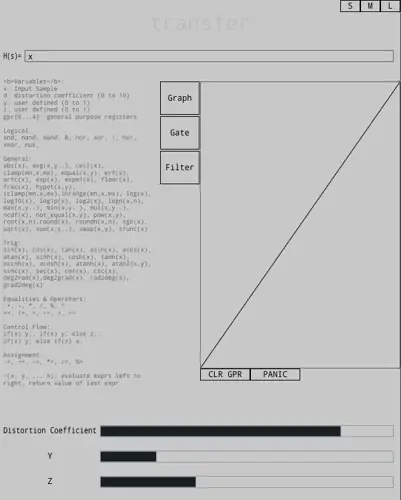
Transfer is a waveshaper based distortion, except the transfer function is JIT compiled from text inputted by the user. Starting as a tool for testing different transfer functions in other projects, it has evolved into a pretty cool and unique plugin (disclaimer it might not be that unique I have done absolutely no market research whatsoever). It also has a built in gate, and an emphasis filter, which applies the filters to the signal pre waveshaping, then applies the exact opposite filter post waveshaping. Due to popular demand (by popular I mean that one guy on reddit), it now also has has 16x oversampling and you can’t turn it off sorry I don’t make the rules.
what that means (how to use)
there’s a list of functions / operators which is pretty hard to miss, and a text field after the H(s) = where you can type an expression in, and it will compile on return key press. In terms of variables, you have access to the input sample (x), the value from the distortion coefficient slider (d) (note: its range is 0 to 10, fairly arbitrarily), the value from the y slider (y), and the value from the z slider (z), which I’d recommend using as a volume control (more on in a sec..). There are also 4 general purpose registers (gpr[n], where n is the register you want to access), which can be used to store abritrary values. The registers get cleared on expression change, and there’s also a CLR GPR button below the filter panel you can use to zero them. The expression input supports conditionals;
if(expr1 evaluates to true) expr2; else expr3;, and you can evaluate multiple expressions (from left to right) with the syntax ~(expr1, expr2, … exprn), where the last value of the expression is what gets returned. This means you can have different transfer functions depending on the whether the sample is increasing or decreasing when combined with the registers, if that’s something you’re into. Assignment is possible but a little weird syntactically, := is regular assignment. You can access the gate and filter panels with the respective gate and filter buttons, and get back to the graph view with, you guessed it, the graph button.
health and safety
As is the nature of something like this, it’s pretty easy to annihilate your headphones, speakers, eardrums, nearby wine glasses and small woodland creatures. If you’re messing around with this and aren’t sure what you’re doing (like me), I’d actually recommend turning down the volume on whatever is driving this to 0 before trying a function, and slowly turning it up, to be sure it’s not going to cause you physical or mental harm. if that falls on deaf ears (hint) please at least put your entire expression in parentheses, multiply by z, and turn the z slider all the way down before you hit enter. This paragraph is now longer than the instructions leading me to believe I have created a novel new WMD, but in all seriousness, be careful especially with logs, or anything that approaches infinity or anything wild in that vein. There’s a panic button below the graph, which will revert your transfer function to H(s) = x, which will just pass whatever input it has through the plugin, useful to avoid a visit to a&e or a noise complaint.
https://github.com/MeijisIrlnd/Transfer


Transfer ( 17 MB )

We’re audio producers and sound designers with over 20 years of experience in the industry. Our team has lived through the entire evolution of digital audio production.
Our mission? To filter out the junk and bring you only the studio-ready free VSTs that actually compete with paid gear. We do the digging so you can focus on creating.
Recent Posts
HardStop Basic – Clipper & Limiter
Tired of pushing your master bus only to hear your drums turn to absolute mush? I found a fix. We…
PARANORMAL – Horror Multi-FX
I've been digging through the web and found something special for your arsenal. We’ve all been there: you’re trying to…
PortaSolo – Vintage Tape Channel
Tired of your digital tracks sounding too sterile, sharp, and lifeless? I found the fix. Modern DAWs hand us pristine…
Vintage Emulator Studio – Retro Suite
how many times have you thrown three different "tape saturation" plugins on a drum bus just trying to recreate that…
ro-mono-303 – Free Bass Synth
I've been digging through the web and found something special for your arsenal today. We’ve all been there in the…
TheMachine – Vintage Tape VST
Are your mixes sounding a little too digital, stiff, or sterile in the box? We've all been there - pushing…