The Growler v1.2.0 Win Mac

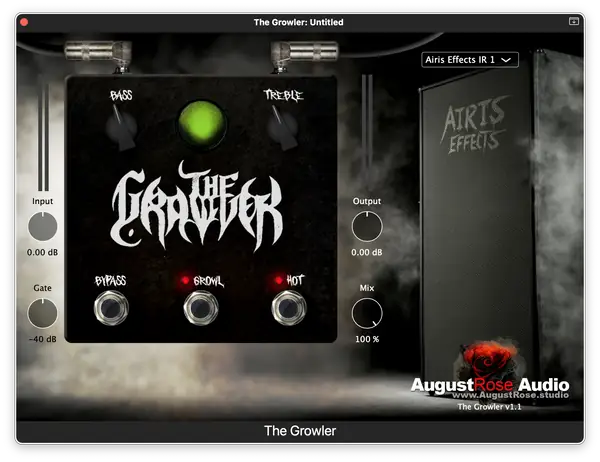
The Growler
49 MB
Welcome to the THICCest of THICC bass tones. Say hello to, The Growler!
The Growler is an all-in-one bass plugin suite that delivers a wide range of incredible bass tones. Whether you’re looking for something more natural or full-on nasty, The Growler has you covered. What’s more, is it super quick and easy to use.
Here’s an overview of its current feature set:
• Input – Use this to increase or decrease the overall distortion. Turning down the input will hit the distortion circuit with less gain, resulting in less distortion. Turning it up does just the opposite.
• Gate – Sets the threshold for the built-in noise gate to cut out unwanted signal noise.
• Output – Use this to compensate for any additional gain added from the Input or other processing done within the plugin.
• Mix – Allows blending of the DI signal with the pedal processing before the impulse response section. Turning this fully to the left (0%) means all DI signal is going into the impulse response section. Turning this fully to the right (100%) means all the pedal processing is going into the impulse response section.
• Bass & Treble – This two-band shelf style EQ is super power and can actually act as if it was a 3 band EQ. For example, if you want more midrange content, simply pull back the Bass and Treble settings and turn up the Output. Or, if you want less midrange, simply do the opposite.
• Bypass – Bypasses the entire plugin. Switching the Bypass on will result in only the original DI signal coming out.
• Growl – Adds low-end distortion and that highly sought after THICCness. Turning it off reduces the low-end distortion and will basically be the DI signal but this can change depending on how you use the Input knob.
• Hot – Adds top-end distortion for a more aggressive sound. Turning this off will still result in some distortion but it will be very minimal. You can use the Input knob to either add a touch more or less distortion overall.
• Impulse Responses – We teamed up with Airis Effects to provide 9 incredible bass IRs built into the plugin. These 9 Airis Effects IRs all offer a unique tonal characteristic. Flip through them and hear just how different, but also amazing, they all sound. Have your own bass IRs you want to use? No problem, just turn the built in IR loader off by selecting the “No IR” option from the dropdown menu and then use your own external IR loader to load up whatever IRs you want.
It’s time to take your bass tone to the next level. Download The Growler now!
AAX (Mac & Windows), AU (Mac) and VST3 (Mac & Windows)


The Growler v1.2.0 ( MB )

We’re audio producers and sound designers with over 20 years of experience in the industry. Our team has lived through the entire evolution of digital audio production.
Our mission? To filter out the junk and bring you only the studio-ready free VSTs that actually compete with paid gear. We do the digging so you can focus on creating.
Recent Posts
Room Service – Plate Reverb
Tired of free reverb plugins turning your lead vocals into a washed-out, muddy mess? We've all been there. You want…
Bit Layer – Multi-Band Crusher
Tired of traditional bitcrushers completely wrecking your punch and turning your low end into pure digital mud? We've all been…
RMSC – Ring Mod Sidechain
Tired of your kick and 808 fighting for low - end real estate? I found a wild fix today. We’ve…
PortaTwin – Cassette Strip
Are your mixes sounding thin and way too sterile? I feel your pain. In modern in-the-box production, clean digital recording…
UnClip – Clip Restorer
Ever had an artist send over an insane vocal take, only to zoom in and see the waveform completely pinned…
Audio Quick Actions – Mac Audio Suite
Tired of firing up a CPU-heavy DAW session just to check a sample's key or see if your two-track bounce…